Sorted:

Faxing and Email Support in Chemotherapy Manager

With this enhancement in CureMD, patient reports can be emailed and/or faxed from the Chemotherapy Manager by the Practice users.

Confirmation while Signing a Chemo Order

Chemotherapy Manager now asks for confirmation when a physician attempts to sign the Chemo Plan/Order of another ordering physician.

Documentation of Drugs taken at Hospital

The latest upgrade in CureMD application now allows users to document administrations that are done at Hospitals and other outsourced location.

Administered Drug Indication in Treatment Planner

With this enhancement, indicators against all drugs from an unsigned Chemo Admin have been removed.

Chemotherapy Flowsheet in CureMD 10g

A new feature has been added to the CureMD system that incorporates a Chemotherapy Flowsheet in CureMD 10g so that the users can view and add Chemo Flowsheet in CureMD 10g Provider Note.

Pre-Auth Module Revamp

With this enhancement, the Pre-Auth section has been revamped making it easier for the users to generate pre-auth requests along with the required data components and with enhanced implementations.

Updates in the Admin Form

Practice User has the ability to create Administration Form Reports which makes it easier for them to monitor Patient's important Data.

[caption id="attachment_18349" align="aligncenter" width="600"]OPPS-Modifier-on-Drug-Level-600x255 OPPS Modifier on Drug Level[/caption]
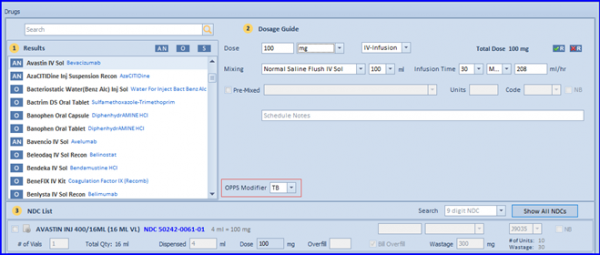
OPPS Billing in Chemotherapy Manager

The Hospital Outpatient Prospective Payment System (OPPS) is introduced to enable practices to bill patients under OPPS for applicable drugs and services

[caption id="attachment_18152" align="aligncenter" width="600"]Navigating-to-Custom-View-600x202 Navigating to Custom View[/caption]

User Specific Customization of Home Screen

User is able to view appointments based on a criteria set by the user.

[caption id="attachment_18128" align="aligncenter" width="600"]Specify-dosage-and-CIVI-Days-600x400 Specify dosage and CIVI Days[/caption]

Update CIVI duration implementations on the Admin/Injection screen

User is able to document the CIVI duration as per the number of days selected from the 'Days' control.