Sorted:

Monthly Scheduler View

Users can view the summary of the appointments against each day in the monthly calendar view.
chemo-admin-1-600x339-1

Validation of Fee Schedule File on Import to CureMD

While uploading a CSV file, user is informed about the skipped CPTs in the Fee Schedule file after they have been imported into the application.
utilization-report-1-600x202-1

[caption id="attachment_14255" align="aligncenter" width="600"]Fields-Drop-down-600x356 Fields Drop-down[/caption]
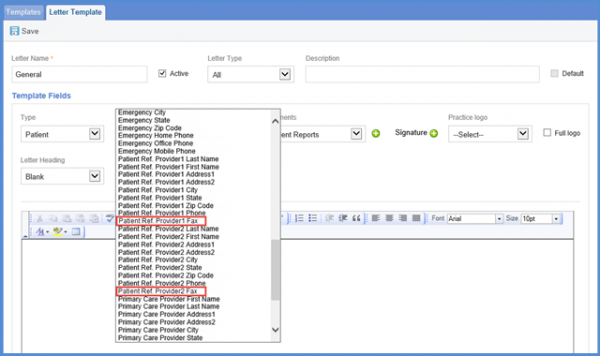
Head Circumference field in Letter Templates

User can select few more options like Patient Ref Provider and Head Circumference in Letter Templates.
[caption id="attachment_14251" align="aligncenter" width="600"]MIPS-600x414 MIPS[/caption]

MIPS Dashboard - Allow provider in multiple entities

A user can associate one provider with multiple entities.

MIPS Dashboard - Restrict Entities by Category

In order to do this CureMD has added a new field named Performance Category to help user create category specific MIPS entities on MIPS Reporting Entities screen.
2019-04-11_3-11-33-600x308-1
[caption id="attachment_14229" align="aligncenter" width="600"]Education2-1-600x260 Multiple Favorite List[/caption]

Support Multiple Favorite Lists

To increase usability and help users in organizing favorites list of different components and view them interchangeably.
e4-1024x450-1

[caption id="attachment_14180" align="aligncenter" width="600"]Reshcedule-1-600x474 Reschedule or Cancel Request[/caption]

Reschedule or Cancel Appointment Requests via Patient Portal

With this enhancement in scheduler module, patient portal users can reschedule or cancel appointment through patient portal.
22-4-1

[caption id="attachment_16218" align="aligncenter" width="600"]Inactive-Providers-Resources-Checkbox1-600x300 Inactive Providers Resources Checkbox[/caption]

Inactive Providers/Resources

Users have the option to choose whether or not display inactive providers and resources in the daily and weekly scheduler views by enabling its checkbox in settings.
Acknowledgement-tooltip2-1
Drug-NDC-view-screen-1-e1523264210996

Restrict NDC selection on Medication Pop up

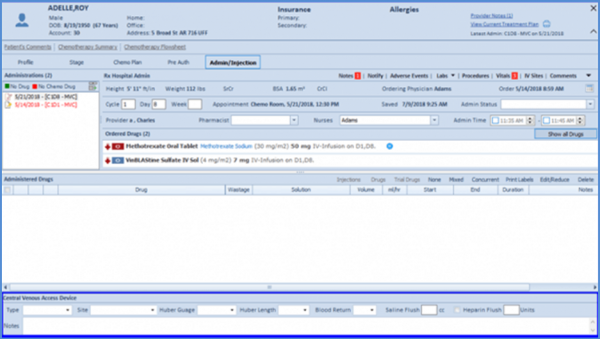
The updated Administered Drugs section features an updated dashboard and the functionality to document start/end date and time for continuous infusions.
[caption id="attachment_16372" align="aligncenter" width="435"]Error-Message-Wrong-Credentials-e1523263500998 Error Message - Wrong Credentials[/caption]

Restricting Login Attempts

The chemo therapy manager provides a nifty feature that allows practice managers to keep track of the practice’s drug requirements.