Sorted:

New Flags in Letter and Note Templates

CureMD enhanced version of Letter/Note template allows you to add new flags. User can add a protected SSN flag and Mothers Maiden First and Last Name.

Updates to OBGYN EDD Report

With the latest enhancements, CureMD application allows the users to document patients with a gestational age exceeding 42 weeks. The system calculates the gestational age automatically w.r.t LMP Date and allows the Estimated Fetal Weight (EFW) to be entered as a decimal value. The relevant data for Estimated Due Date (EDD) is also retained by the system if the case type is changed and reverted to pregnancy.

New Graph View for Blood Pressure in Vitals

With this update, user can graphically view the change in Patient’s Blood Pressure percentile over time.

Validation of SSN and EIN Fields

CureMD has introduced validation checks for SSN or EIN of the Practice User/Provider. Practice User can only enter Numeric values in the input fields of SSN and EIN. This enhancement helps in decreasing Claim Rejection Rate.

Display Policy Number with Insurance Plan Name in Case Review

This enhancement is useful for adding workers compensation cases, where one policy number is registered with spinal cord injury and another is for head trauma. Practice User can easily identify different policies of same plan and comments against each, when adding a Case.

Setting to Auto-populate Height in Vitals

This upgrade is beneficial for Practices that mostly deals with Infants, as there is a need to record drastic changes in height, weight or both. The previous readings of the patient vitals can be auto-populated in the current vitals fields.
 

Enhancements in Calender Weekly Page

With this upgrade, Practice User can set the date range of weekly schedule on Calendar. Read More

Enhancements in Calendar Standard Page

CureMD application has made a couple changes to the Add Calendar Standard page. In order to make the process more efficient, the date range can be edited by clicking on the date field. Secondly, the user cannot edit the criteria under Repeat section once it is saved.

Display Middle Initial in Patient Search Results

With this feature, user can view Patient’s Middle Name Initials in the Search Results and Patient Hot List.

[caption id="attachment_20399" align="aligncenter" width="600"]2-1-600x317 Auto-Population of Ordering Provider[/caption]
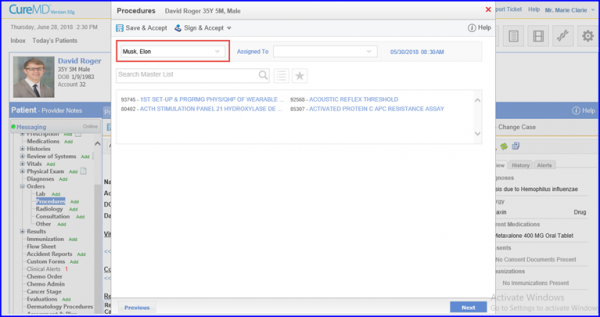
Auto Population of Ordering Provider for Procedure Other and Consultation Orders

When creating a Procedure, Other or Consultation orders, the system automatically populates the ordering provider on the Provider Note. Read More