Real-Time Current Time Indicator Added to Daily Scheduler View
View Current Time Indicator in Scheduler
View Exact Current Time
What’s New
-
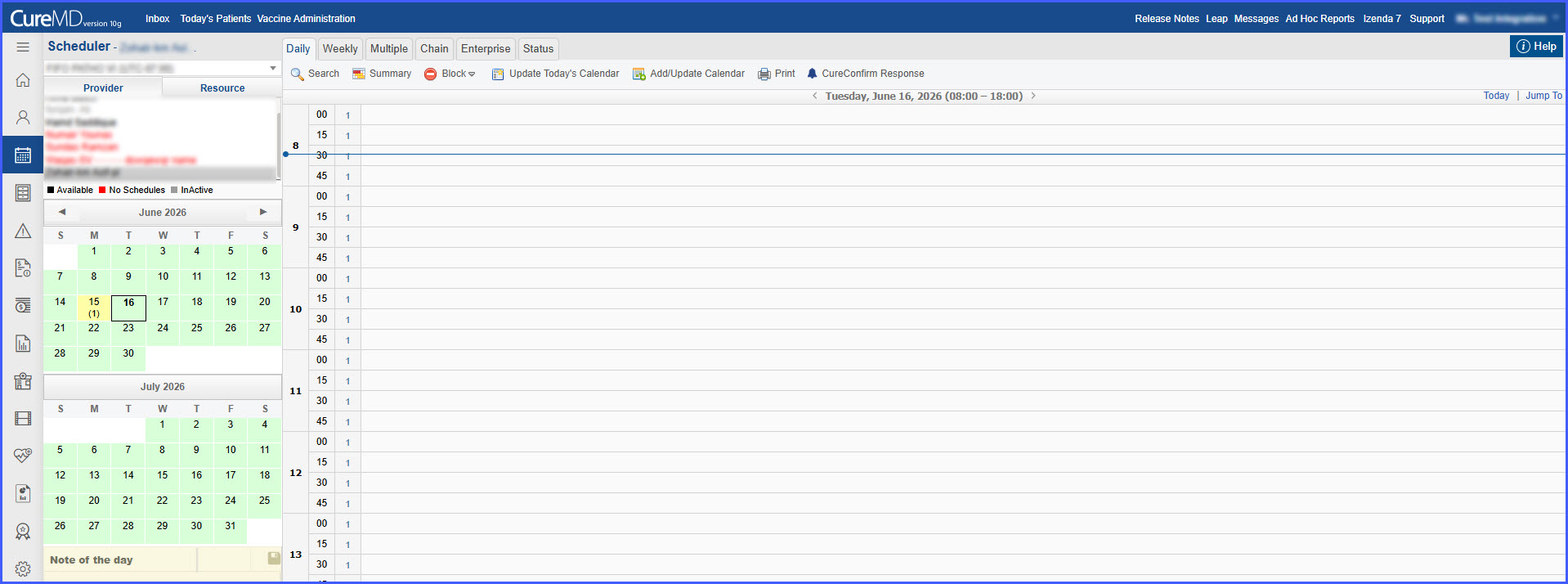
A horizontal dotted line now represents the current time within the Scheduler.
-
The indicator is available in:
-
Daily View
-
-
The line spans the entire visible calendar grid across all displayed providers and resources.
-
The indicator updates dynamically in real time throughout the day.
-
Hovering over the indicator displays the exact current time.
-
The indicator is visually distinct from appointments and empty calendar slots.
-
Positioning aligns accurately with the Scheduler time scale.
-
The indicator is displayed only when viewing the current date.
-
Current time is retrieved from the user’s local machine.
How It Works
- Open the Scheduler and navigate to the current date.
- View the horizontal dotted line displayed across the calendar grid.
- As time progresses, the indicator automatically moves to reflect the current time.
- Hover over the indicator to view the exact current time.
- When viewing past or future dates, the indicator is not displayed.
 Benefits
-
Provides immediate visual awareness of the current time within the schedule.
-
Improves scheduling efficiency by helping users orient themselves within the day’s calendar.
-
Reduces reliance on the time axis for determining the current time.
-
Maintains a clean interface by displaying the indicator only on the current date.
-
Ensures accurate positioning through real-time updates based on local system time.
