What are Referrals?
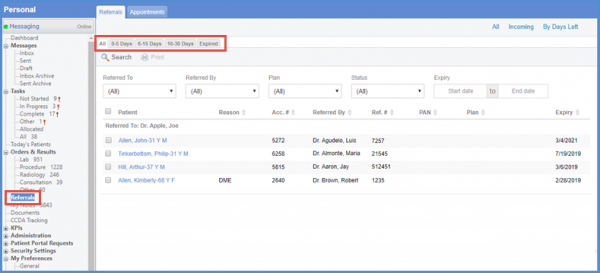
Follow the workflow mentioned above to land on the ‘Referrals’ screen. ‘Referrals’ are grouped under different tabs as following:
- ‘All’; Lists all referrals
- 0-5’; Lists referrals expiring within 5 days
- 6-15′; Lists referrals expiring between 6 and 15 days
- ’16-30’; Lists referrals expiring between 16 and 30 days
- ‘Expired’; Lists all expired referrals
There are multiple search options available for the user to filter the data listed here. For example, users can filter by the following:
- ‘Referred By’
- ‘Referred To’
- ‘Insurance’
- ‘Status of Referral’
- ‘Expiry Date’
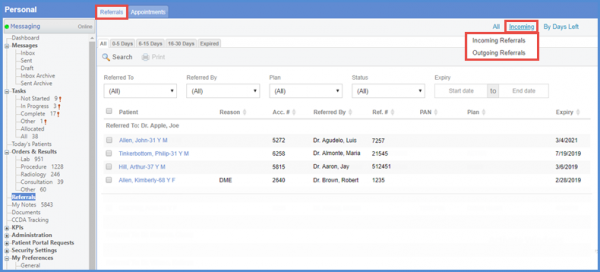
User have the option to switch between ‘Incoming Referrals’ and ‘Outgoing Referrals’. Hover over the ‘Incoming’ option to display the incoming referrals and outgoing referrals option.
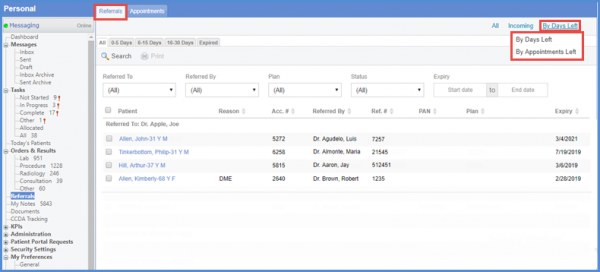
User can also choose between By Day Left and By Appointments Left. The list of referrals is displayed according to the option selected by the user.
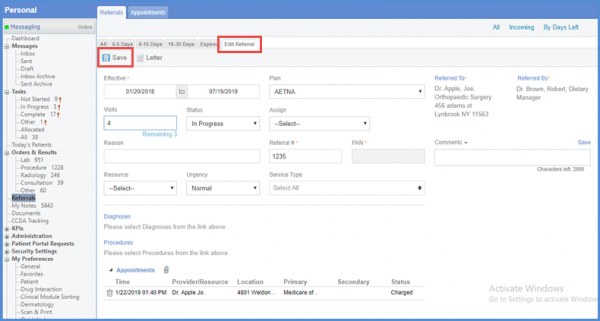
To update a referral, click on the required patient to open the ‘Referral’ screen. Here users can update the relevant information of a referral.
Input the required information and click ‘Save’ when done.