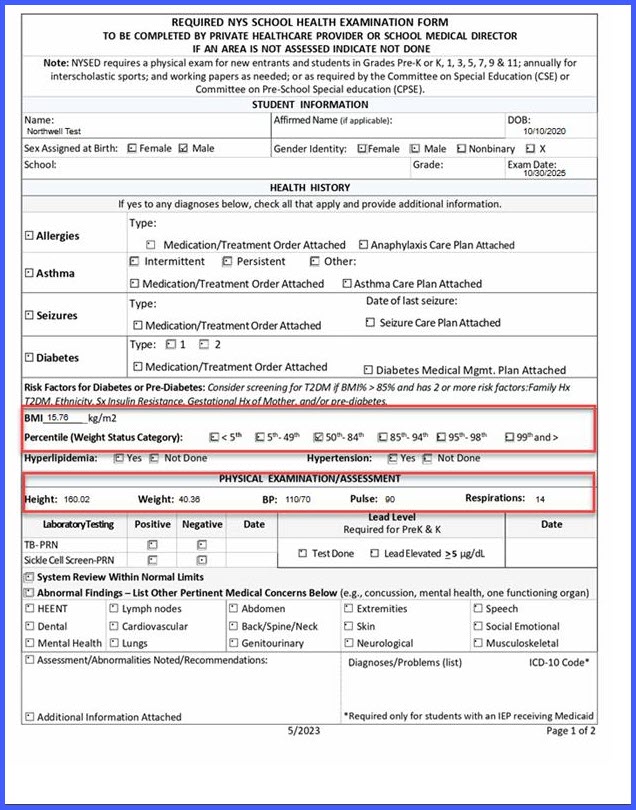
Vitals Auto-Population and Percentile Logic Enhancements in NYS School Health Examination Form
What’s New
-
Vitals auto-population triggered by Performed Date entry or modification.
-
Automatic fetching of Height, Weight, BMI, BP, Pulse, Respiration, and Percentile for the selected date.
-
Full overwrite of previously entered or auto-populated vitals when Performed Date changes.
-
Manual entry allowed after auto-population, and retained unless Performed Date changes.
-
Percentile calculation triggered by: Entering/changing Exam Date and Manually editing BMI.
-
Percentile auto-clear when: BMI manually changed with no Exam Date.
-
Percentile evaluates to zero: No auto-population and full manual control if Performed Date is blank.
How It Works
-
When the user opens the NYS School Health Examination Form – Updated:
-
If Performed Date is blank, all vitals’ fields remain empty for manual entry.
-
-
When the user enters or updates the Performed Date:
-
The system checks for vitals recorded on that exact date in the clinical component.
-
If vitals exist, the latest values are auto-populated.
-
All existing values (including manual ones) are overwritten.
-
If no vitals exist for that date, nothing is auto-populated.
-
-
After auto-population, users may manually modify any field.
-
Manual values remain unless the Performed Date is changed again, which triggers a full refresh and overwrite.
-
Removing the Exam Date does not clear existing vitals.
-
Percentile checkboxes are recalculated when:
-
Exam Date is added or changed
-
BMI is manually updated
-
-
Percentiles are cleared when:
-
BMI is changed while Exam Date is blank
-
Calculated percentile equals zero
-
Benefits
-
Ensures date-accurate vitals for compliance with NYS standards
-
Eliminates manual searching and copying of vitals
-
Reduces errors caused by outdated or mismatched data
-
Allows flexible manual updates while preserving automated accuracy
- Supports cleaner and more consistent reporting
-
Improves workflow efficiency for school and pediatric practices