Reports > Miscellaneous > Charges Payments Detail Report > Generate Report > Charges Section > View Visit Reason Column
What’s New
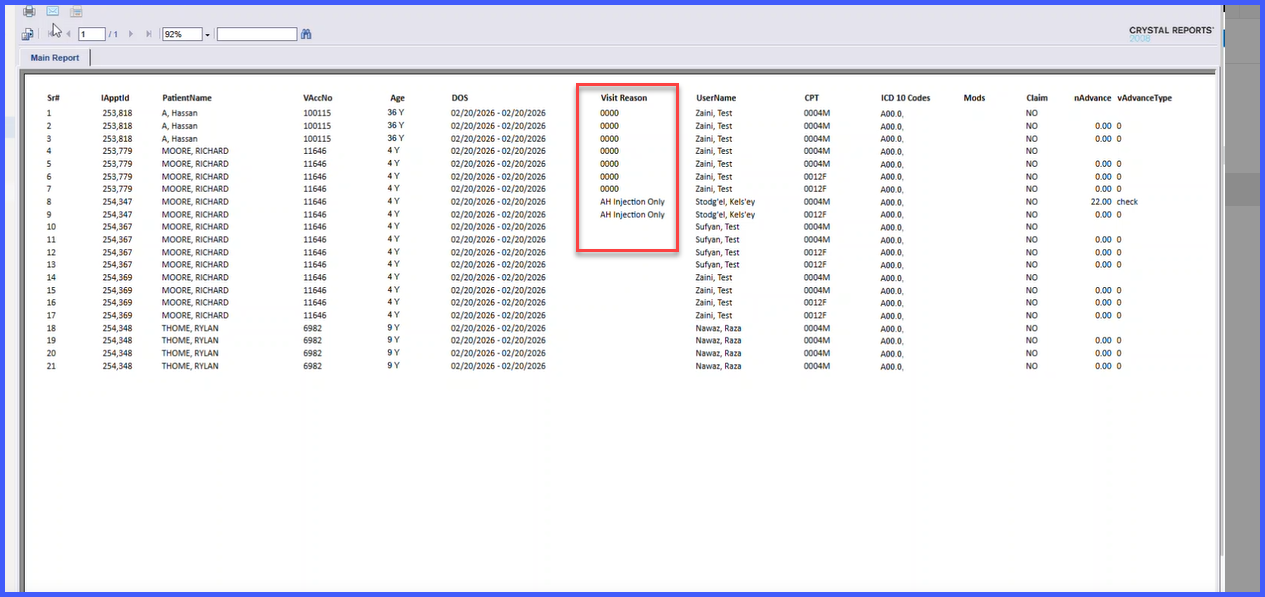
- A new column “Visit Reason” added to: Reports > Miscellaneous > Charges Payments Detail Report (Charges section).
- Visit Reason is sourced from the associated appointment/visit record.
- Field is read-only within the report.
- Column is available only in the Charges section.
- No changes to existing report calculations, totals, or structure.
- Data visibility follows existing role-based access controls.
- No impact on report performance or load time.
How It Works
- Navigate to Reports > Miscellaneous > Charges Payments Detail Report.
- Generate the report.
- In the Charges section, view the newly added Visit Reason column.
- The system automatically pulls the Visit Reason from the linked appointment/visit record.
- The field is displayed as read-only and respects user access permissions.
Benefits
- Reduces the need to navigate across modules to identify visit context.
- Provides combined clinical and billing information in a single report.
- Minimizes manual cross-referencing during billing review.
- Improves efficiency in reporting and audit workflows.
- Enhances clarity and usability of billing reports.
