Tribal Affiliation Searchable Dropdown Added to Patient Demographics
What’s New
-
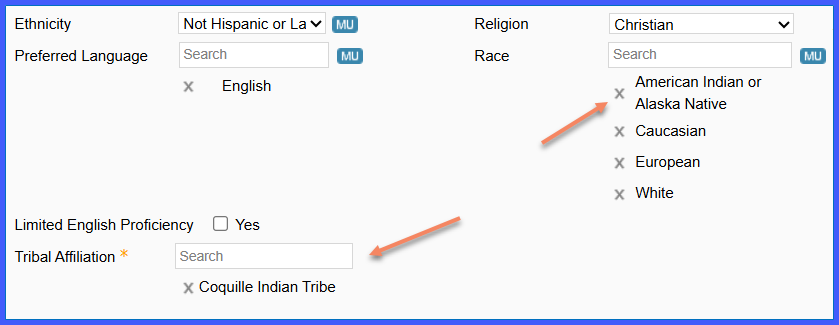
The Tribal Affiliation field appears on the Demographics > Profile page when the Race field is set to either of these two separate values: “Alaska Native” or “American Indian or Alaska Native”.
-
The field is a searchable dropdown that supports multiple selections.
-
Dropdown values are sourced from the HL7 v3-TribalEntityUS CodeSystem.
-
Each selection stores the code, code system URI, and display name in the backend.
-
The field is reflected across Patient Portal, LEAP, Avalon, and the Patient Audit Trail.
-
No default values are applied, even when mandatory-field rules are enabled.
How It Works
-
Navigate to Patient > Registration > Demographics.
-
Select any one of the following as the patient’s Race: “American Indian or Alaska Native” or “Alaska Native.”
-
The Tribal Affiliation field appears as a searchable dropdown.
-
Begin typing to search the HL7 v3-TribalEntityUS dataset; matching tribes appear dynamically.
-
Select one or more tribal affiliations (display name shown in the UI).
-
Save the demographics.
-
The system stores the selected code, code system URI, and display name.
Benefits
-
Improves accuracy and standardization of demographic data capture.
-
Supports audit readiness by storing coded, traceable demographic values.
-
Enhances usability with searchable, multi-select dropdowns for large datasets.
-
Maintains consistency across clinical, portal, and audit-related modules.
