Search Available Appointments in Extended Multiple View
Search Available Appointments
Book an Appointment from Search Results
What’s New
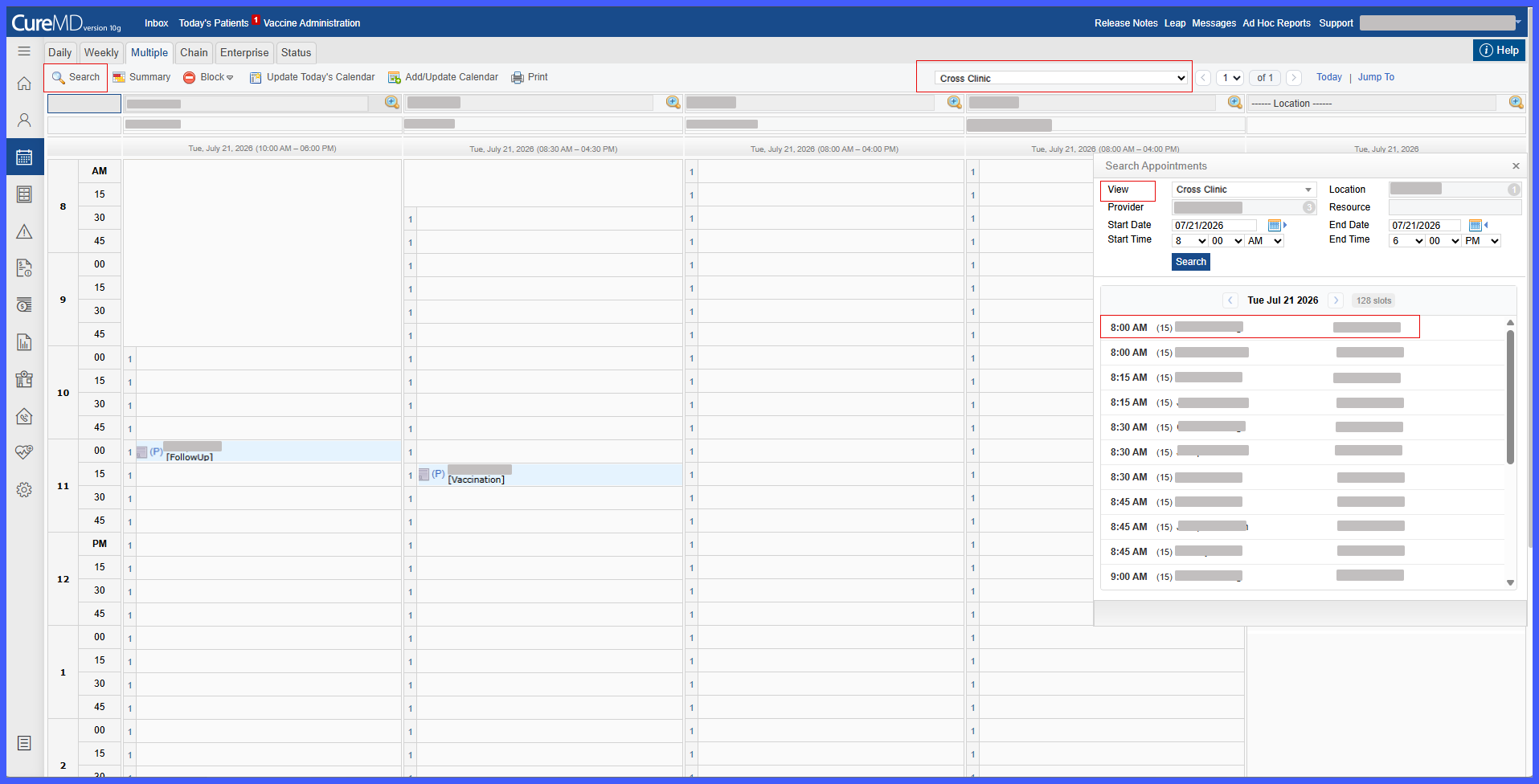
- A new Search Appointments panel is available within the Extended Multiple View Scheduler.
- The currently selected Saved View is automatically loaded into the appointment search.
- Location, Provider, and Resource criteria are automatically populated based on the selected Saved View.
- Saved View members are displayed as read-only to maintain consistency with the configured view.
- The default search period is:
– Date: Today’s Date
– Start Time: 8:00 AM
– End Time: 6:00 PM - Users can search availability across multiple providers, resources, and locations simultaneously.
- Appointment searches support a maximum date range of 30 days.
- Search results include only slots that meet existing scheduling, availability, and booking rules.
- Results are grouped chronologically by date, with the first date containing available appointments automatically expanded.
- Providers are ordered by earliest available appointment time.
- Users can scroll to review additional available appointment slots.
- Previous and Next navigation is available when reviewing availability across multiple dates.
- Selecting an available slot continues directly into patient selection and detailed appointment booking.
How It Works
- Navigate to the Extended Multiple View Scheduler and select the applicable Saved View.
- Open the Search Appointments panel.
- The system automatically populates the Location, Provider, and Resource criteria from the selected Saved View. These fields remain read-only.
- Review or update the desired date and time range. The search defaults to today’s date from 8:00 AM to 6:00 PM.
- Search for available appointments. The selected date range cannot exceed 30 days.
- The system returns appointment slots that satisfy existing scheduling and availability rules.
- Review results grouped by date. The first date with availability is automatically expanded, and providers are ordered by their earliest available appointment time.
- Use scrolling or Previous and Next navigation to review additional slots and dates when applicable.
- Select the desired appointment slot.
- The system opens patient selection, followed by the detailed appointment booking screen, allowing the user to complete scheduling.
Impacted Areas
- Scheduler – Multiple View
- Search Appointments
- Saved Views
- Appointment Scheduling
Benefits
- Reduces the time required to locate available appointments.
- Allows staff to search across multiple providers, resources, and locations simultaneously.
- Improves scheduling efficiency for practices managing large provider groups.
- Provides greater visibility into upcoming provider availability.
- Helps staff quickly identify the earliest available appointment.
- Maintains existing scheduling and availability rules when returning available slots.
- Provides a seamless transition from availability search to patient selection and appointment booking.
- Improves the overall scheduling experience for front desk staff and patients.
