OB Lab Results Comments and Selected Results Now Display Correctly in Provider Notes
Document OB Lab Results
Review OB Lab Results in Provider Note
What’s New
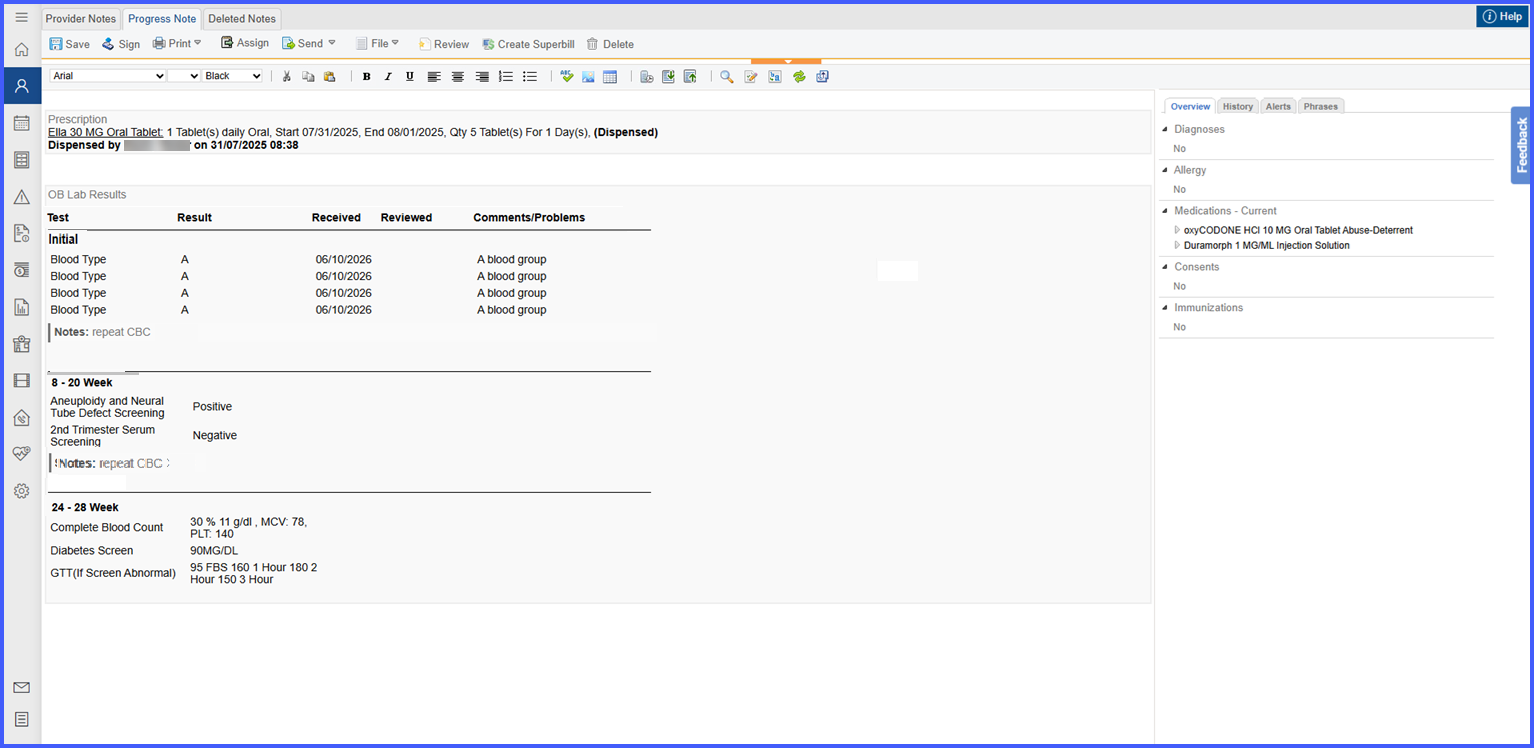
- The OB Lab Results block now displays a single shaded OB Lab Results heading at the top of the section.
- A single column header row is displayed with:
– Test
– Result
– Received
– Reviewed
– Comments/Problems - Column headers are displayed once and are not repeated for each OB Lab Results section.
- OB Lab Results sections are displayed as bold subheadings matching the modal, including:
– Initial
– Supplemental
– 8 – 20 Week
– 24 – 28 Week
– 32 – 36 Week
– 35 – 37 Week - Section-level comments entered in the OB Lab Results modal now carry into the Provider Note.
- Section comments are displayed as a dedicated Notes: row immediately after the final test within the applicable section.
- The Notes row spans the full width of the table and includes a visible left accent bar.
- Horizontal dividers separate accepted OB Lab Results sections, with no divider displayed after the final section.
- Only sections containing accepted information are displayed in the Provider Note.
How It Works
- Open an active obstetric patient’s Provider Note and access the OB Lab Results component.
- Enter or update applicable test results, received dates, review status, row-level comments, and section-level comments within the OB Lab Results modal.
- Click Accept to add the entered information to the Provider Note.
- The Provider Note displays the accepted results under their corresponding OB Lab Results section.
- If a section-level comment was entered, it appears as a dedicated Notes: row immediately beneath the final test in that section.
- Each populated section is separated by a horizontal divider, while the overall block maintains a single column header for easier review.
 Benefits
- Prevents section-level clinical comments from being lost when OB Lab Results are accepted into the Provider Note.
- Ensures the Provider Note accurately reflects the information entered within the OB Lab Results modal.
- Reduces the need for providers to manually re-enter or verify comments after accepting results.
- Improves readability through consistent headings, section labels, Notes rows, and dividers.
- Provides clearer organization of OB laboratory information during and after the encounter.
Known Behavior / Limitations
- OB Lab Results and section comments appear in the Provider Note only after Accept is selected in the modal.
- Empty sections are not displayed in the Provider Note.
- The Notes row appears only when a section-level comment has been entered.
- The Notes row spans the complete table width and is not associated with an individual Test, Result, Received, Reviewed, or Comments/Problems column.
- No additional configuration is required.
