Capture and Display Plan/Product Type from Eligibility on Charge Page
Capture Plan Type from Eligibility Response
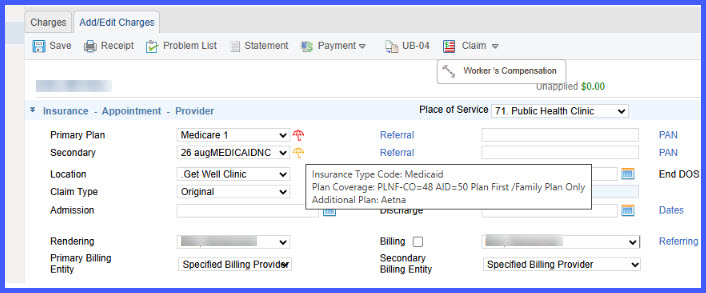
View Plan Details on Charge Page
Review Additional Plans
What’s New
- Plan Type (EB04) and Plan Description (EB05) are captured from successful eligibility responses.
- Plan details are stored at the charge level for the specific Date of Service (DOS).
- Supports multiple eligibility runs across different DOS without overwriting previously stored values.
- Plan information is displayed on the Charge page for:
– Primary plans
– Secondary plans
– Tertiary plans
– Additional plans - A new umbrella icon is displayed at the end of each plan section.
Umbrella icon color indicators provide eligibility status visibility:
– 🟢 Green: Eligible
– 🔴 Red: Not Eligible
– 🟠 Orange: Additional Plan/Payer - Hovering over the umbrella icon displays:
– Eligible / Not Eligible status
– Manual-E / Manual-NE status
– Plan Type
– Plan Description
– Additional plan details - Additional plans are summarized using the format:
– Plan Name + Count (e.g., Aetna +3)
How It Works
- Run eligibility for a patient using a specific Date of Service (DOS).
- The system retrieves Plan Type (EB04) and Plan Description (EB05) from the eligibility response.
- The retrieved values are stored at the charge level for the selected DOS.
- Navigate to the Charge page.
- Review plan information displayed for Primary, Secondary, Tertiary, and Additional plans.
- Hover over the umbrella icon to view detailed eligibility and plan information.
- If eligibility is run again for a different DOS, the system stores the new plan information separately without affecting previously stored values.
Benefits
- Improves billing accuracy by associating plan type information directly with the charge and DOS.
- Reduces manual effort by eliminating the need to reference eligibility responses separately.
- Enhances decision-making with visual eligibility indicators and detailed plan information.
- Improves auditability by preserving plan details for each DOS independently.
- Streamlines charge review and validation workflows for billing and RCM teams.
- Supports complex insurance scenarios involving multiple plans without cluttering the user interface.
