How to Login to CureMD Avalon?
For launching CureMD Avalon, the user can open CureMD Avalon on their iPhone. Following splash screen is displayed:

From the ‘Login’ screen, fill in the username and password and tap the ‘LOGIN’ button.
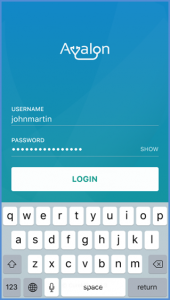
If the user taps the ‘SHOW’ button, the password is shown and the button label is changed to ‘HIDE’.
In addition, if the user is registered with multiple practices, they are shown the list of the practices to choose from once the ‘LOGIN’ button is clicked.
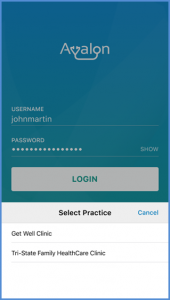
If ‘TouchID’ is configured in the Iphone, the user is navigated to the ‘Enable TouchID’ screen upon selecting a practice. To know more about enabling TouchID, click here.
