How to Access the CureMD MU KPI?
The CureMD MU (Meaningful Use) KPI allows users to get an instant overview in terms of the practice compliance with the various measures set forth by CMS.
This KPI has two tabs that allow users to review their progress for Stage 1 and Stage 2.
Follow the workflow mentioned above to land on the ‘MU Performance’ screen.
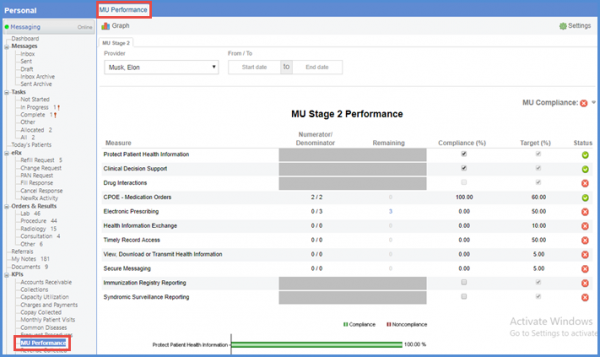
For calculating the compliance with the various measures, select the required location, provider, and a date range and click on the ‘Graph’ icon to display the required information.
The following details will be displayed:
- ‘Measure’
- ‘Denominator’
- ‘Numerator’
- ‘Compliance %’
- ‘Target %’
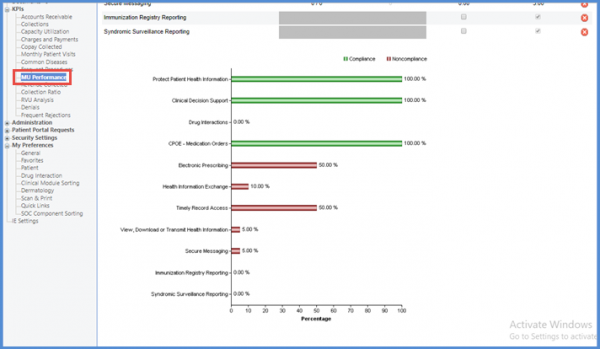
For a quick overview of the performance, users can view the graph which is shown below the table.
Users can also make changes in the KPI’s measures.
Click on the ‘Settings’ icon.

Select the required Measures.
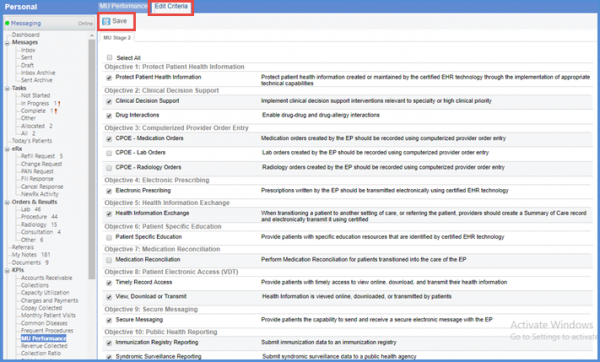
After making the required changes click ‘Save’.
