How to Add Appointment Notes?
Users can add ‘Appointment Notes’ for a scheduled patient.
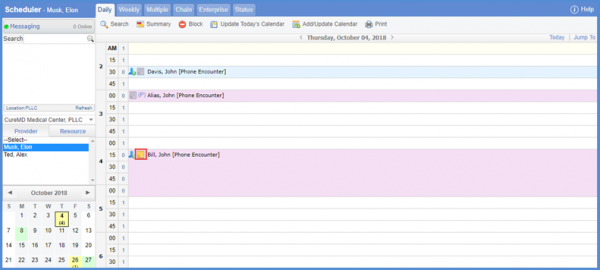
In the ‘Scheduler’ window, click on the ( ) button to open the ‘Appointment Notes’ screen.
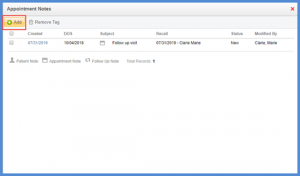
To add a note, click the ‘+Add’ button.
Users can add ‘Appointment Notes’ for a scheduled patient.
In the ‘Scheduler’ window, click on the () button to open the ‘Appointment Notes’ screen.
To add a note, click the ‘+Add’ button.

Posted On: Aug 26, 2026
Posted On: Aug 26, 2026
Posted On: Aug 26, 2026
Posted On: Aug 26, 2026
Posted On: Aug 26, 2026
Posted On: Aug 26, 2026