How to Add Procedure/ Tests?
Follow the above mentioned workflow to reach the ‘Procedure/Test’ tab. A list of all the available procedures/tests is displayed. Click on the one which is required to be added. Users can also search for a procedure by using the ‘Search Procedure’ search bar.
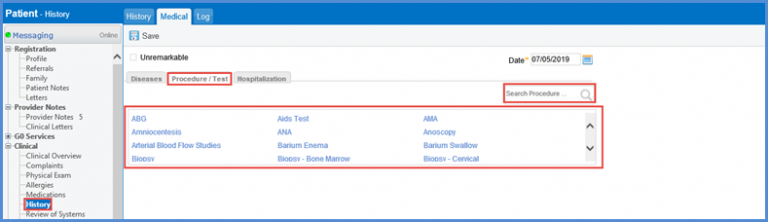
To see how to add a medical test, Click here.
The readability of a patient’s medical history is improved. 
Users can easily read and understand the different components of a medical history.
Add diseases, procedure/test, and hospitalization comments in the respective tabs of the medical history and then click ‘Save’. The components of the medical history are clearly segregated with line breaks in between them.
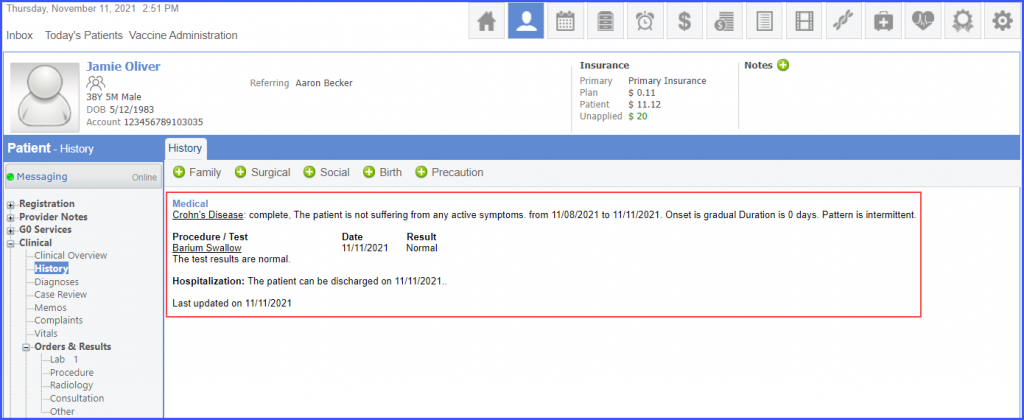
Similar enhancement has been made in the ‘Provider Notes’. To view the change, click here.
