How to Document Release of Information Consent?
CureMD supports transmission of consents to HIE both via an HL7 and through an electronically signed consent letter. User navigates to ‘Consents’ and selects Release of Information as Type.
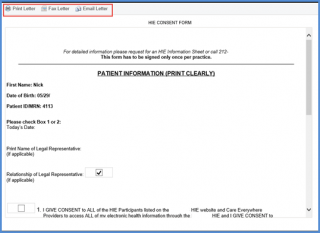
Users can e-mail or fax the consent document to an HIE.
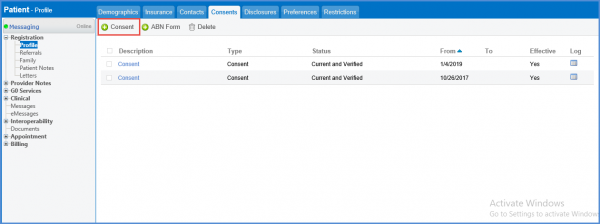
To add a consent, follow the workflow above to navigate to the “Consents” tab and click on the ‘Add Consent’ icon.
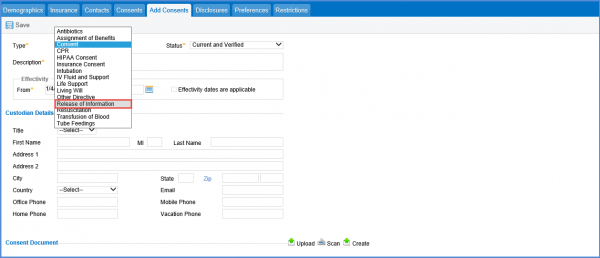
From the “Add Consents” screen, select ‘Release of Information’ as the Type of form.
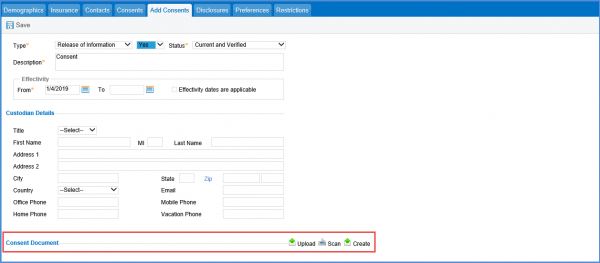
Once release of information is selected from the drop-down, user can select from the two options:
- Yes
- No
The selected option is transmitted to the HIE in an HL7 file. Selecting ‘Yes’ means that the patient has given consent to share information. No means otherwise.

There’s also an option to upload or scan a consent document. A consent document can be uploaded or scanned. If the user wishes to select a consent letter from a pre-added CureMD template, it can be done by clicking on Create. System will provide a drop-down of all available consent letters added.
Once the consent is signed, it can be emailed or faxed from CureMD.