CMS69v12 – Preventive Care and Screening: Body Mass Index (BMI) Screening and Follow-Up Plan
Preventive Care and Screening: Body Mass Index (BMI) Screening and Follow-Up Plan
CMS69v12
Percentage of patients aged 18 years and older with a BMI documented during the current encounter or during the measurement period AND who had a follow-up plan documented if BMI was outside of normal parameters.
– DENOMINATOR
All patients aged 18 and older on the date of the encounter with at least one qualifying encounter during the measurement period.
A qualifying encounter in this case is an encounter to evaluate a patient’s BMI.
– NUMERATOR
Patients with a documented BMI during the encounter or during the measurement period, AND when the BMI is outside of normal parameters, a follow-up plan is documented during the encounter or during the measurement period.
A normal BMI range is 5-24.9 kg/m2
A Low BMI is < 18.5 kg/m2
A high BMI is > 25 kg/m2
Interventions for BMI outside normal parameters include:
Follow-ups
Referrals
Medication
Diagnosis (Underweight or Overweight)
– DENOMINATOR EXCEPTIONS
Patients with a documented medical reason for not documenting BMI or for not documenting a follow-up plan for a BMI outside normal parameters (e.g., elderly patients 65 years of age or older for whom weight reduction/weight gain would complicate other underlying health conditions such as illness or physical disability, mental illness, dementia, confusion, or nutritional deficiency such as vitamin/mineral deficiency; patients in an urgent or emergent medical situation where time is of the essence and to delay treatment would jeopardize the patient’s health status).
Patients who refuse measurement of height and/or weight.
– DENOMINATOR EXCLUSIONS
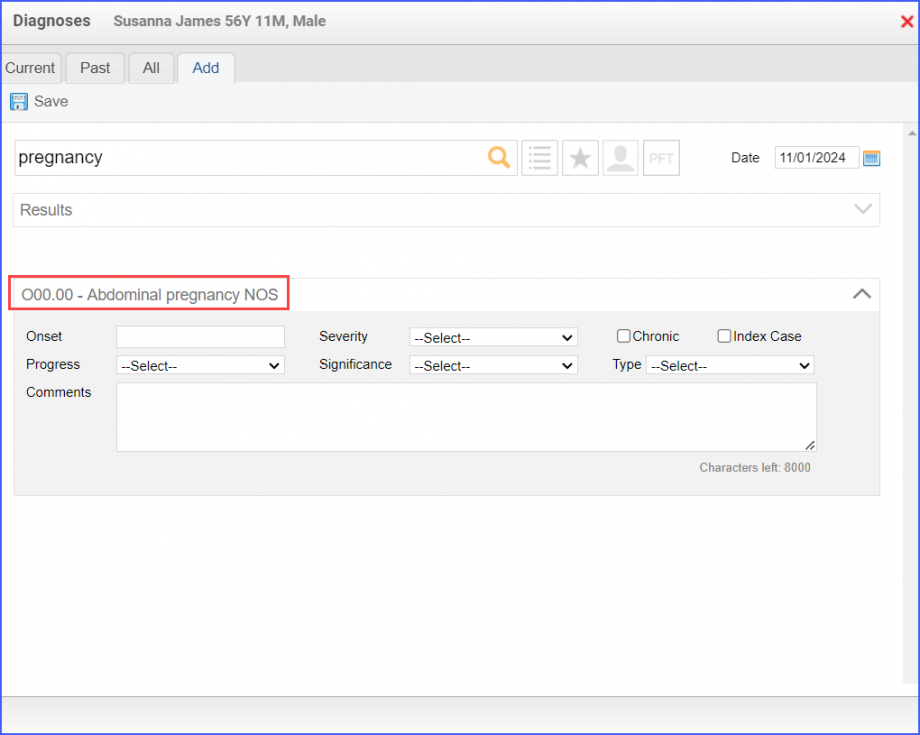
Patients who are pregnant at any time during the measurement period. The pregnancy is to be diagnosed during the encounter for evaluating BMI.
Patients receiving palliative or hospice care at any time during the measurement period.
– APPLICATION WORKFLOW
For Denominator:
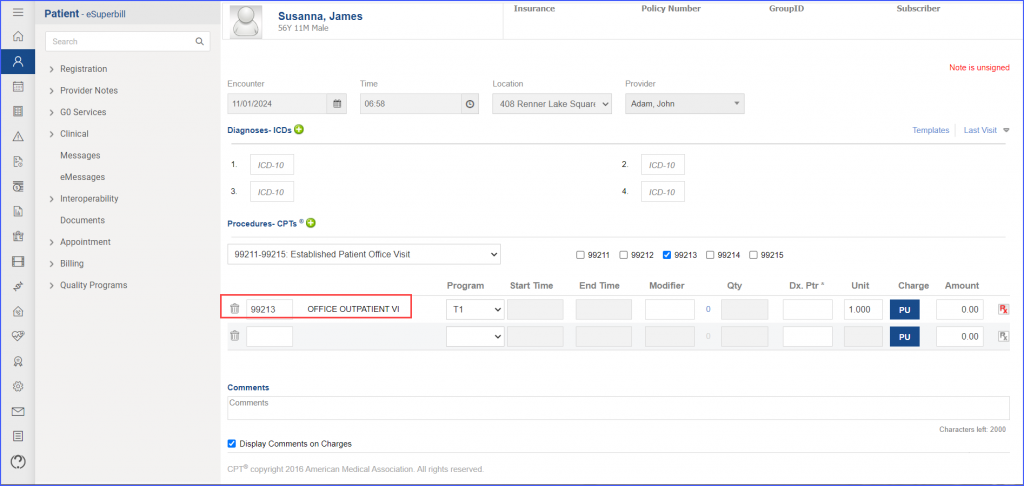
To record an encounter, navigate to Patient > Provider Note > Create Superbill. Under the ‘Procedures-CPT’ heading, enter a relevant encounter.
eSuperbill for Encounter
For Numerator:
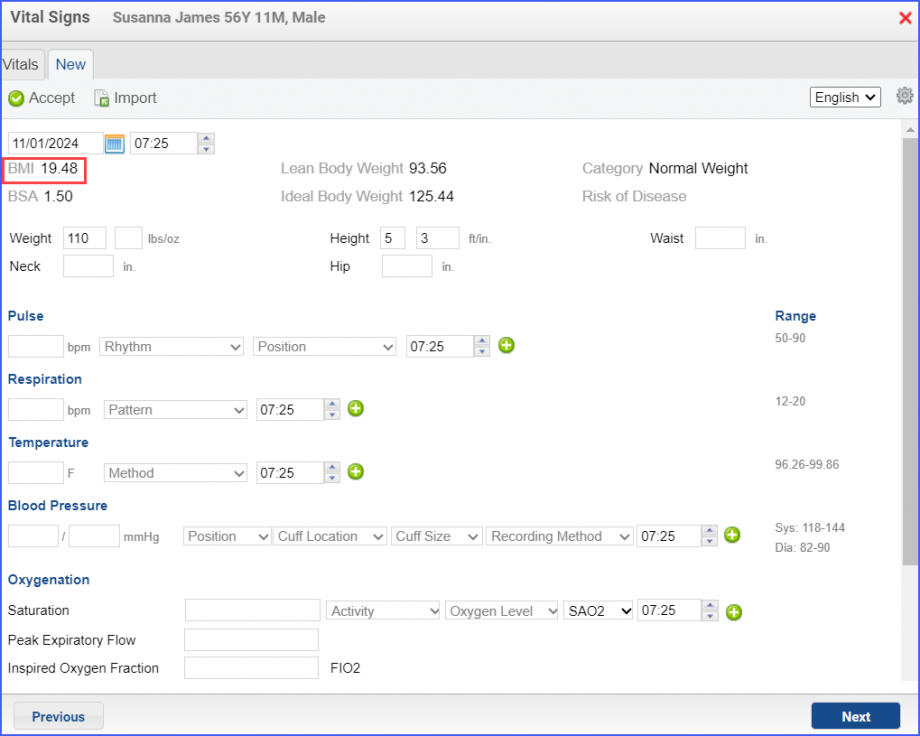
To record BMI through vitals, navigate to Patient > Provider Note > Vitals. Click ‘Add’ and enter the weight and height of the patient, through which the system automatically calculates the BMI. Once done, click ‘Accept’.
BMI Calculated by Weight and Height
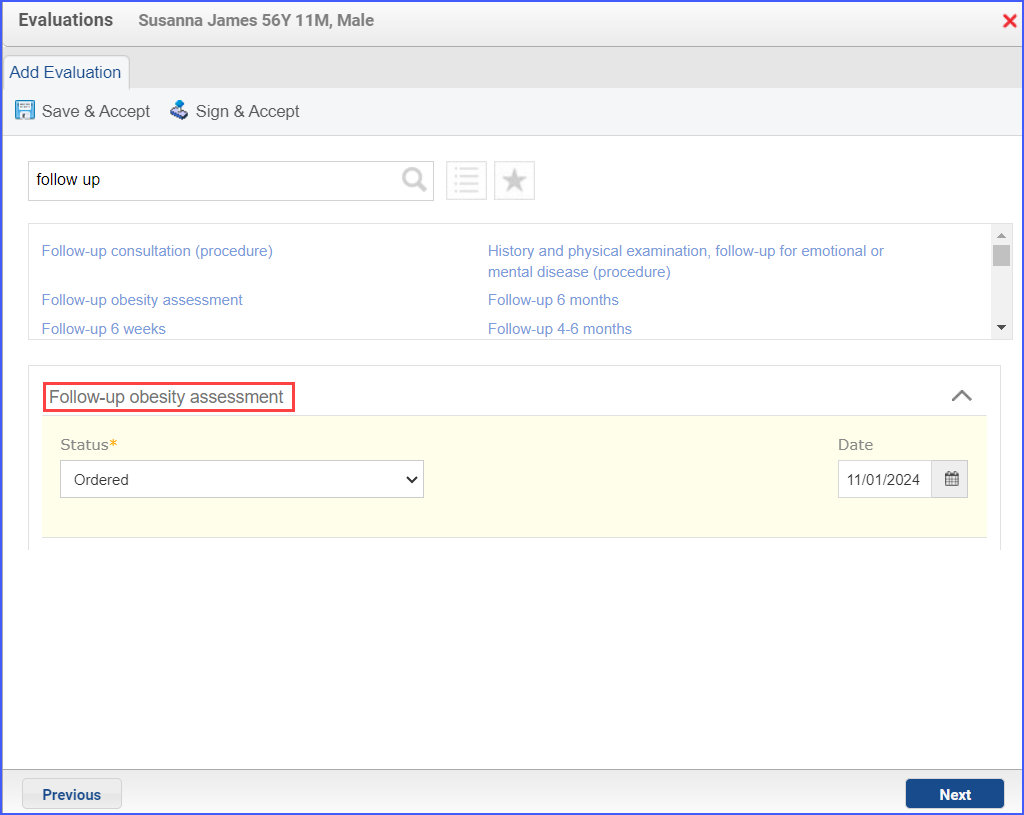
To document a follow up intervention for BMI outside normal parameters, head over to Patient > Provider Note > Evaluations. Click ‘Add’ and search for a relevant intervention. From the ‘Status’ drop-down select ‘Performed’. Once done, click ‘Save & Accept’ or ‘Sign & Accept’.
Example of Follow Up Intervention
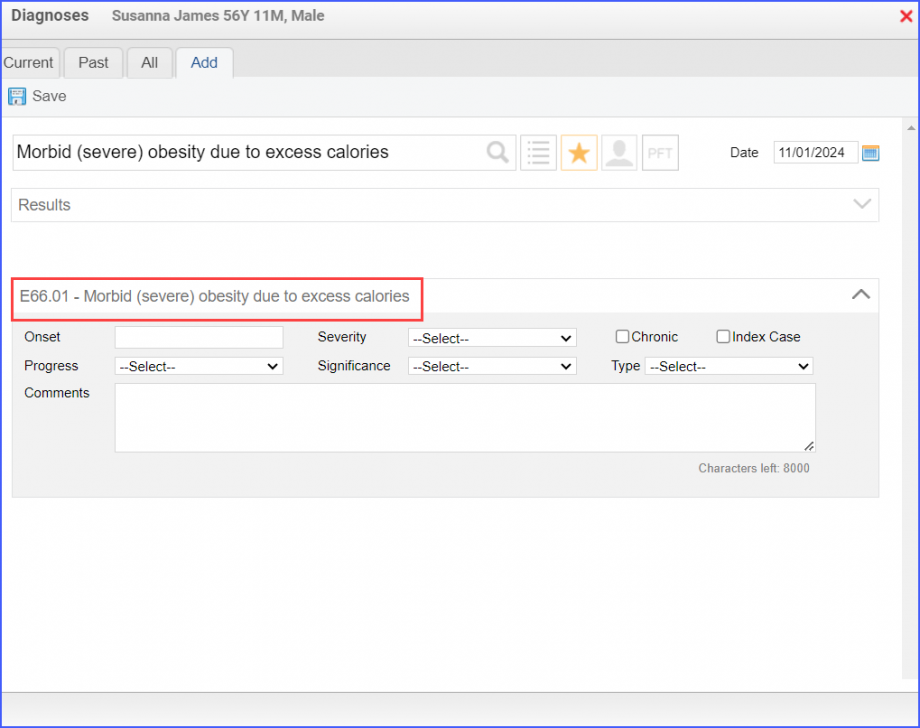
To document the diagnosis, use the workflow Patient > Provider Note > Diagnoses, and click ‘Add’. Search for the diagnosis, add the diagnosis details, and click ‘Save’. Then click ‘Accept’ to add the diagnosis to the provider note.
Example of Overweight Diagnosis
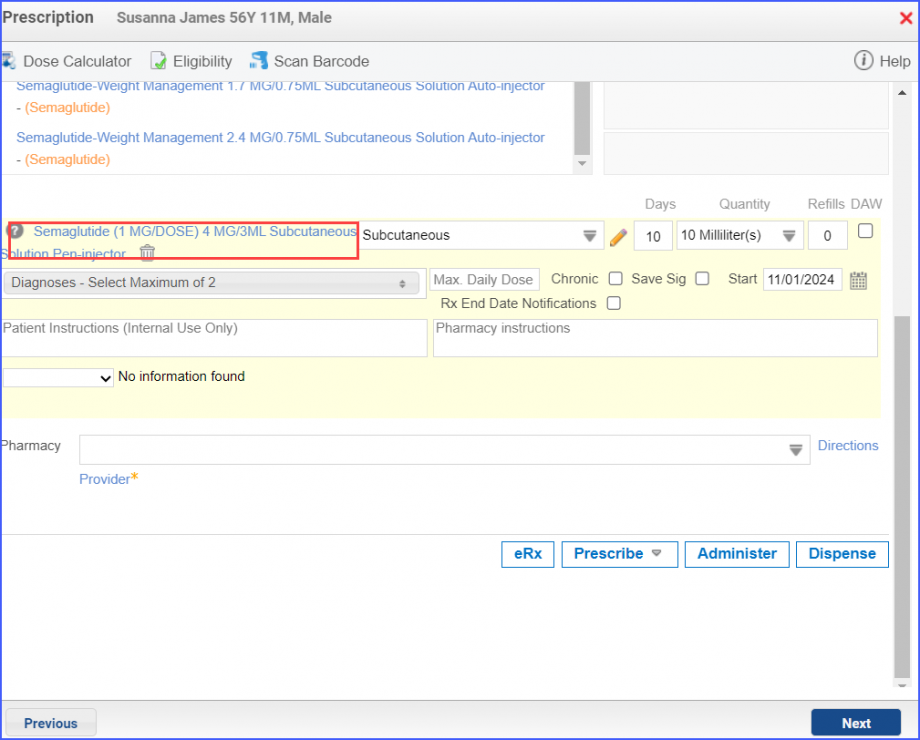
Medication can be ordered via Patient > Provider Note > Prescription. Here, click ‘Add’ and search for the relevant medication, fill out the details and once done, click ‘Prescribe’.
Example of Medication for Above Normal BMI
For Denominator Exclusions:
To record patient pregnancy, navigate to the workflow Patient > Provider Note > Diagnoses.
Example of Pregnancy Diagnosis
To record an encounter, navigate to Patient > Provider Note > Create Superbill.
For patients receiving palliative care during the measurement period:
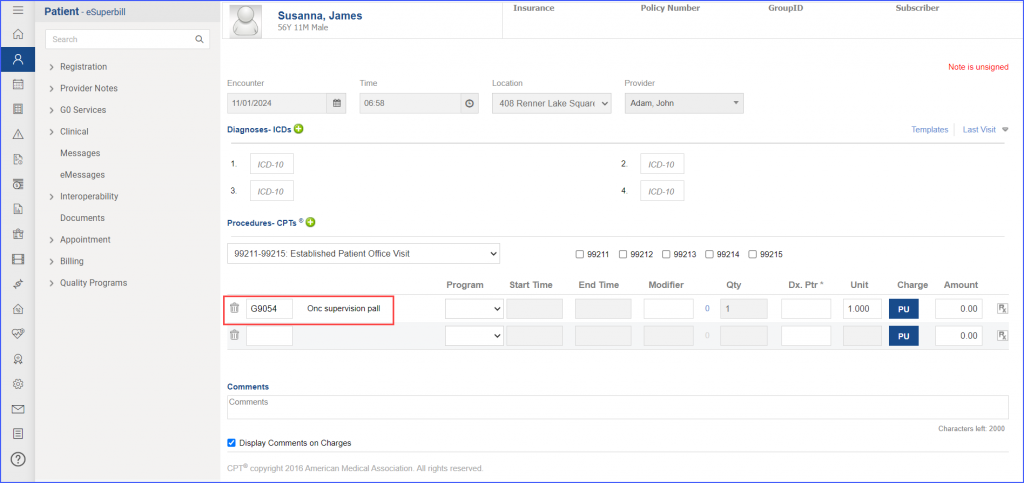
To record the ‘Palliative Care Encounter’, head over to Patient > Provider Note > Create Superbill
Example of Palliative Care Encounter
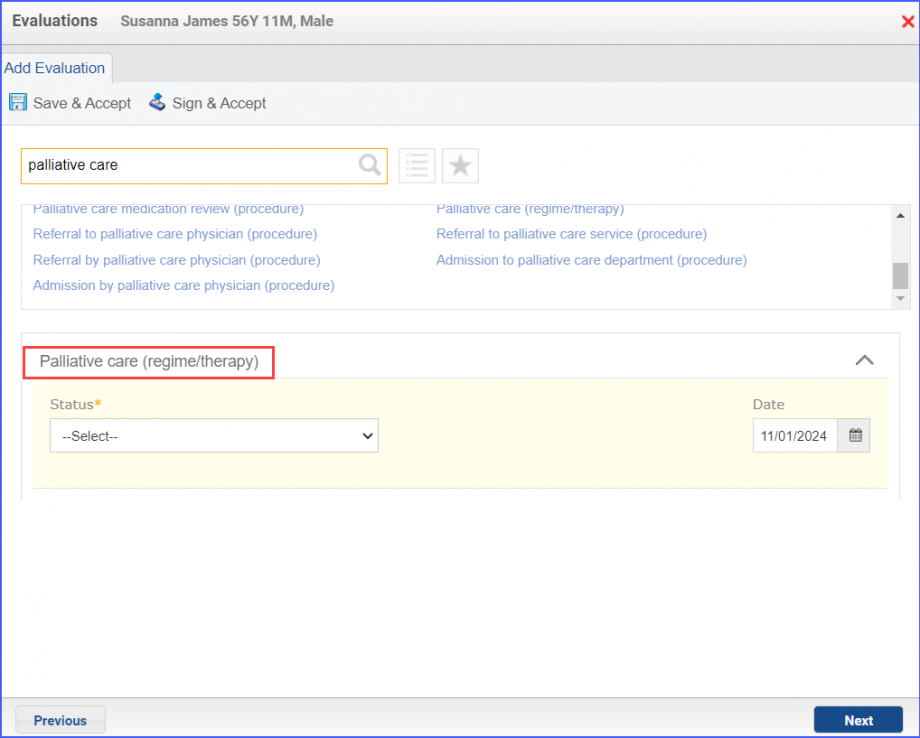
To record the ‘Palliative Care Intervention’, use the workflow Patient > Provider Note > Evaluations
Example of Palliative Care Intervention
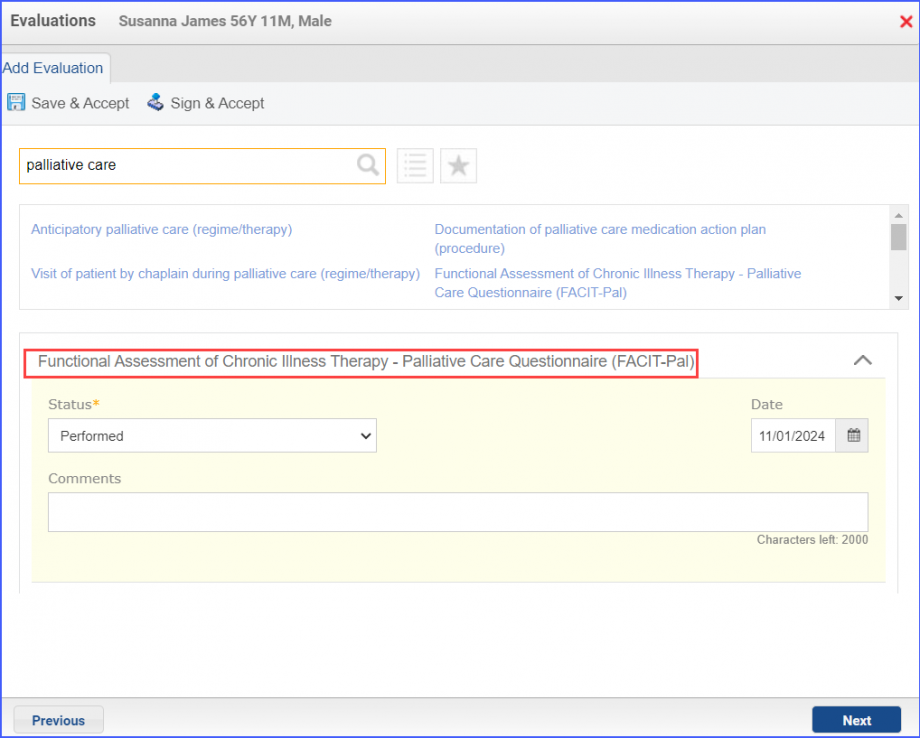
To record the ‘Functional Assessment of Chronic Illness Therapy’ assessment, navigate to Patient > Provider Note > Evaluations.
Example of Palliative Care Assessment
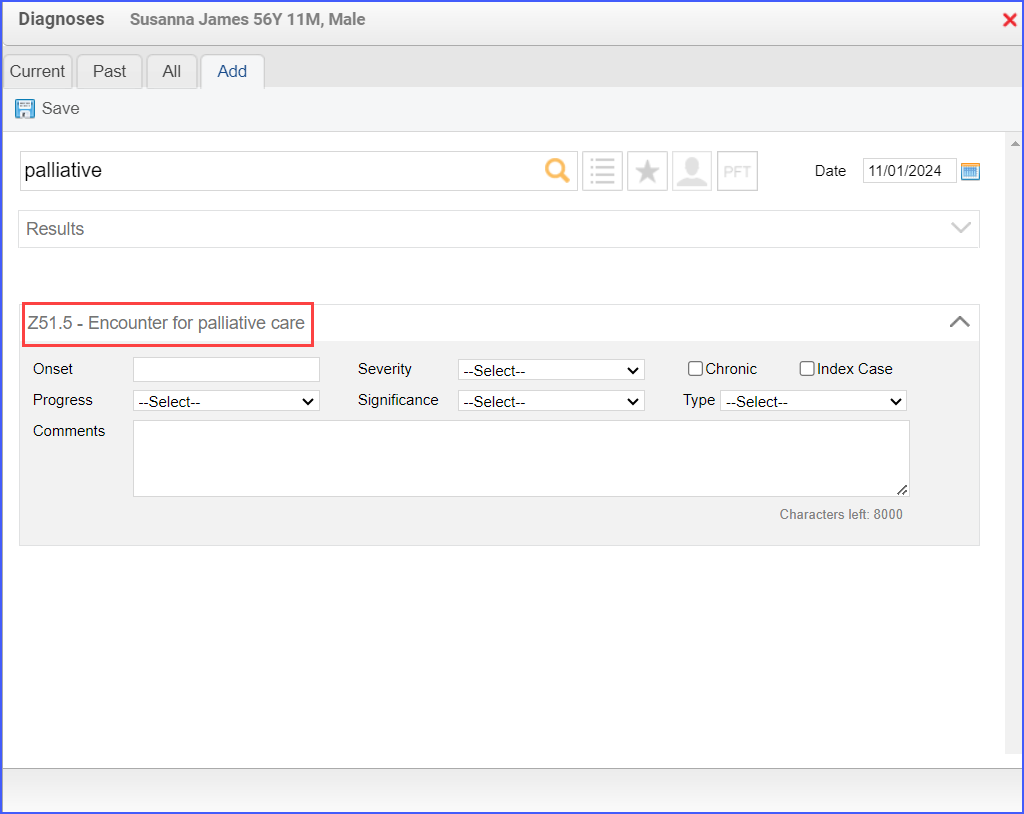
The “Encounter for palliative care” diagnosis can be recorded via Patient > Provider Note > Diagnoses.
Encounter for Palliative Care Diagnosis
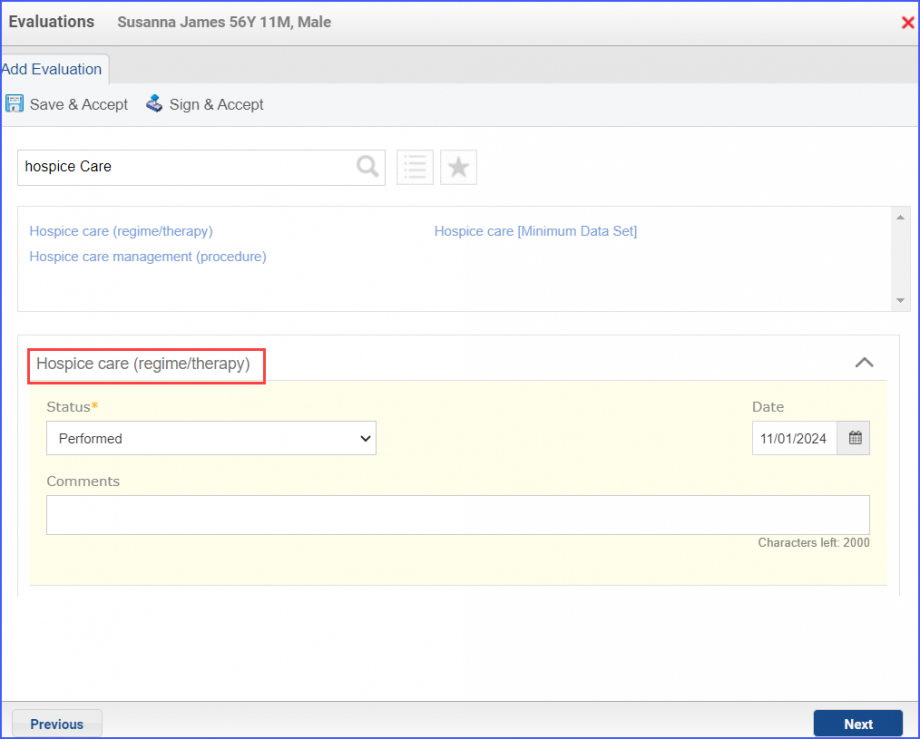
To document that a patient is receiving hospice care outside of a hospital or long-term care facility, navigate to Patient > Provider Note > Evaluations. Use the below mentioned codes to order or perform an intervention:
385763009: Hospice Care (Regime/Therapy)
385765002: Hospice Care Management (Procedure)
Hospice Care Evaluation
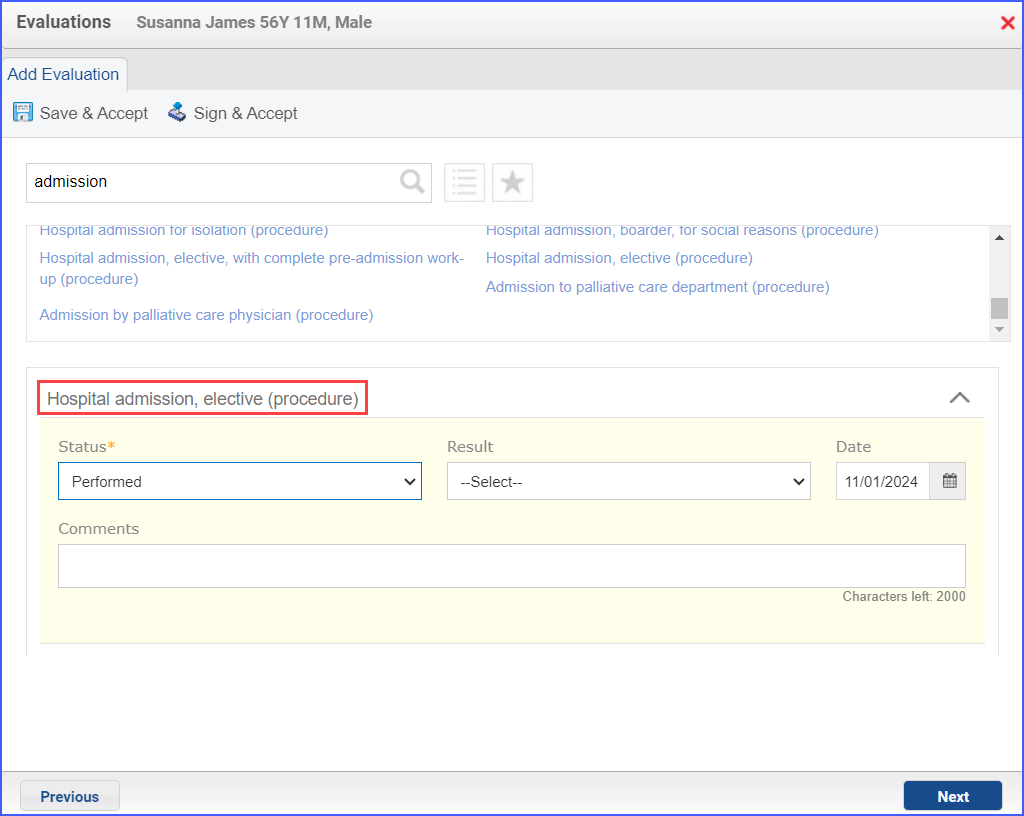
To document an inpatient encounter, navigate to Patient > Provider Note > Evaluations.
Example of Inpatient Encounter
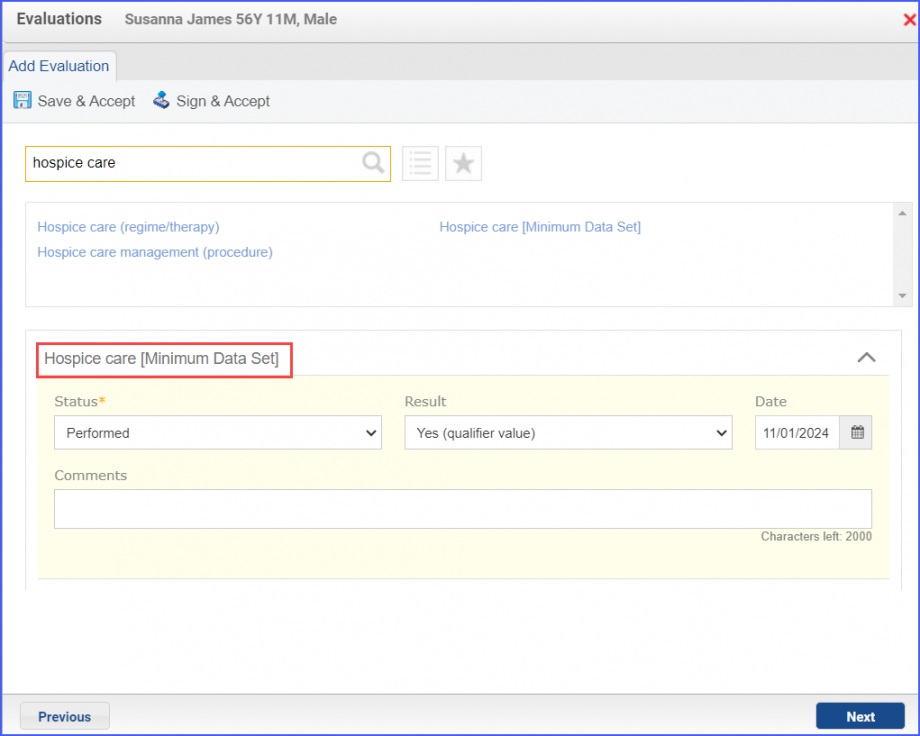
To document a hospice care assessment, follow the workflow Patient > Provider Note > Evaluations. Click ‘Add’ and search for ‘Hospice Care [Minimum Data Set]’. Then select ‘Performed’ from the ‘Status’ dropdown and ‘Yes’ from the ‘Result’ field.
Hospice Care Assessment
A hospice encounter can be documented through Patient > Provider Note > Evaluations or Patient > Provider Note > Create Superbill.
For Denominator Exceptions:
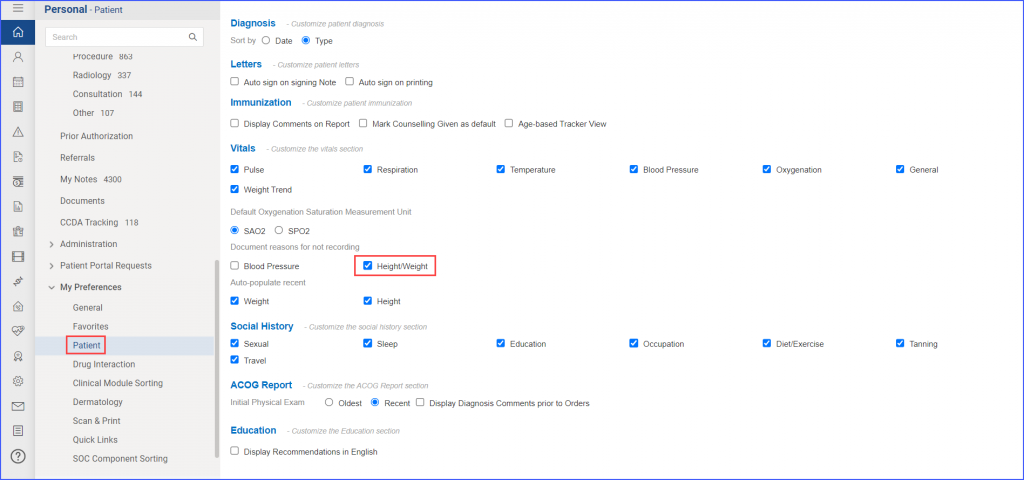
Note: To document reasons for not recording vitals, users must set preferences from the Personal Module. Navigate to Personal > My Preferences > Patient. Mark the ‘Height/Weight’ checkbox under the ‘Document Reasons for not recording’ heading. Then click ‘Save’.
Height/Weight Checkbox in My Preferences
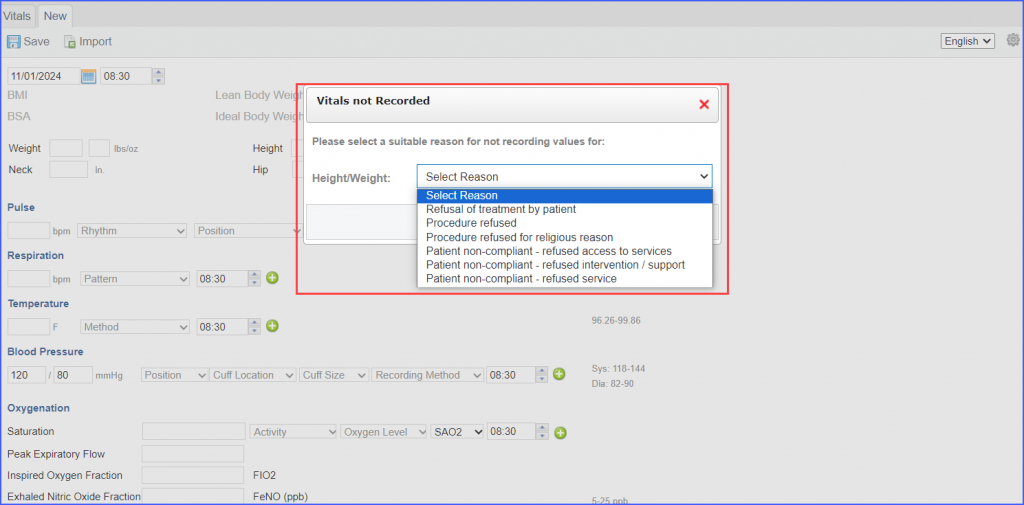
To document reasons for not recording BMI, navigate to Patient > Clinical > Vitals. Click on the ‘Save’ button without recording Height and Weight. A pop up ‘Vitals not recorded’ appears. From the Height/Weight dropdown, select the relevant.
Documenting Reasons for not Recording BMI
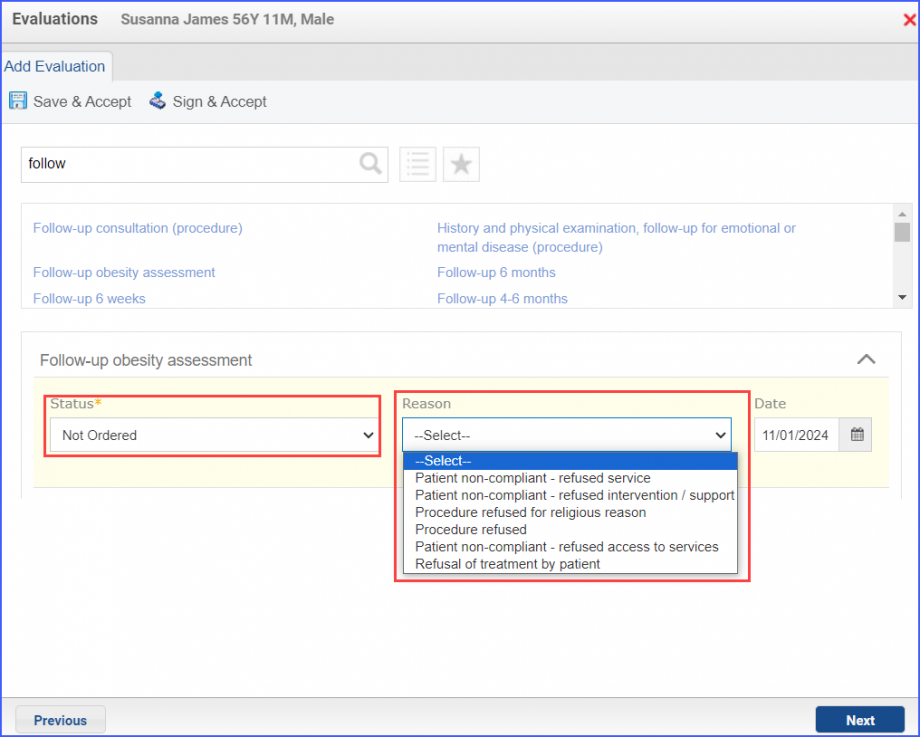
No Follow Up or BMI Referral for abnormal BMI can be recorded through Patient > Provider Note > Evaluations. Here, search for the relevant follow up procedure and set the status to ‘Not Performed’ or ‘Not Ordered’. From the ‘Reason’ dropdown, select the relevant reason.
Documentation for Not Ordering an Intervention
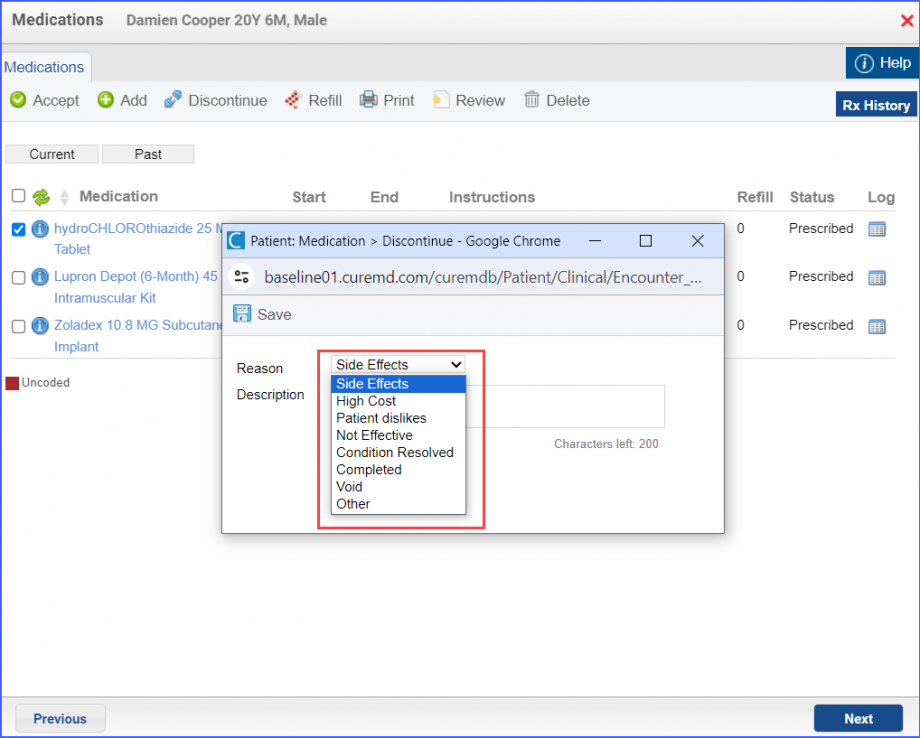
The documentation of medical reasons for not prescribing medication can be done via Patient > Provider Note > Medications > Current > Discontinue. Here, the reason for discontinuing an active medication is to be selected from the drop-down.