CMS124v10 – Cervical Cancer Screening

Cervical Cancer Screening CMS124v10 Percentage of women 21–64 years of age who were screened for cervical cancer using either of the following criteria:
  • Women age 21–64 who had cervical cytology performed within the last 3 years.
  • Women age 30–64 who had cervical human papillomavirus (HPV) testing performed within the last 5 years.
– DENOMINATOR

Women 23-64 years of age with a medical visit during the measurement period

– DENOMINATOR EXCLUSIONS

  • Women who had a hysterectomy with no residual cervix or a congenital absence of cervix.
  • Exclude patients who are in hospice care for any part of the measurement period.
  • Exclude patients receiving palliative care during the measurement period.

– NUMERATOR

Women with one or more screenings for cervical cancer. Appropriate screenings are defined by any one of the following criteria:

  • Cervical cytology performed during the measurement period or the 2 years prior to the measurement period for women who are at least 21 years old at the time of the test.
  • Cervical human papillomavirus (HPV) testing performed during the measurement period or the 4 years prior to the measurement period for women who are 30 years or older at the time of the test.
– APPLICATION WORKFLOW

For Denominator:

A female patient of age 23-64 at the start of the measurement period, with a visit during the measurement period, is considered for this measure. To record an encounter, navigate to Patient > Provider Note > eSuperbill. Under the ‘Procedures- CPTs’ heading, enter the encounter code.
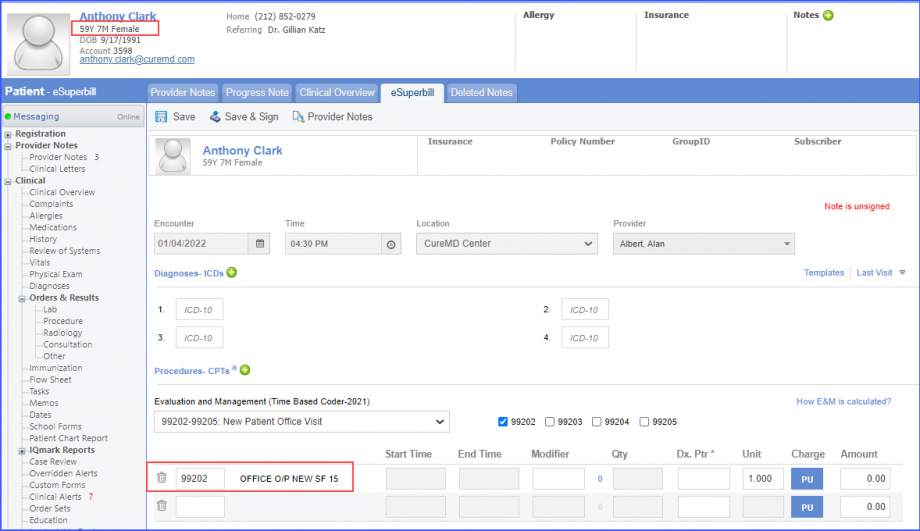
  • Office Visit
  • Home Healthcare Services
  • Preventive Care Services – Initial Office Visit, 18 and Up
  • Preventive Care Services – Established Office Visit, 18 and Up
  • Telephone Visits
  • Online Assessments
eSuperbill-3-920x531
eSuperbill

For Numerator:

Female patient satisfying any one of the following conditions are included in the numerator:

  • Patient is 21 years of age or older and received a Pap test in a three-year period.
  • Patient is 30 years of age or older and has a HPV test performed during the measurement year or during the four years prior to the measurement year.

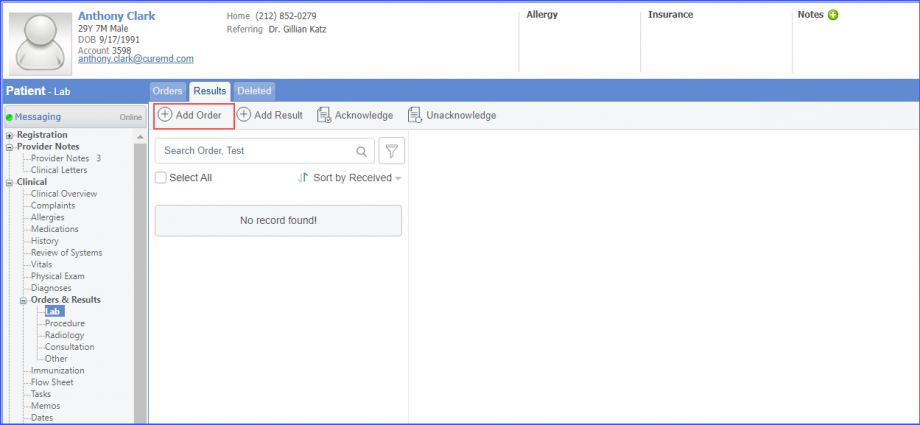
To record PAP Test/HPV test, navigate to Patient > Clinical > Orders&Results > Labs and click ‘+ Add Order’ button.
AddOrder-920x425
‘+ Add Order’

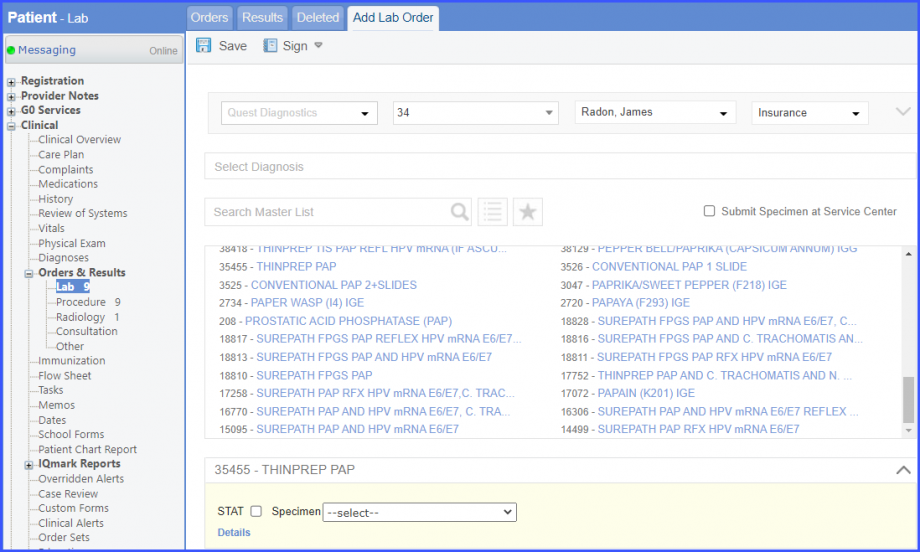
Here, select a laboratory and search for the lab test. Once done, click on the ‘Save’ or ‘Sign’ button.
AddLabOrder-920x552
Add Lab Order

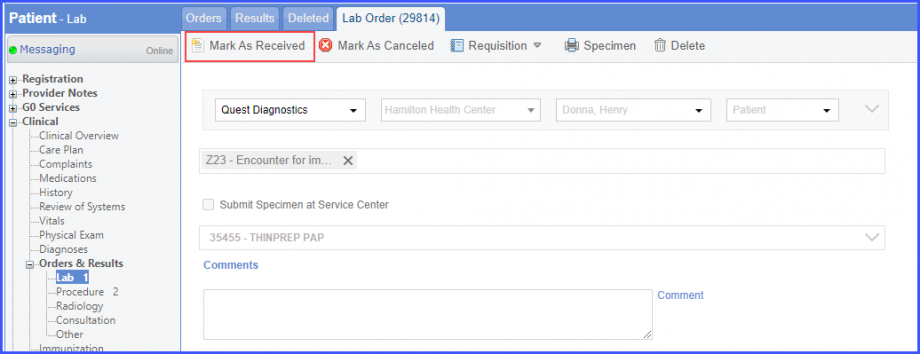
Next, click on the ‘Mark As Received’ button.
MarkAsReceived-920x354
‘Mark As Received’

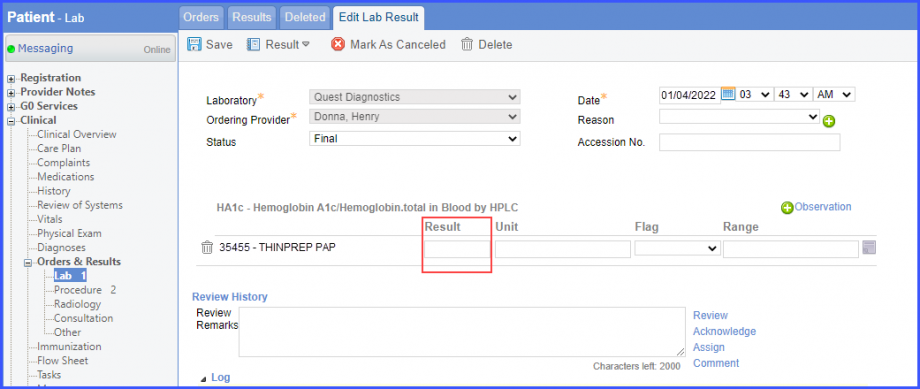
 On the ‘Edit Lab Result’ screen, add the observations and click on the ‘Save’ button.
ResultField-1-920x389
Result Field

Note: 

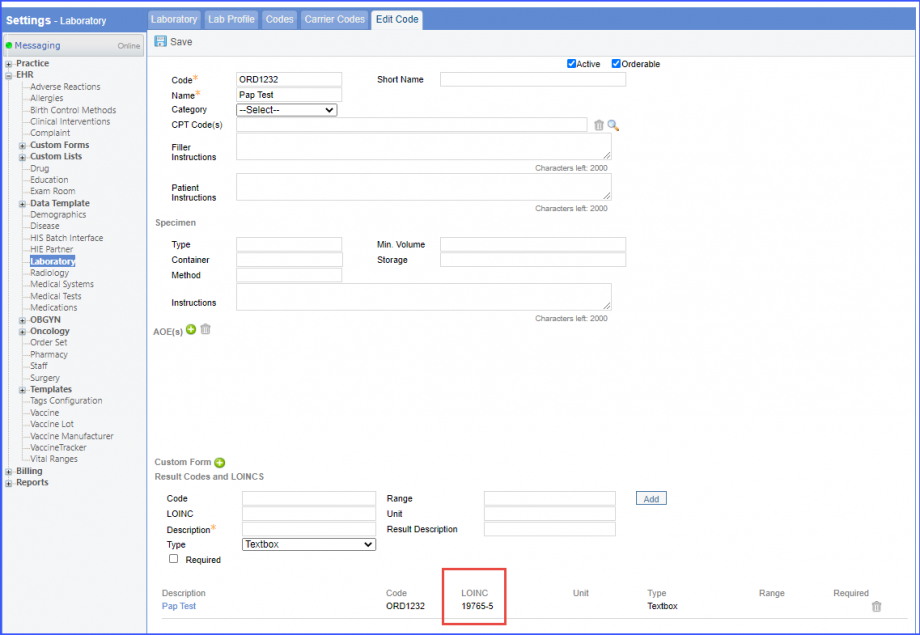
For LOINC Code Based Labs: Please ensure that the lab code is mapped to a LOINC Code from the Settings. To map a LOINC with the lab code, navigate to Settings > EHR > Laboratory. Select the Lab and navigate to the ‘Code’ tab. Then, click on the Lab Order. Under the ‘Result Codes and LOINCS’ heading, add a Code, LOINC and Description and click on the ‘Add’ button.

Once done, click on ‘Save’. 
Numerator2-3-920x635
Laboratory – Settings

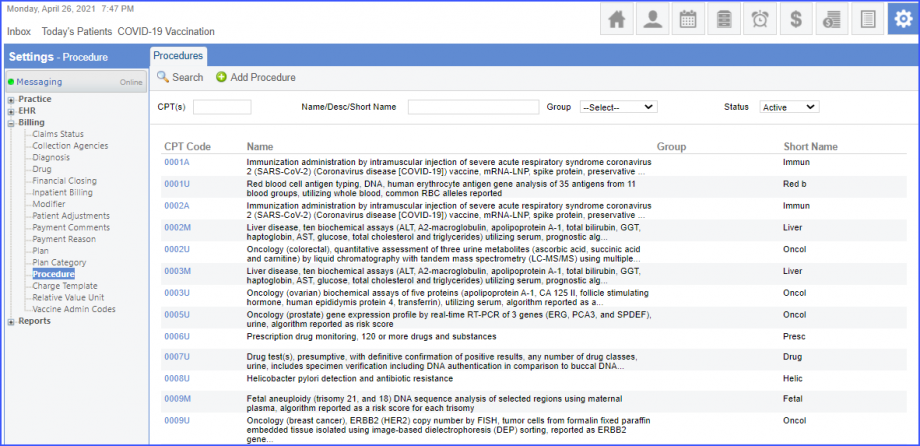
For CPT Code Based Labs: When a CPT code is added to a lab order, please ensure that the CPT code is present in the ‘Procedures’. 
Numerator3-3-920x446
CPT Codes

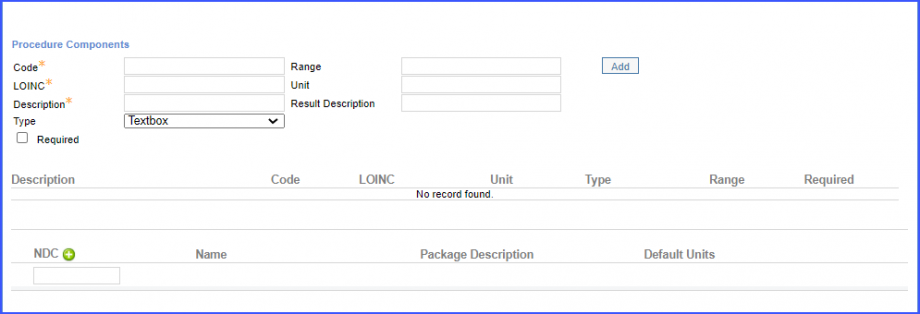
Moreover, the CPT code should be mapped to a LOINC Code from the Settings. To map a LOINC with the CPT code, navigate to Settings > Billing > Procedure. Select the CPT code and navigate to the ‘Edit Procedure’ tab. Under the ‘Procedure Components’ heading, add a Code, LOINC and Description and click on the ‘Add’ button.

Once done, click on ‘Save’. 
Numerator4-1-920x314
Procedure Components

For Denominator Exclusions:

Women who satisfy any one of the following criteria are excluded from the denominator.
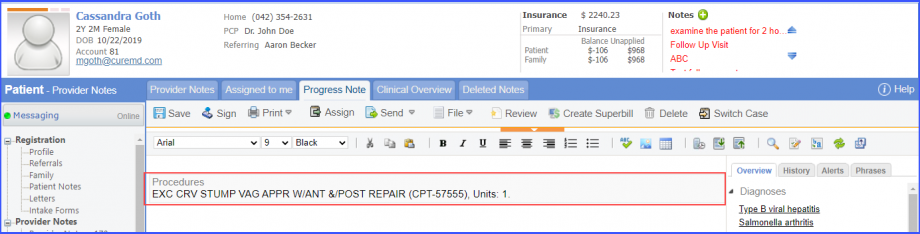
  • Hysterectomy with no residual cervix performed on patient. To record this, navigate to Patient > Provider Note > Orders > Procedures. Click ‘Add’ and search for the procedure. Add the procedure details and click on ‘Save & Accept’/hover over ‘Sign & Accept’. If the user hovers over ‘Sign & Accept’, then click ‘Complete’. The procedure is added to the provider note.
Procedure-1-920x234
Procedure

Note:

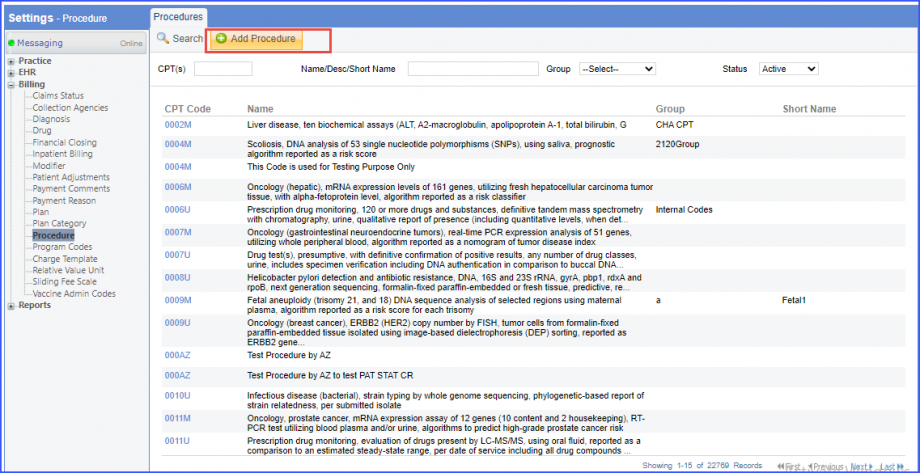
Please ensure that the Procedure is present in the system. For this, navigate to Settings > Billing > Procedure. If the procedure is not added then, click on the ‘Add Procedure’ button.
AddProcedure1-920x473
Add Procedure 

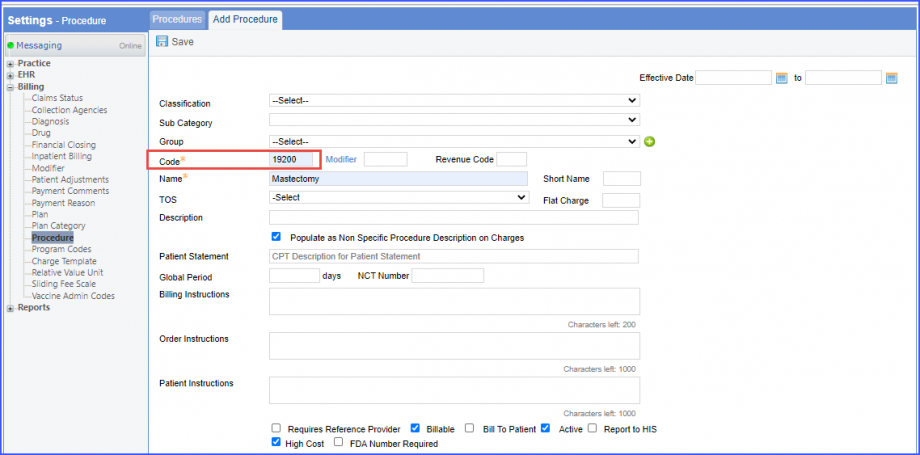
Here, enter the ‘Code’ and ‘Name’ of the Procedure. Once done, click on the ‘Save’ button. 
AddProcedure2
Add Procedure
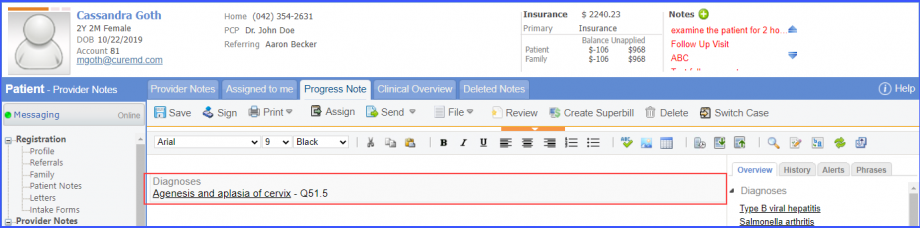
  • Patient is diagnosed with congenital absence of cervix. To document the diagnosis, use the workflow Patient > Provider Note > Diagnoses and click ‘Add’. Search for the diagnosis, add the diagnosis details, and click ‘Save’. Then click ‘Accept’ and the diagnosis is added to the provider note.
Diagnosis-1-920x228
Diagnosis
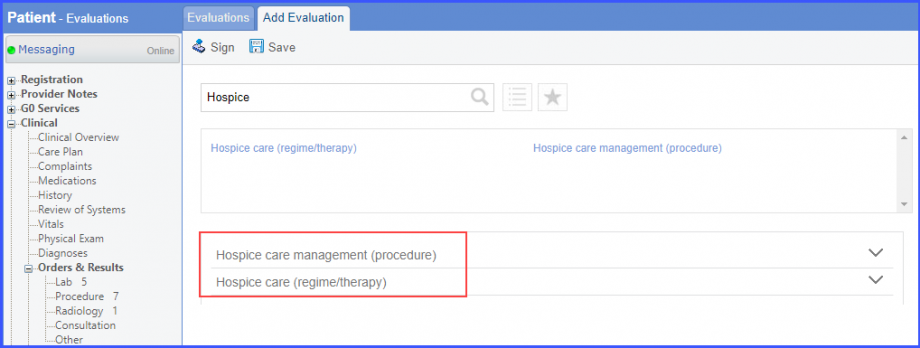
  • Patients who were in hospice care during the measurement year. To document that patient is receiving hospice care outside of a hospital or long term care facility, navigate to Patient > Clinical > Evaluations. Use the below mentioned codes to order or perform an intervention:
    • 385763009: Hospice Care (Regime/Therapy)
    • 385765002: Hospice Care Management (Procedure)
Evaluation1-3-920x348
Evaluation
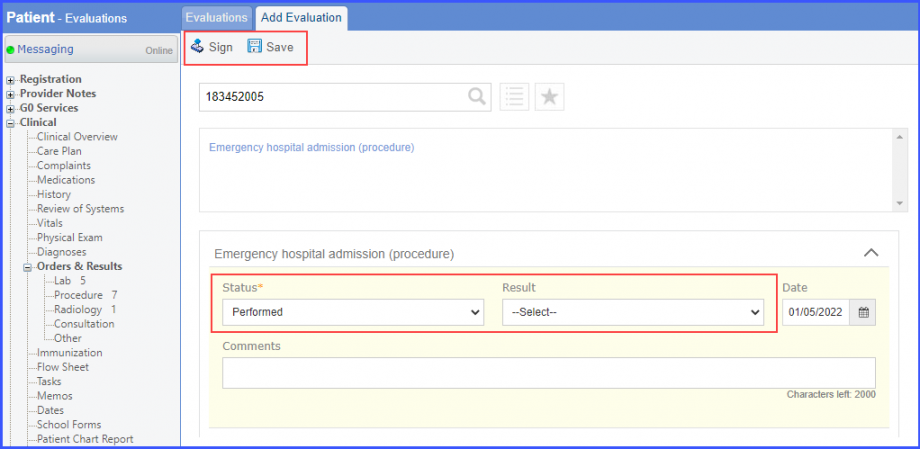
    • To document an encounter inpatient, navigate to Patient > Clinical > Evaluations 
Evaluation2-3-920x449
Evaluation
  • Patients receiving palliative care during the measurement period.
    • To record the ‘Palliative Care Encounter’ performed, use the workflow Patient > Provider Note > eSuperbill.
    • To record the ‘Palliative Care Intervention’ performed, use the workflow Patient > Clinical > Evaluations.
    • To record the ‘Functional Assessment of Chronic Illness Therapy’ assessment performed, navigate to Patient > Clinical > Evaluations.