How to eFax – Prescriptions
The user has the option to eFax prescriptions that have already been prescribed. There are two ways to eFax a prescription:
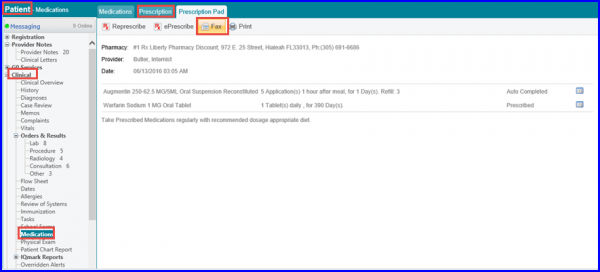
- By navigating to Patient module, expanding the Clinical category from left-tree menu and clicking on Medication, then clicking on Prescription tab, selecting a prescription and clicking on Fax.
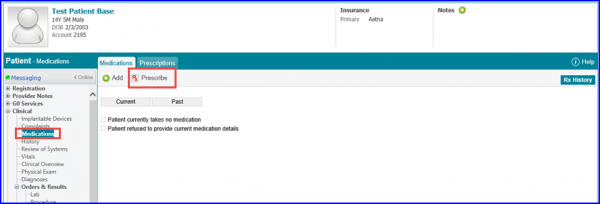
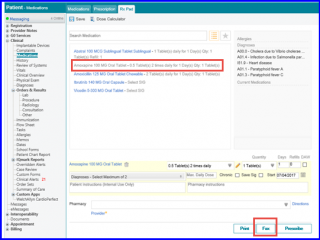
- By navigating to Patient module, expanding the Clinical category from left-tree menu and clicking on Medication, then clicking on Prescribe under Medications tab and clicking on Fax.
The screen for the first workflow is as shown below:
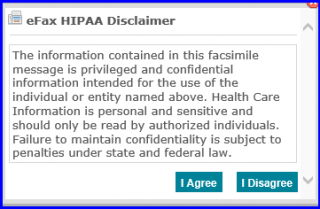
A HIPAA Disclaimer message appears stating the terms and conditions. Please read it and click on ‘I agree’ to continue with the fax.
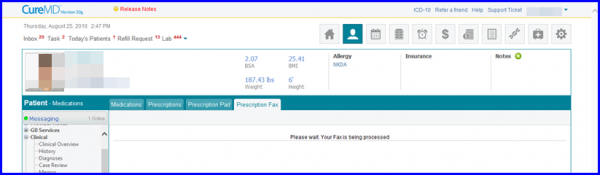
The user will be directed back to the main screen with the status of the fax showing up and a prompt notifying that the fax is being processed.
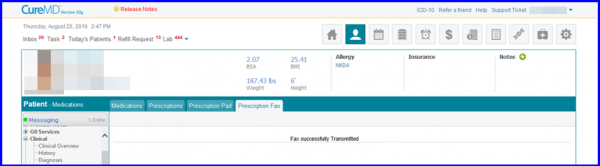
Fax successfully transmitted will appear once the fax has been sent.
User can also fax a prescription that he has just completed from the prescription pad.
Navigate to Patient module, click on Clinical category from the left-tree menu and click on Medications, click on “Prescribe” under Medications tab and click on Fax.
Select the medicine to be prescribed, fill in the required information and click on Fax.
A HIPAA Disclaimer message appears stating the terms and conditions. Please read it and click on ‘I agree’ to continue with the fax.
The user will be directed back to the main screen with the status of the fax showing up and a prompt notifying that the fax is being processed.
Fax successfully transmitted will appear once the fax has been sent.
