Enhanced Appointment Reminder Emails with “Confirm All” and “Cancel All” Actions
What’s New
-
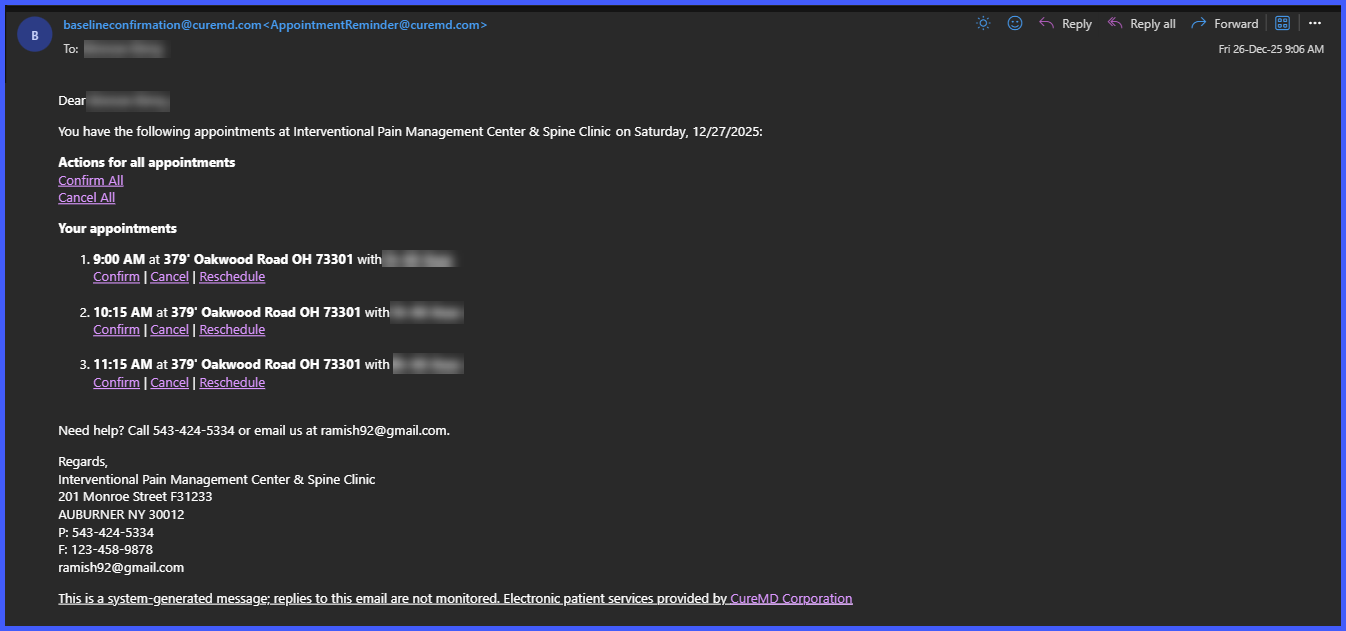
Patients with two or more appointments on the same date receive one consolidated reminder email.
-
All same-day appointments are listed in chronological order within the email.
-
Two new bulk action buttons are added at the top of the email: Confirm All and Cancel All.
-
Bulk actions apply only to appointments that have not already been confirmed or canceled.
-
A system message appears when all appointments have already been processed.
-
Existing per-appointment actions (Confirm, Cancel, Reschedule) remain available.
How It Works
-
When a patient has multiple appointments scheduled on the same date, the system sends one combined reminder email instead of multiple emails.
-
The email displays each appointment in time order with standard action links below each entry.
-
At the top of the email, the patient can select Confirm All or Cancel All to act on all unprocessed appointments.
-
Appointments that were already confirmed or canceled remain unchanged.
-
If all appointments have already been processed, the system displays the message: “All appointments have already been processed.”
-
Patients may still confirm, cancel, or reschedule individual appointments as needed.
Benefits
-
Reduces the number of reminder emails sent to patients.
-
Allows patients to manage multiple appointments more efficiently.
-
Maintains accurate appointment statuses without staff intervention.
-
Preserves individual appointment controls for flexibility.
-
Improves clarity and consistency in appointment communication.
