Default Email Body for Order Requisitions
What’s New
-
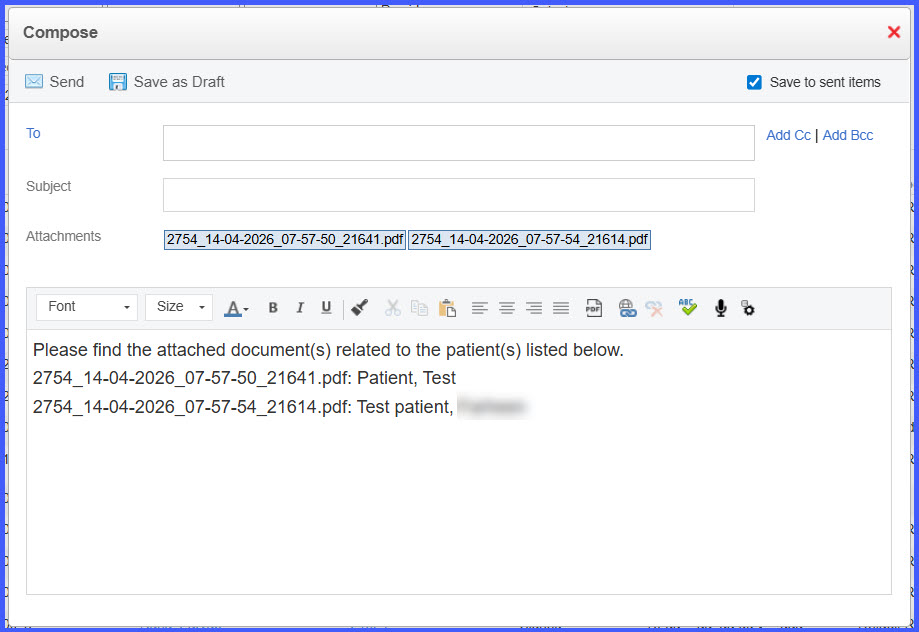
Email body is automatically pre-filled when sending order requisitions.
-
For a single patient, the email includes a message with the patient’s name.
-
For multiple patients:
– Each attachment is listed with the corresponding patient name.
– If multiple patients are included in a single attachment, all patient names are listed in the email body. -
Users can edit or remove the pre-filled email content before sending.
-
Applies across Orders workflows in:
– Personal
– Patient
– Provider Note
– Administration
How It Works
- Navigate to an Orders workflow and select requisitions to email.
- Choose the option to send via email.
- The system automatically generates a pre-filled email body based on the associated patient(s).
- Review the email content:
– Single patient → patient name included
– Multiple patients → attachments mapped to patient names or listed collectively - Edit or remove the content as needed.
- Send the email.
Benefits
- Reduces manual effort when composing emails for requisitions.
- Ensures consistent inclusion of patient context in communications.
- Improves clarity when sending multiple requisitions or combined documents.
- Maintains flexibility by allowing users to edit the email before sending.
