Consent Templates – Separate Patient and Other Signature Fields
Configure Consent Signature Fields
Patient Completes Consent in Kiosk
Capture Additional Signature
What’s New
- Consent letter templates now support two distinct signature field types:
– Patient
– Other - A new Signature control is available under:
Settings > Letter Template > Add (+) > Letter Type: Consent.
The Signature control includes:
– Signature Heading
– Signature Type dropdown (Patient or Other) - The Signature Type dropdown defaults to Select.
- Patient and Other signatures are captured and stored independently.
- The Other signature field can be used for any required non-patient signer, including:
– Provider
– Witness
– Guardian
– Other authorized signer - Users must have the appropriate permissions to add or configure signature fields.
How It Works
- Navigate to Settings > Letter Template > Add (+) and select Letter Type: Consent.
- Add a Signature field to the template.
- Enter a Signature Heading and choose either Patient or Other from the Signature Type dropdown.
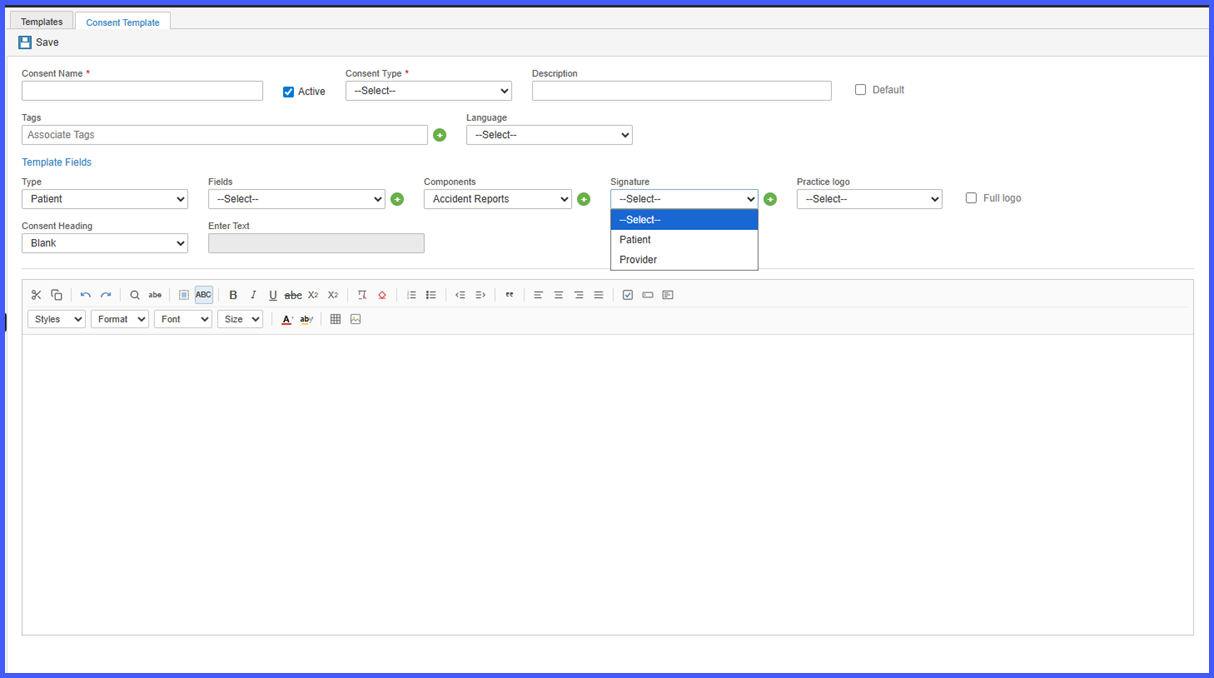
- Save the consent template.
- When the consent is completed through Kiosk, the patient’s signature is applied only to the Patient signature field.
- The Other signature field remains available for the appropriate signer to electronically sign the consent after patient submission.
Benefits
- Clearly distinguishes patient signatures from other required signatures.
- Improves compliance by supporting separate signature capture for multiple signers.
- Allows providers and other authorized individuals to electronically sign consent forms after patient completion through Kiosk.
- Increases flexibility by supporting multiple non-patient signer types using the generic Other signature field.
