CMS347v5 – Statin Therapy for the Prevention and Treatment of Cardiovascular Disease

Statin Therapy for the Prevention and Treatment of Cardiovascular Disease CMS347v5 Percentage of the following patients – all considered at high risk of cardiovascular events – who were prescribed or were on statin therapy during the measurement period:

*All patients who were previously diagnosed with or currently have an active diagnosis of clinical atherosclerotic cardiovascular disease (ASCVD), including an ASCVD procedure; OR

*Patients aged >= 20 years who have ever had a low-density lipoprotein cholesterol (LDL-C) level >= 190 mg/dL or were previously diagnosed with or currently have an active diagnosis of familial hypercholesterolemia; OR

*Patients aged 40-75 years with a diagnosis of diabetes

INITIAL POPULATION- 1

All patients who were previously diagnosed with or currently have an active diagnosis of clinical ASCVD, including an ASCVD procedure, before the end of the measurement period.

DENOMINATOR – 1

Equals initial population 1

NUMERATOR – 1

Patients who are actively using or who receive an order (prescription) for statin therapy at any time during the measurement period.


–  INITIAL POPULATION- 2

Patients aged >= 20 years at the beginning of the measurement period who have ever had a laboratory test result of LDL-C >= 190 mg/dL or were previously diagnosed with or currently have an active diagnosis of familial hypercholesterolemia.

DENOMINATOR – 2

Equals initial population 2

NUMERATOR – 2

Patients who are actively using or who receive an order (prescription) for statin therapy at any time during the measurement period.


– INITIAL POPULATION- 3

Patients aged 40 to 75 years at the beginning of the measurement period with an active diagnosis of Type 1 or Type 2 diabetes at any time during the measurement period.

DENOMINATOR – 3

Equals initial population 3

NUMERATOR – 3

Patients who are actively using or who receive an order (prescription) for statin therapy at any time during the measurement period.

DENOMINATOR EXCLUSIONS:
  • Patients who have a diagnosis of pregnancy at any time during the measurement period
  • Patients who are breastfeeding at any time during the measurement period
  • Patients who have a diagnosis of rhabdomyolysis at any time during the measurement period

DENOMINATOR EXCEPTIONS:

  • Patients with statin-associated muscle symptoms or an allergy to statin medication
  • Patients who are receiving palliative or hospice care
  • Patients with active liver disease or hepatic disease or insufficiency
  • Patients with end-stage renal disease (ESRD)
APPLICATION WORKFLOW

For Denominator – 1:

All patients who fulfil the following criteria are included in denominator 1:
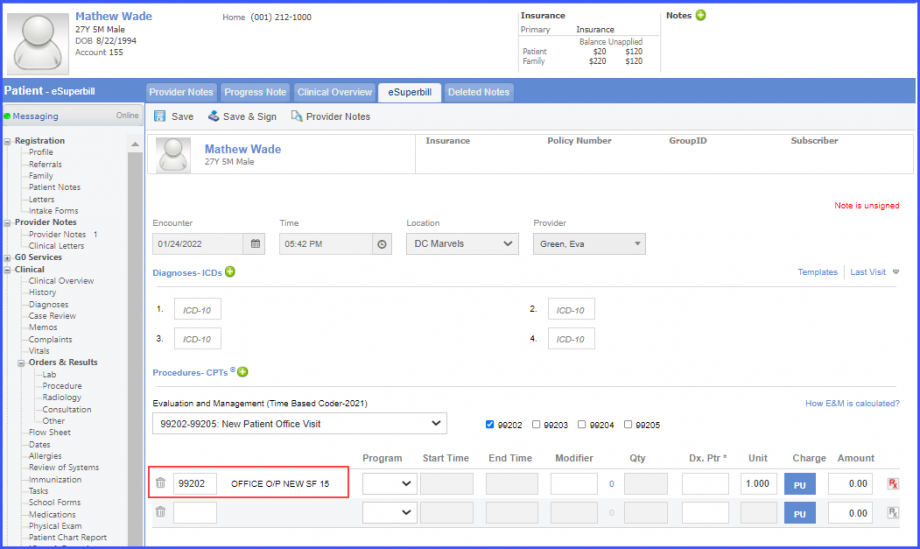
  • Patients who had a qualifying encounter during the measurement period. To record an encounter, navigate to Patient > Provider Note > eSuperbill.
D1_eSuperbill-920x549
eSuperbill
  • Patient had ASCVD diagnosis or procedure before the end of the measurement period.
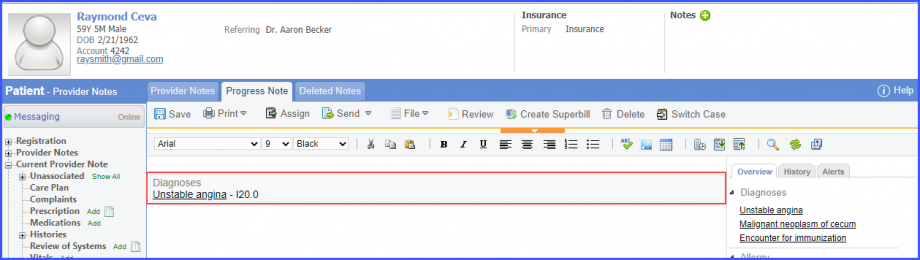
    • To record the ASCVD diagnosis, use the workflow Patient > Provider Note > Diagnoses, and click ‘Add’. Search for the ASCVD diagnosis and add the diagnosis details. Then click ‘Save’. The diagnosis is added to the provider note.
D1_Diagnosis-920x260
ASCVD Diagnosis
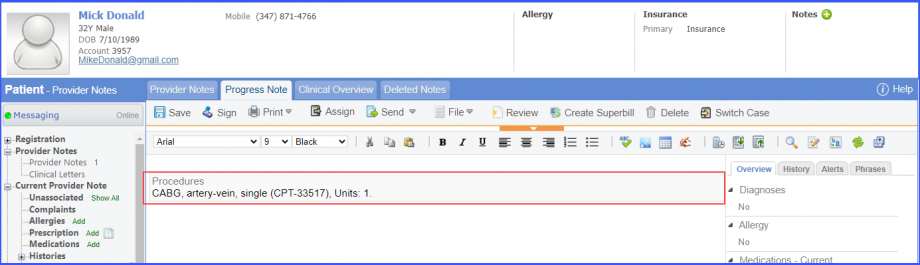
    • To document ASCVD procedure, navigate to Patient > Provider Note > Orders > Procedures. Click ‘Add’ and search for the procedure. Add the procedure details and click on ‘Save & Accept’/hover over ‘Sign & Accept’. If the user hovers over ‘Sign & Accept’, then click ‘Complete’.
D1_Procedure-920x265
ASCVD Procedure

Note:

Please ensure that the Procedure is present in the system. For this, navigate to Settings > Billing > Procedure. If the procedure is not added then, click on the ‘Add Procedure’ button.  
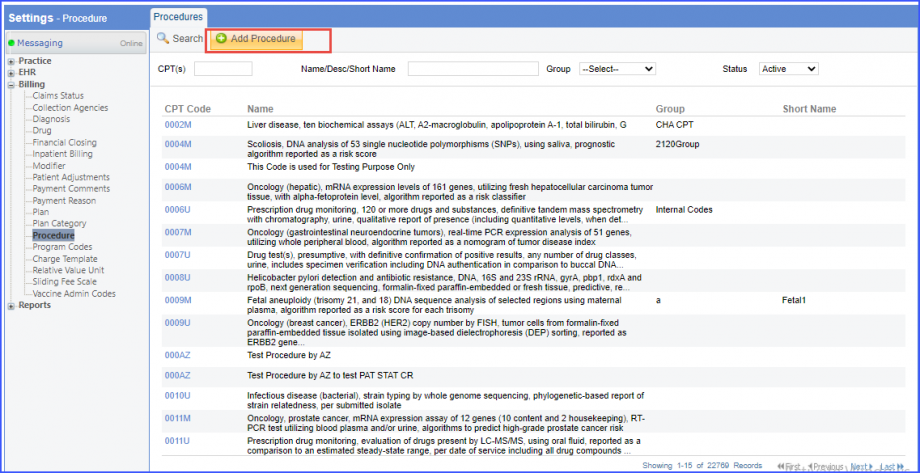
AddProcedure1-1
Add Procedure

Here, enter the ‘Code’ and ‘Name’ of the Procedure. Once done, click on the ‘Save’ button.  
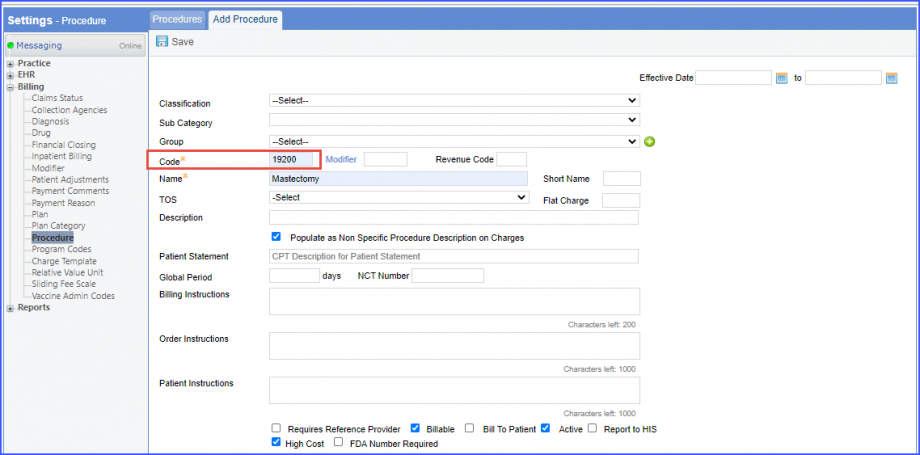
AddProcedure2-1
Add Procedure

For Denominator – 2: 

All patients who fulfil the following criteria are included in denominator 2:
  • Patient is aged >= 21 and had a qualifying encounter during the measurement period. To record an encounter, navigate to Patient > Provider Note > eSuperbill.
  • Patient has a diagnosis for hypercholesterolemia or has a current/prior LDL result greater than or equal to 190 before the end of the measurement period.
    • To record the hypercholesterolemia diagnosis, use the workflow Patient > Provider Note > Diagnoses, and click ‘Add’. Search for the hypercholesterolemia diagnosis and add the diagnosis details. Then click ‘Save’. The diagnosis is added to the provider note.
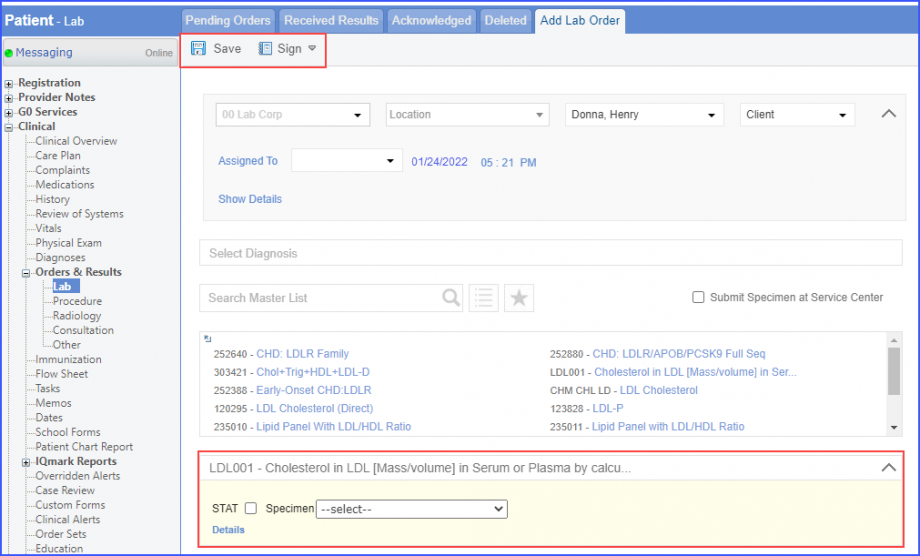
    • To perform a ‘LDL Cholesterol’ laboratory test, navigate to Patient > Clinical > Orders & Result > Labs and click on the ‘+ Add Order’ button. Select a Laboratory and search for a ‘LDL Cholesterol’ test. Once done, click on the ‘Save’ button or hover over the ‘Sign’ button. If the user hovers over the ‘Sign’ button, then click ‘Queue’.
D2_Lab1-920x556
LDL Cholesterol Test

Next, click on the ‘Mark as received’ button.
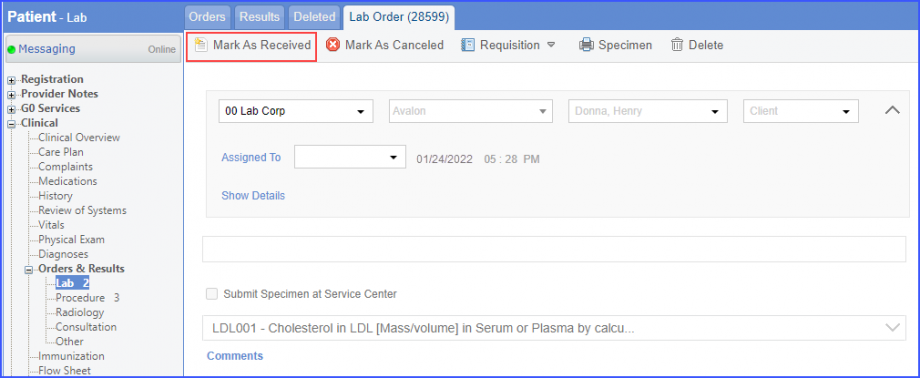
D2_Lab2-920x378
Mark As Received’ Button

On the lab result screen, add the observations and click on the ‘Save’ button.
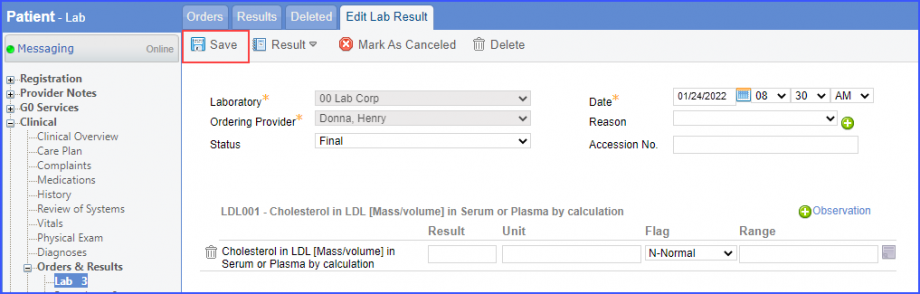
D2_Lab3-920x294
Save Button

Note:

For LOINC Code Based Labs: Please ensure that the lab code is mapped to a LOINC Code from the Settings. To map a LOINC with the lab code, navigate to Settings > EHR > Laboratory. Select the Lab and navigate to the ‘Code’ tab. Then, click on the Lab Order. Under the ‘Result Codes and LOINCS’ heading, add a Code, LOINC and Description and click on the ‘Add’ button.

Once done, click on ‘Save’.  
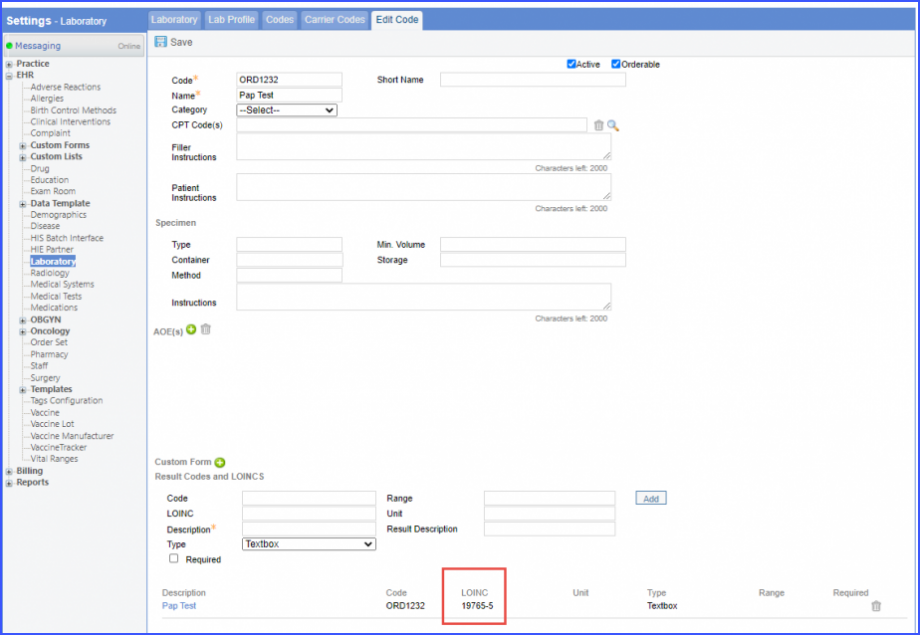
LabSettings1-920x635
Laboratory – Settings

For CPT Code Based Labs: When a CPT code is added to a lab order, please ensure that the CPT code is present in the ‘Procedures’.  
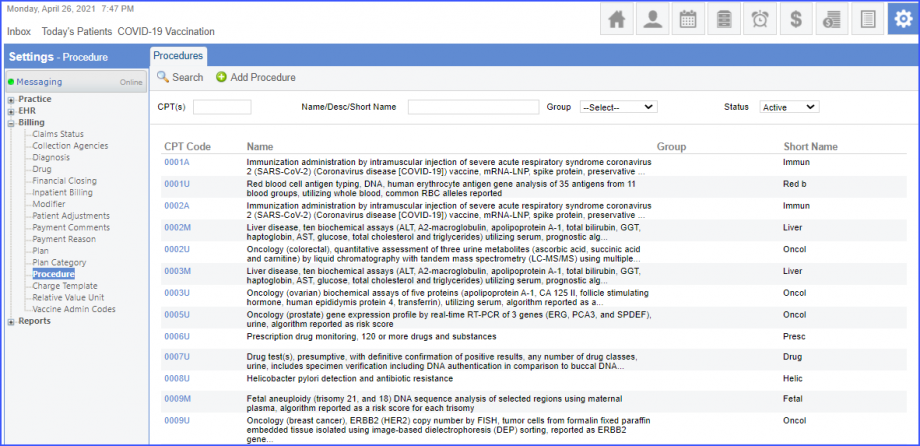
CPTcodes-1
CPT Codes

Moreover, the CPT code should be mapped to a LOINC Code from the Settings. To map a LOINC with the CPT code, navigate to Settings > Billing > Procedure. Select the CPT code and navigate to the ‘Edit Procedure’ tab. Under the ‘Procedure Components’ heading, add a Code, LOINC and Description and click on the ‘Add’ button.

Once done, click on ‘Save’.  
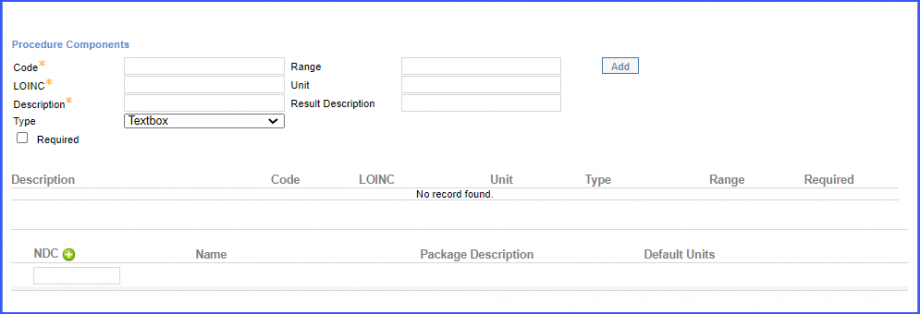
ProcedureComponents-1
Procedure Components
  • Patient does not have a record of ASCVD diagnosis or procedure before the end of the measurement period.

For Denominator – 3:

All patients who fulfil the following criteria are included in denominator 3:

  • Patient is aged >= 40 and <= 75, and had a qualifying encounter during the measurement period. To record an encounter, navigate to Patient > Provider Note > eSuperbill.
  • Patient has a diagnosis for diabetes during the measurement period. To record the diagnosis, use the workflow Patient > Provider Note > Diagnoses, and click ‘Add’. Search for the diabetes diagnosis and add the diagnosis details. Then click ‘Save’. The diagnosis is added to the provider note.
  • Patient does not have a diagnosis for hypercholesterolemia or a current/prior LDL result greater than or equal to 190 before the end of the measurement period.
  • Patient does not have a record of ASCVD diagnosis or procedure before the end of the measurement period.

For Numerator:

Patients who are actively using or who receive an order (prescription) for statin therapy at any point during the measurement period.
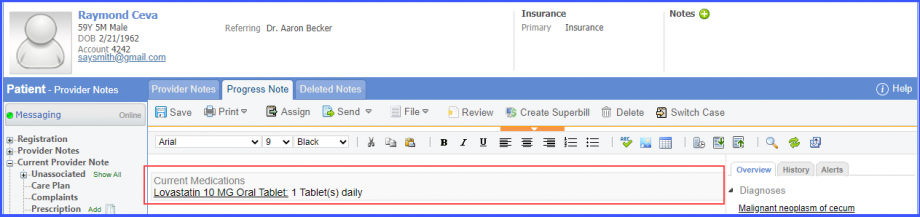
  • Currently taking statin therapy through the end of the measurement period. To document current statin therapy, navigate to Patient > Provider Note > Medications. Click ‘Add’ and search for the medication. Add the dosage information and click ‘Save. The medication is added to the provider note.
numerator-920x217
Statin Therapy Medication
  • Statin therapy ordered during the measurement period. To document current statin therapy, navigate to Patient > Provider Note > Prescriptions. Click ‘Add’ and search for the prescription. Add the dosage information and click ‘Save. The prescription is added to the provider note.

For Denominator Exceptions:

All patients who fulfil any of the following criteria are included in denominator exceptions:
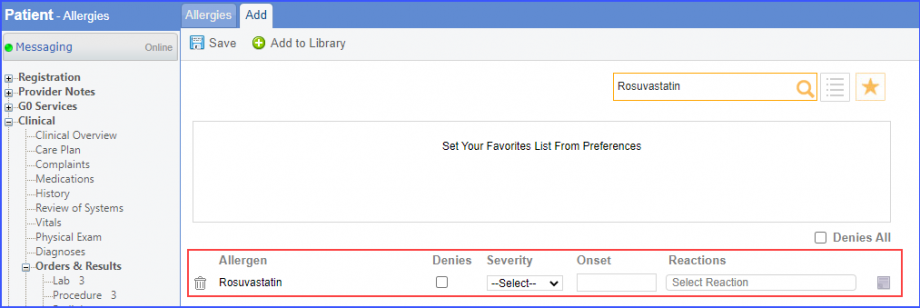
  • Patients with adverse reaction, allergy, or intolerance to statin medication during the measurement year.
    • To document statin allergy intolerance, use the workflow Patient > Provider Note > Allergies. Click ‘Add’ and search for an allergen. Add the allergen details and click ‘Save’.
DE_StatinAllergen-920x308
Statin Allergen
    • To document statin reaction, use the workflow Patient > Provider Note > Allergies. Click ‘Add’ and search for an allergen. Add the allergen details and select a reaction from the ‘Reactions’ dropdown. Then click ‘Save’.
  • Patients with a diagnosis for liver disease or hepatitis disease or insufficiency during the measurement year. To record a diagnosis, navigate to Patient > Provider Note > Diagnosis.
  • Patients with a diagnosis for end-stage renal disease (ESRD) during the measurement year. To record a diagnosis, navigate to Patient > Provider Note > Diagnosis.
  • Patients with a diagnosis of ‘Statin Associated Muscle Symptoms’ overlapping the measurement year. To record a diagnosis, navigate to Patient > Provider Note > Diagnosis.
  • Patients receiving palliative care during the measurement period.
    • To record the ‘Palliative Care Encounter’ performed, use the workflow Patient > Provider Note > eSuperbill.
    • To record the ‘Palliative Care Intervention’ performed, use the workflow Patient > Clinical > Evaluations.
    • To record the ‘Functional Assessment of Chronic Illness Therapy’ assessment performed, navigate to Patient > Clinical > Evaluations.
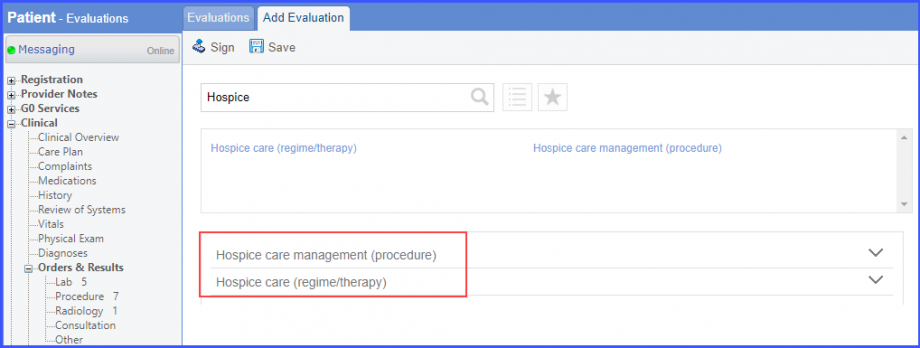
  • Patients who received hospice care during the measurement year. To document that patient is receiving hospice care outside of a hospital or long term care facility, navigate to Patient > Clinical > Evaluations. Use the below mentioned codes to order or perform an intervention:
    • 385763009: Hospice Care (Regime/Therapy)
    • 385765002: Hospice Care Management (Procedure)
Evaluation1-920x348
Evaluation
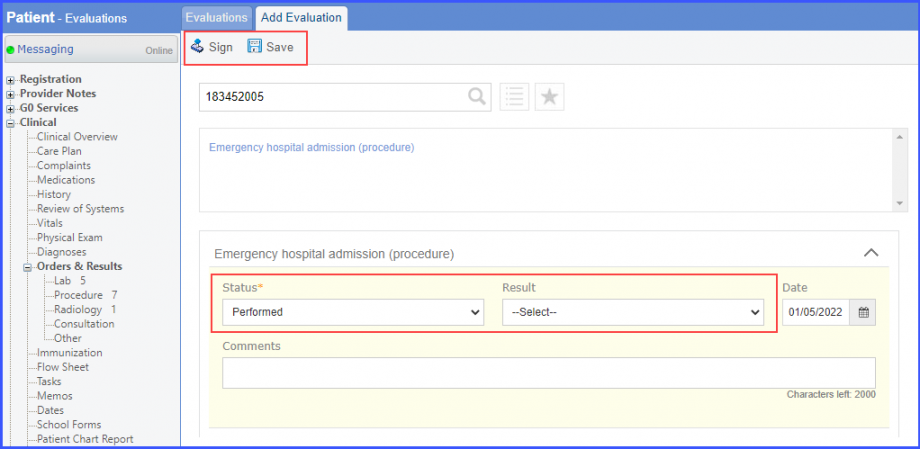
    • To document an encounter inpatient, navigate to Patient > Clinical > Evaluations 
Evaluation2-920x449
Evaluation

For Denominator Exclusions: 

All patients who fulfil any of the following criteria are excluded from the denominator.

  • Patients who have a diagnosis of pregnancy or rhabdomyolysis during the measurement period.
  • Patients who are breastfeeding during the measurement period.

To record a diagnosis, navigate to Patient > Provider Note > Diagnosis.