Billing Group Logic Added for UB04 Claim Type
What’s New
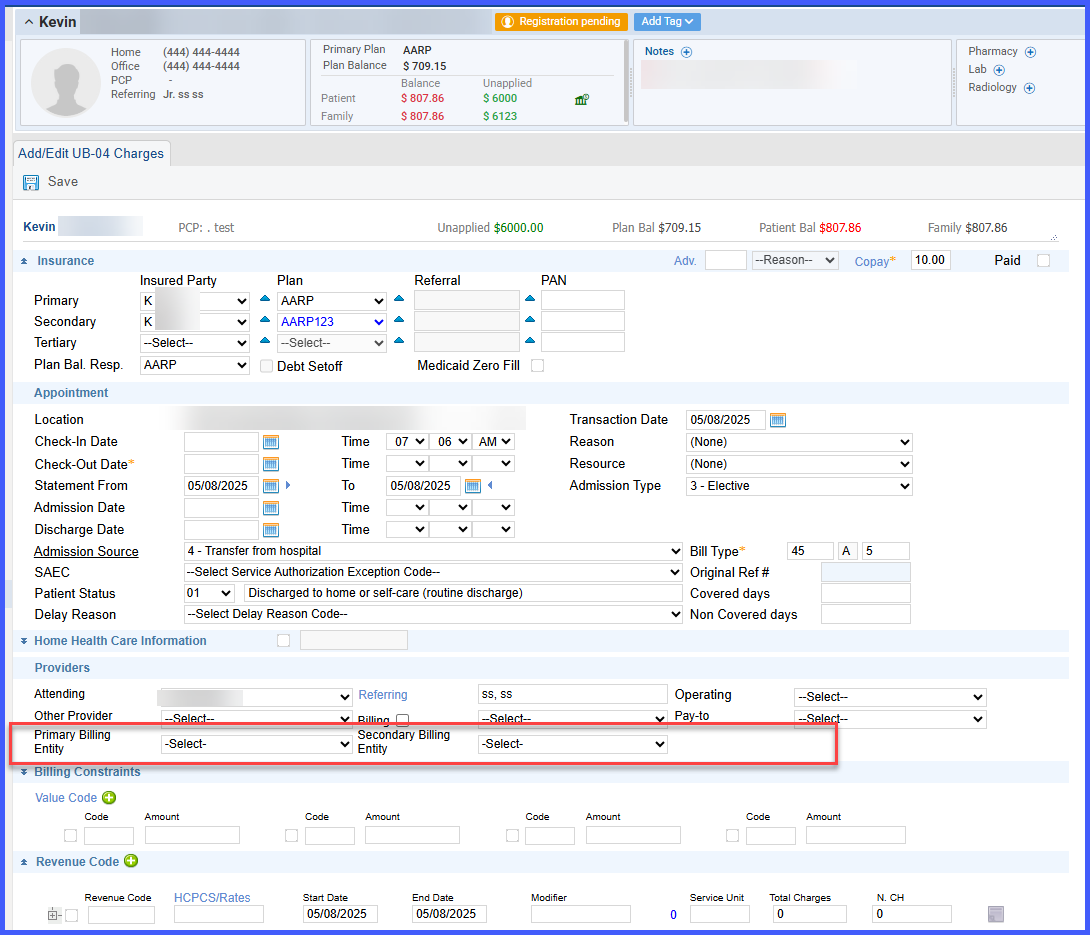
- Billing Entity Selection is now available per payer level (Primary, Secondary, Tertiary) on UB04 claims.
- Billing groups will be filtered and shown in the dropdown based on the following matching criteria:
- Plan/Payer: Must match the payer on both the billing group and the charge.
- Location: Must match between the billing group and the charge.
- DOS (Date of Service): Must fall within the billing group’s defined date range.
- Charge Type: Must be set to UB92.
- When all criteria are met, the Billing Group will appear in the dropdown.
- The user can select from eligible options, or the system can auto-select a billing group using the same logic as implemented for Professional Claims.
Additional Enhancements:
- A value labeled “Specified Billing Provider” is included in each billing entity dropdown.
- The Provider section now dynamically reveals the appropriate dropdowns based on payer selection:
- Primary insurance → Shows Primary Billing Entity dropdown
- Secondary insurance → Shows Secondary Billing Entity dropdown
- Tertiary insurance → Shows Tertiary Billing Entity dropdown
Consistency with Professional Claims:
- The overall logic and behavior mirror the Professional Claims implementation to ensure a seamless user experience and reduce training efforts.