Email Address Support for Unregistered Family Members
Access Family Member Information
Add Unregistered Family Member
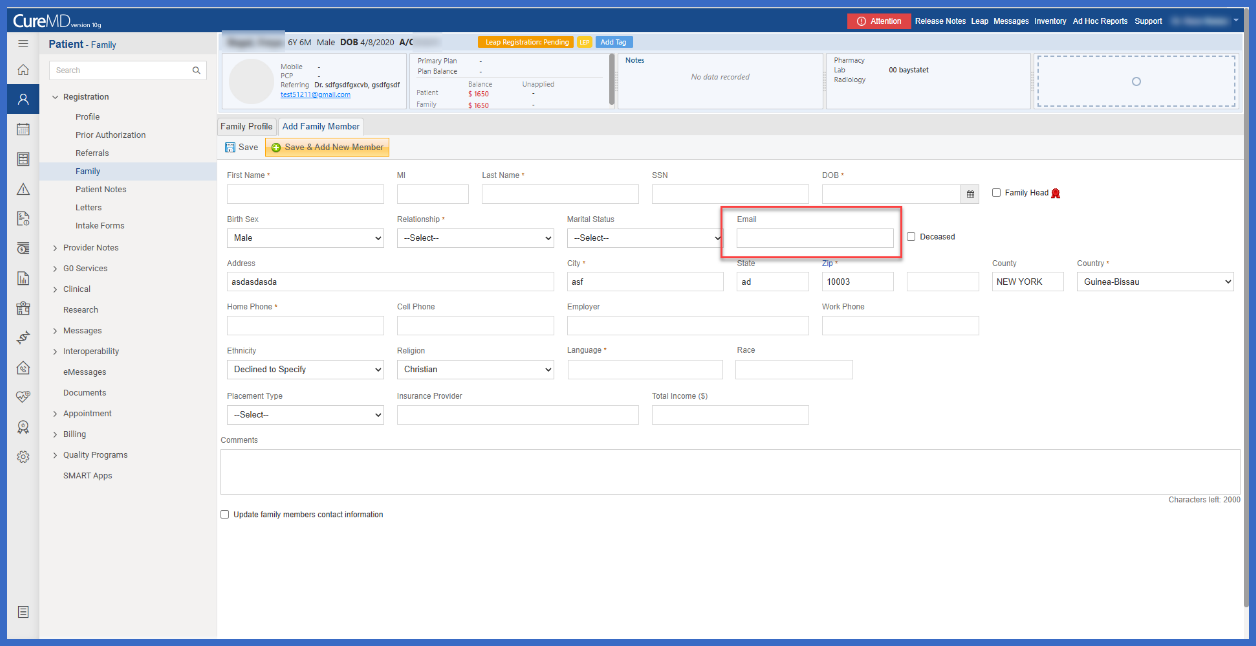
Enter Family Member Email
What’s New
- Added a new Email field to the Add Unregistered Family Member page.
- The field is available under Patient > Registration Tree > Family > Add Unregistered Family Member
- Users can enter an email address while registering an unregistered family member.
- Email information can be captured alongside the existing family member details.
- The enhancement is incorporated into the existing family member registration interface.
- Existing fields and family member registration functionality remain unchanged.
- No separate screen or additional workflow is required to capture email information.
How it works:
- Open the applicable patient’s chart.
- Navigate to Patient > Registration Tree > Family.
- Select Add Unregistered Family Member.
- Locate the new Email field within the family member information form.
- Enter the family member’s email address along with the other applicable details.
- Complete the family member registration using the existing workflow.
Benefit:
- Allows practices to capture email addresses for unregistered family members.
- Improves the completeness of family member contact information maintained within the patient’s profile.
- Reduces the need to maintain family member email information outside the existing registration workflow.
- Provides convenient access to an additional contact information field during family member registration.
- Maintains a consistent user experience by incorporating the field into the existing interface.
- Preserves current family member registration functionality without introducing additional steps or navigation.
