Enhanced Consent Identification in the Patient Overview Panel
View Patient Consents
Open an Existing Consent
What’s New
- Replaced the generic “Consent” label with the actual consent title.
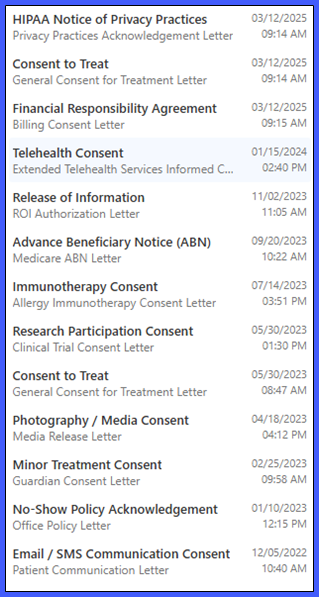
- Each consent entry now displays:
- Consent Title – Displayed on the first line in black text.
- Associated Letter Name – Displayed beneath the consent title in a muted secondary color.
- Signed/Recorded Date – Displayed on the right side of the entry.
- Signed/Recorded Time – Displayed directly beneath the date.
- Multiple consent records can now be distinguished by their respective titles and associated letter names.
- When multiple consents share the same title and letter name, their recorded dates and times help distinguish the entries.
- If an associated letter has been renamed, the Overview panel displays its current name.
- If an associated letter has been deleted, the consent title remains visible without displaying an error.
- Long consent titles and letter names are automatically truncated with an ellipsis to maintain the panel layout.
- Hovering over truncated text displays the complete title or letter name.
- Special characters, including quotation marks, ampersands, and non-Latin characters, are displayed as stored.
- Selecting a consent continues to open its corresponding record using the existing workflow.
How It Works
- Open the applicable patient’s chart.
- Navigate to the Overview panel.
- Locate the Consents section.
- Review the available consent records, which now display their respective titles and associated letter names.
- Refer to the displayed date and time to distinguish between multiple records with similar names.
- Hover over a truncated consent title or letter name to view its complete text.
- Select the desired consent to open its existing record.
Benefits
- Allows providers to identify specific patient consents without opening each record individually.
- Reduces unnecessary navigation when reviewing patients with multiple recorded consents.
- Makes it easier to distinguish between different consent types, such as Consent to Treat, Telehealth Consent, and HIPAA acknowledgments.
- Provides immediate visibility into when each consent was signed or recorded.
- Helps users identify more recent consent entries when multiple records exist.
- Reduces the likelihood of selecting or reviewing the wrong consent.
- Preserves existing consent navigation and viewing workflows without requiring additional training.
