Updated Add/Edit Lab & Radiology Result Permissions
What’s New
-
Renamed the existing permissions as follows:
-
Edit Lab Results → Add/Edit Lab Result
-
Edit Radiology Results → Add/Edit Radiology Result
-
-
Updated permission labels under:
-
Settings > Practice Users > Permissions > Patient
-
Settings > Role > Permissions > Patient
-
-
The updated terminology is reflected consistently for both individual Practice Users and Roles.
-
Existing permission behavior remains unchanged.
-
Users without the applicable permission cannot add or edit the corresponding Lab or Radiology Results from the applicable Personal or Clinical workflows.
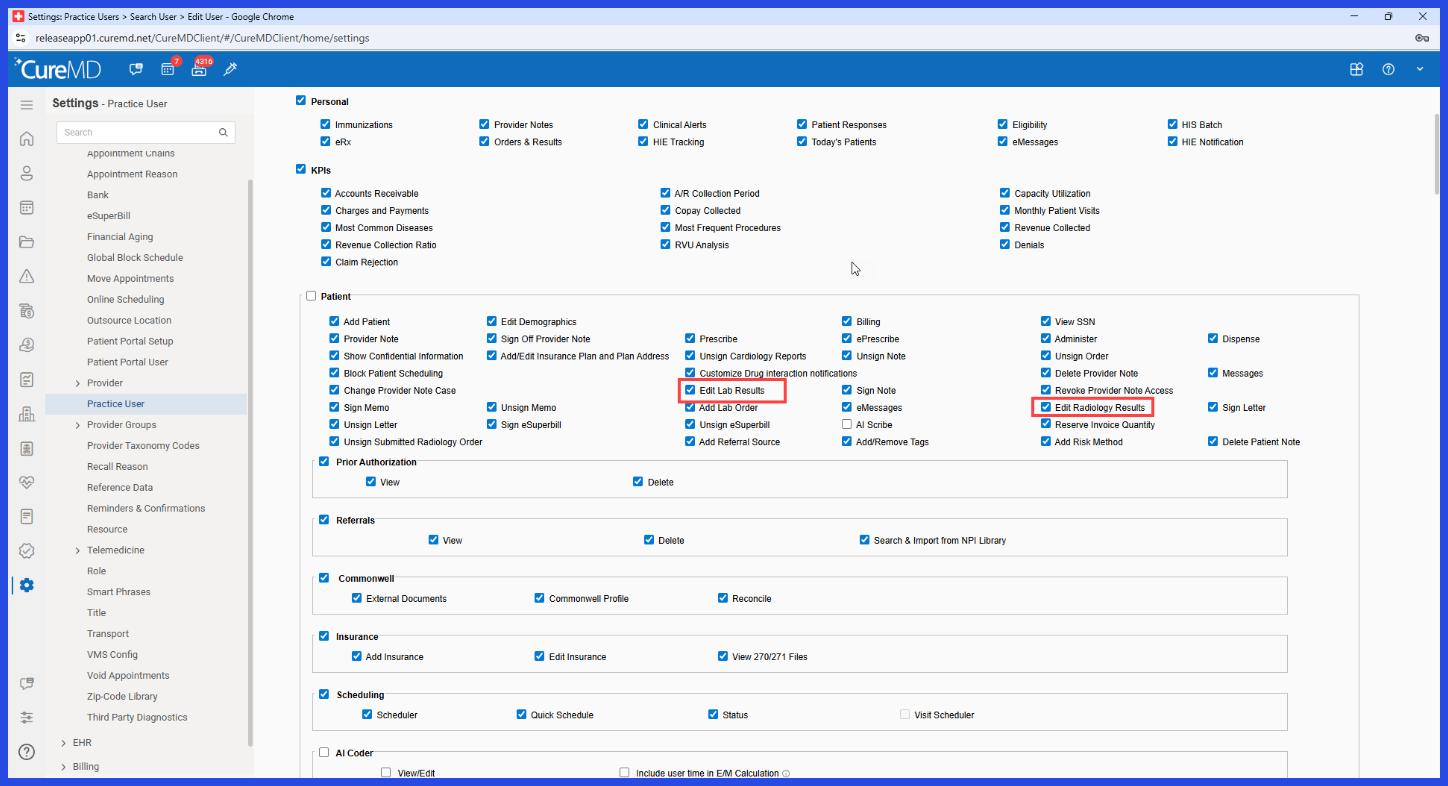 How How It Works
- Navigate to the appropriate Practice User or Role permission configuration.
- Open the Patient permissions section.
- The permissions are displayed using the updated Add/Edit terminology.
- Enable Add/Edit Lab Result to allow the applicable user to add or edit Lab Results.
- Enable Add/Edit Radiology Result to allow the applicable user to add or edit Radiology Results.
Benefits
- Makes permission names clearer and more accurately describes the access they control.
- Reduces ambiguity for administrators configuring user and role permissions.
- Provides consistent terminology across Practice User and Role configurations.
- Helps administrators assign access more accurately based on staff responsibilities.
- Maintains existing access controls while improving permission clarity.
