WY APHL Specimen Label Template
Print a WY APHL Specimen Label
Scan a WY APHL Specimen Label
What’s New
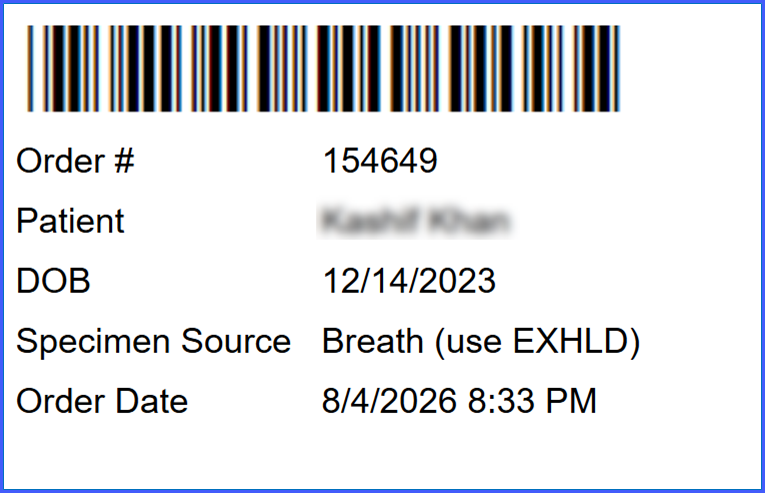
- A new WY APHL specimen label template is available within Specimen Templates.
- The template generates a system-generated, scannable barcode when the specimen label is printed.
- The barcode encodes the Order Number associated with the specimen.
- The Order Number is printed directly beneath the barcode.
- Scanning the barcode returns the Order Number only.
- The following information is printed beneath the barcode in this order:
– Order Number
– Patient Name
– Date of Birth (DOB)
– Specimen Source
– Order Date
How It Works
- Select the WY APHL template from the available Specimen Templates.
- Print the specimen label associated with the lab order.
- The system generates a barcode containing the Order Number.
- The Order Number is printed beneath the barcode, followed by the patient and specimen details.
- Scan the barcode using a compatible scanner to retrieve the associated Order Number.
Benefits
-
Reduces manual entry errors by providing a scannable Order Number.
-
Speeds up specimen handling by allowing staff to scan the barcode instead of manually entering the Order Number.
-
Provides consistent identification information on the specimen label.
-
Supports more efficient specimen processing for the Wyoming Public Health Laboratory.
Known Behavior / Limitations
- The barcode contains the Order Number only; scanning does not return the other printed fields
- The functionality applies specifically to the WY APHL specimen label template.
- A barcode-capable label printer and compatible barcode scanner are required for scanning workflows.
