Display TPL Status Code for All Secondary Plans on Charge Page
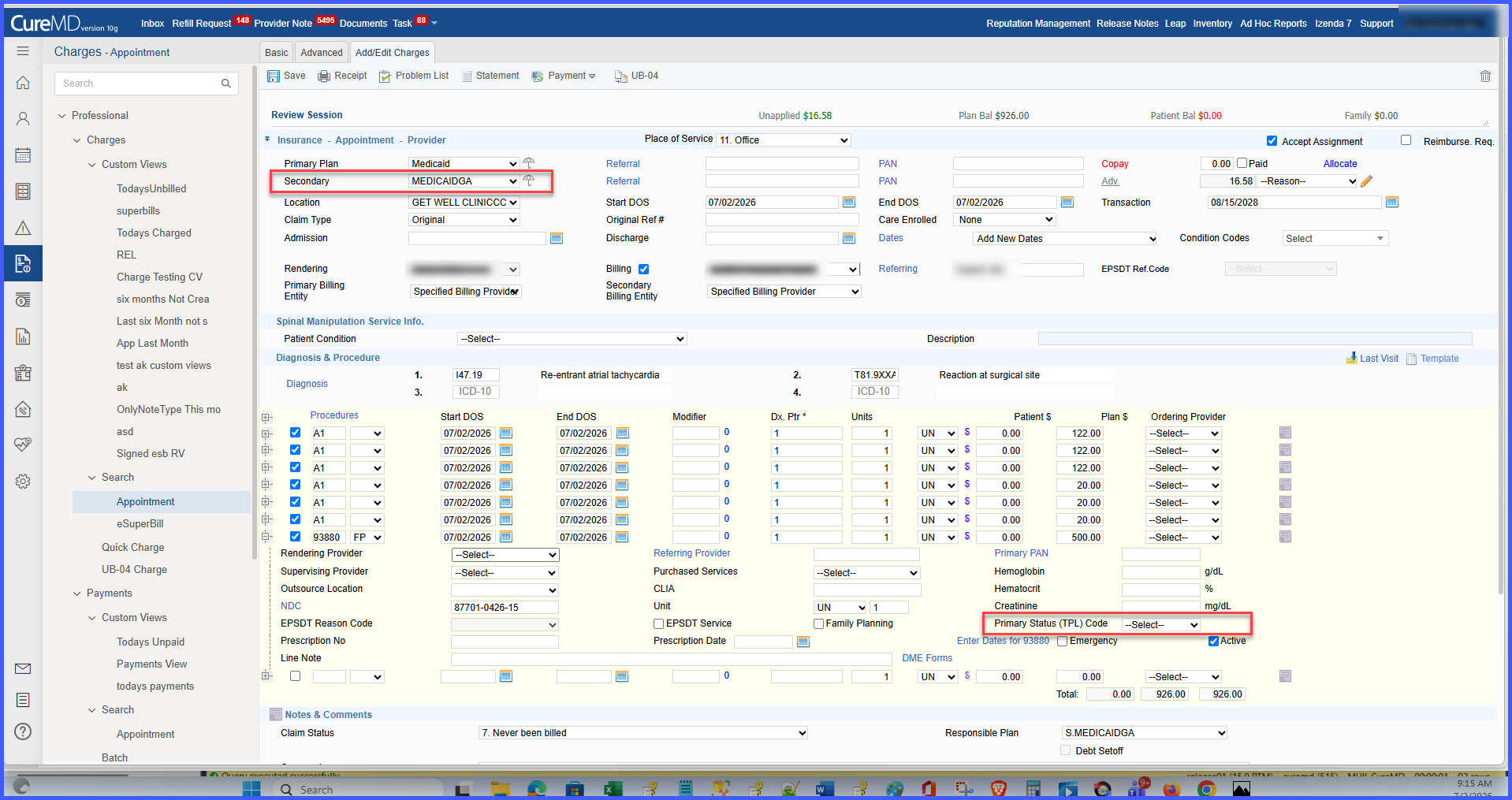
Enter TPL Status Code for Secondary Plans
Process Charges with TPL Information
What’s New
- The TPL Status Code field is now displayed whenever the selected insurance plan has Secondary responsibility.
- The field no longer depends on specific plan names such as Medicaid-IL.
- TPL Status Code is validated as a required 2-digit numeric value before saving.
- The entered TPL Status Code is stored with the charge for downstream claims processing.
- The field remains hidden for Primary plans and scenarios where no Secondary plan exists.
- Existing charges continue to function without modification, maintaining backward compatibility.
How It Works
- Navigate to Charges and open or create an appointment charge.
- Select a Secondary insurance plan.
- The TPL Status Code field is automatically displayed.
- Enter a valid 2-digit numeric TPL Status Code.
- Save the charge.
- The system validates and stores the TPL Status Code with the charge for downstream claims processing.
Benefits
- Provides consistent TPL Status Code capture across all environments.
- Eliminates dependency on insurance plan naming conventions.
- Reduces billing errors caused by missing TPL information.
- Improves claims accuracy and billing efficiency.
- Supports reliable downstream claims processing.
