Reports > Service Analysis > General Service Analysis > Responsible Plan > Patient > Generate Report
Reports > Service Analysis > General Service Analysis > Search by Appointment Plan > Appointment Plan > Patient > Generate Report
What’s New
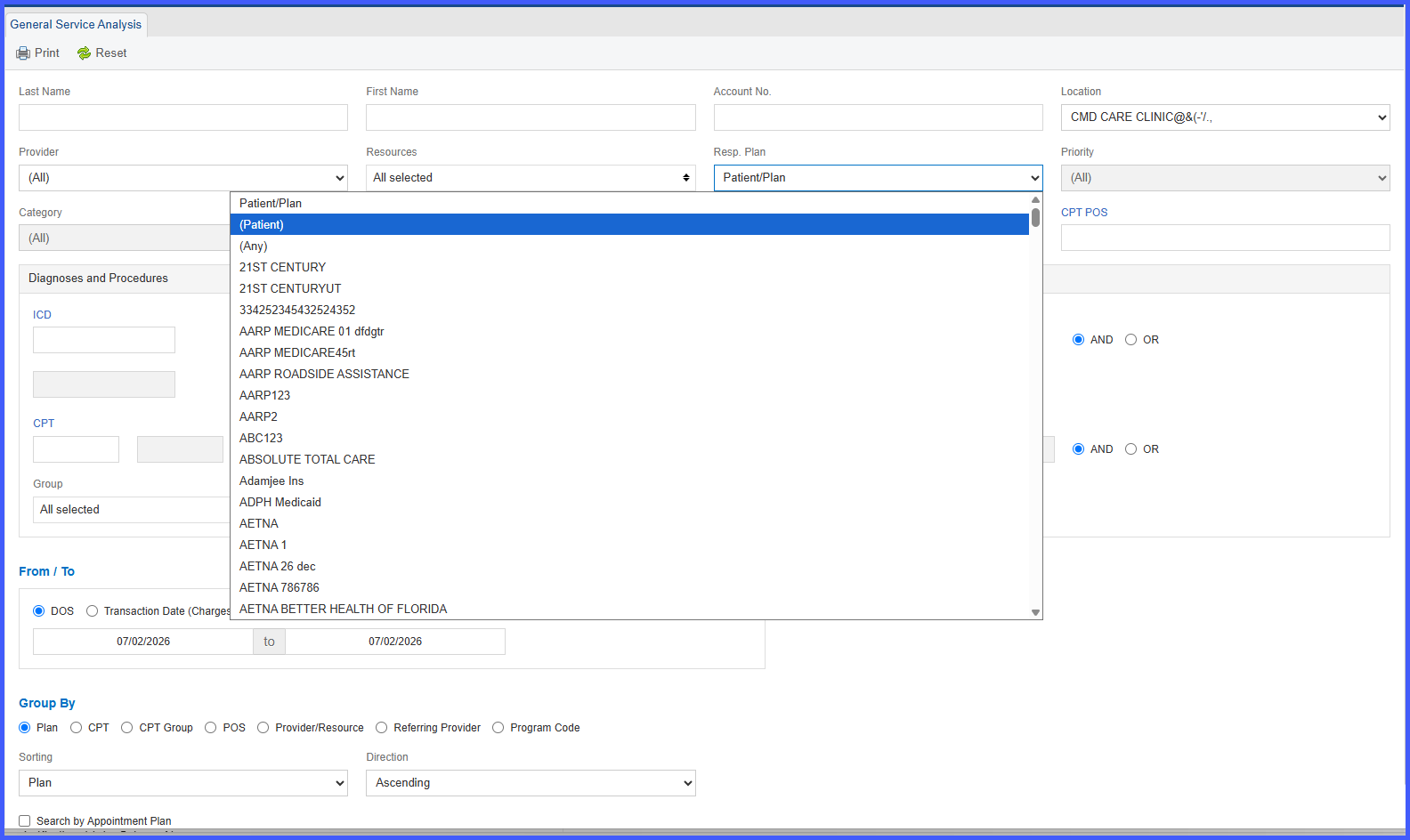
- A new Patient option has been added to the Responsible Plan filter.
- Selecting Patient displays appointments where the Responsible Plan is Patient/None.
- When Search by Appointment Plan is enabled, the filter automatically changes to Appointment Plan.
- Selecting Patient under Appointment Plan displays only Self-Pay appointments.
- Reports can now be generated specifically for patient balances and payments.
How It Works
- Navigate to Reports > Service Analysis > General Service Analysis.
- Open the Responsible Plan filter.
- Select Patient to include only appointments where the Responsible Plan is Patient/None.
- If Search by Appointment Plan is enabled, the filter changes to Appointment Plan.
- Select Patient under Appointment Plan to generate a report containing only Self-Pay appointments.
- Generate the report to review patient balances and payment information.
Benefits
- Improves reporting accuracy for Self-Pay patient balances and payments.
- Eliminates the need for manual filtering of insurance-responsible appointments.
- Provides dedicated reporting for patient collections.
- Supports more effective financial analysis and revenue tracking.
