Patient Comments on Lab Result Reports Across All Templates
Add Patient Comments to Lab Results
Print Lab Result Report with Patient Comments
What’s New
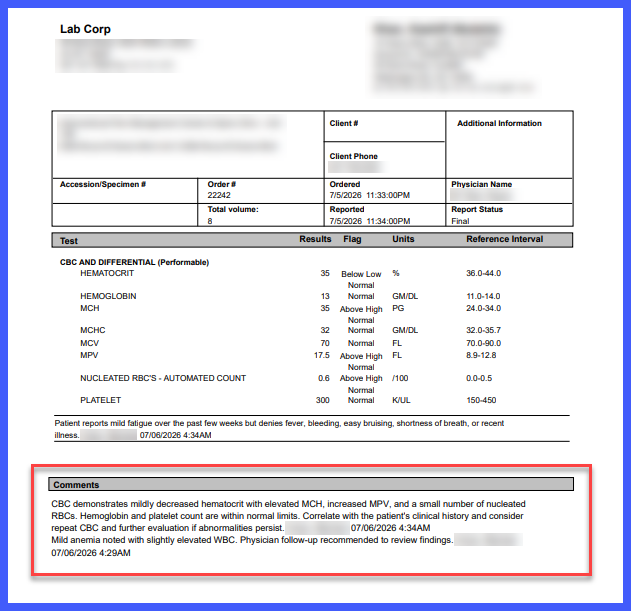
- Patient comments entered in the Lab Results Beta View are now displayed across all supported lab result report templates.
- Both test-level and overall patient comments are included in printed reports.
- Comments are displayed when the Patient Comments on Provider Note/Report preference is enabled.
- Behavior is now consistent across all supported report templates.
- Ameripath, CBLPath, and Propath templates continue to exclude patient comments because they do not support test-level information.
How It Works
- Open a lab result in the Beta View.
- Enter patient comments at the test level and/or overall result level.

- Ensure the Patient Comments on Provider Note/Report preference is enabled.
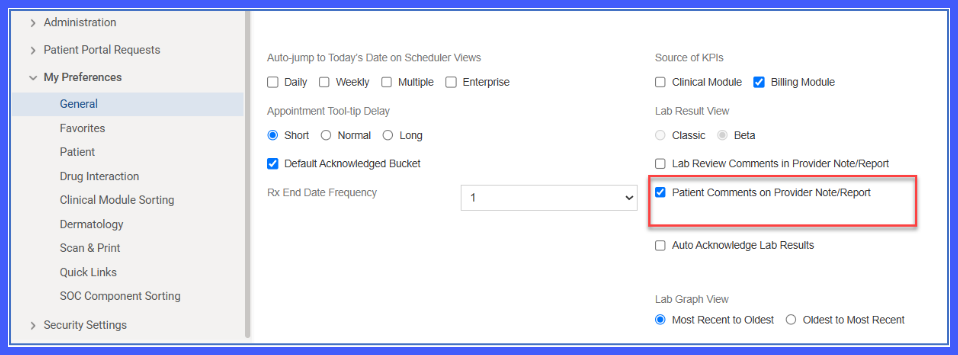
- Generate or print the lab result report.
- The system includes the patient comments on all supported report templates.
Benefits
- Provides consistent display of patient comments across supported report templates.
- Eliminates the need to verify which templates support patient comments.
- Reduces manual workarounds when printing lab reports.
- Improves reporting consistency for providers and laboratory staff.
