Result Release Configuration in Practice Settings
Configure Result Release Settings
Release Results Immediately Upon Receipt
Release Results on Acknowledgment
What’s New
-
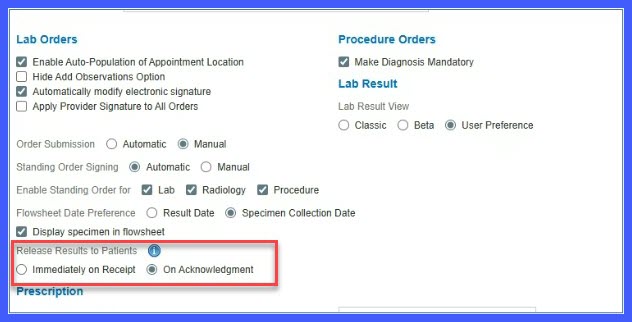
A new Result Release Results setting is available under Settings > My Practice Settings > EHR.
-
Two release options are available:
-
Immediately Upon Receipt
-
On Acknowledgment
-
-
Immediately Upon Receipt shares results as soon as they are received or entered, unless Do Not Share is enabled at the test level.
-
On Acknowledgment shares results only after a provider acknowledges the result.
-
Changing the release mode triggers a confirmation prompt describing the impact on existing results.
-
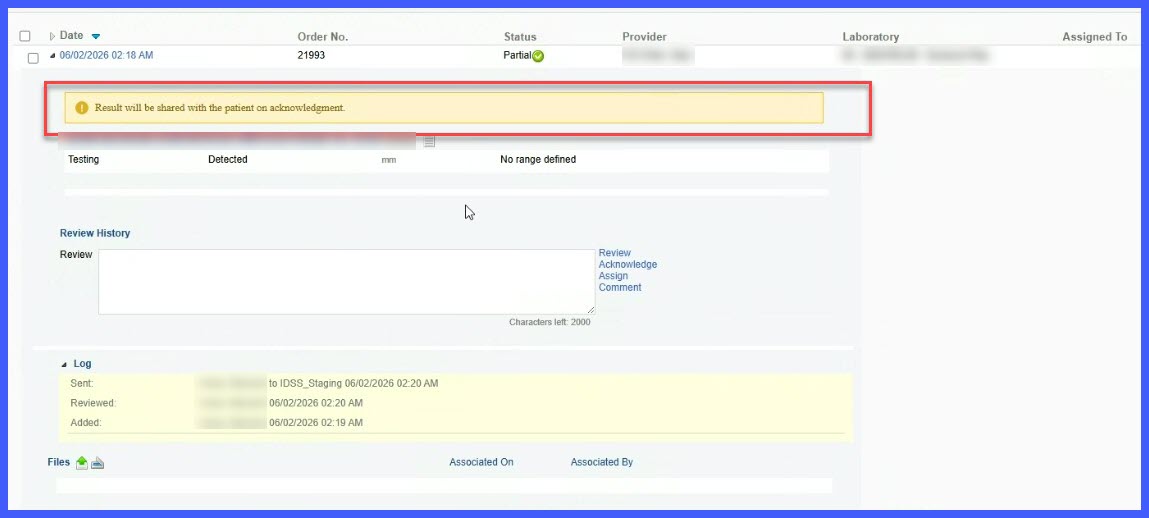
A banner message is displayed when results are configured for acknowledgment-based release.
-
The banner appears in:
-
Result Addition screens
-
Result Editing screens
-
Lab Result Beta view
-
Lab Result Classic view
-
-
The banner is automatically removed once the result is acknowledged.
How It Works
- Navigate to Settings > My Practice Settings > EHR.
- Locate the Result Release Results setting.
- Select one of the available release modes:
– Immediately Upon Receipt
– On Acknowledgment - Review and confirm the system prompt explaining the impact on existing results.
- Save the configuration.
- The system applies the selected release behavior to patient-facing results.
- For acknowledgment-based release, a banner appears on result screens indicating the result will be shared after acknowledgment.
- Once the result is acknowledged, the banner is removed and the result becomes available to the patient.
Benefits
-
Provides practices with greater control over result-sharing workflows with patients.
-
Supports different operational and clinical review processes.
-
Increases transparency through confirmation prompts and status banners.
-
Ensures patients receive results according to the practice’s configured release policy.
-
Maintains support for test-level Do Not Share settings.
