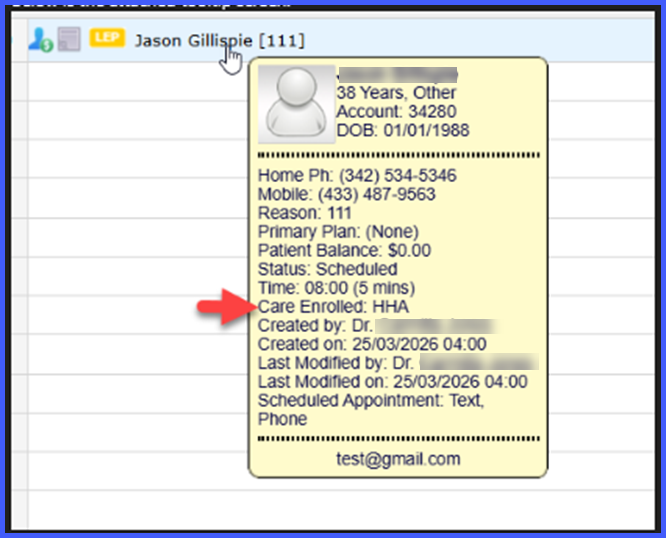
Scheduler > Hover Over Appointment > Tooltip Displays Care Enrolled Status
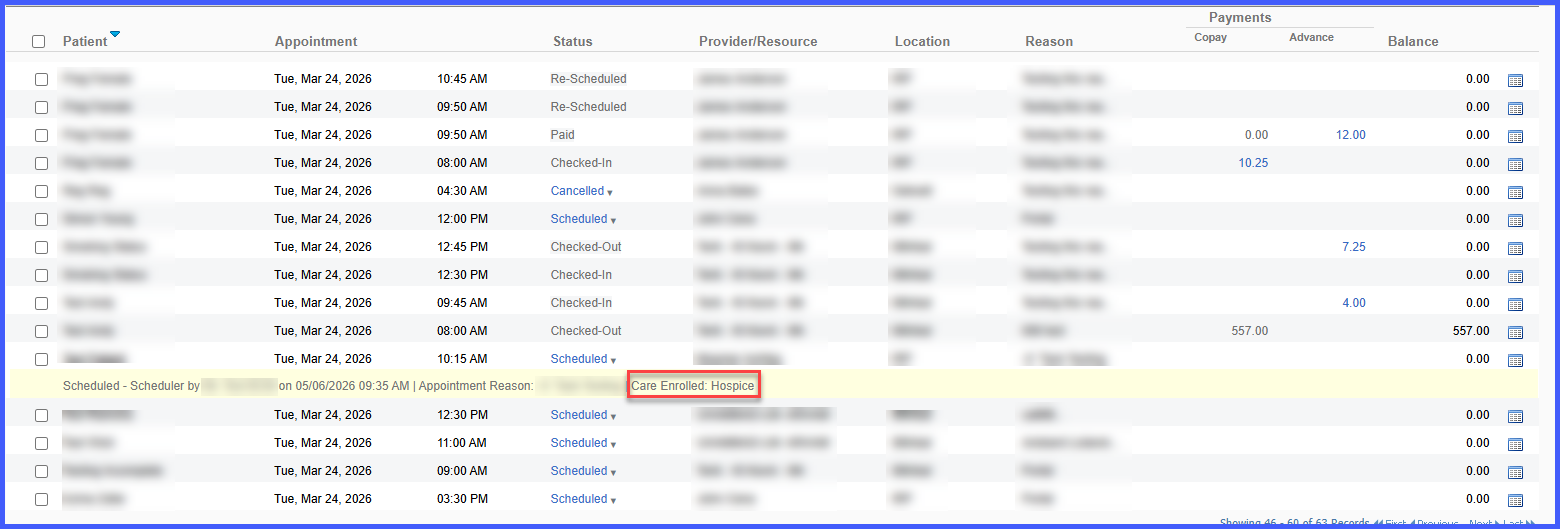
Scheduler / Patient Status Page > Open Logs > View Care Enrolled Updates
What’s New
- Care Enrolled status is now displayed in appointment tooltips.
- Care Enrolled updates are logged in appointment logs.
- Controlled via a practice-level feature flag.
- When disabled, Care Enrolled information is hidden from logs and tooltips.
- Care Enrolled status is reflected in:
- Scheduler Status page logs
- Patient Status page logs
- Supported across multiple scheduling actions including scheduling, rescheduling, editing, follow-ups, drag-and-drop, bulk moves, calendar updates, and slot blocking/unblocking.
- Also supported in Patient App and Kiosk appointment workflows.
How It Works
- Enable the Care Enrolled feature at the practice level.
- Perform scheduling actions (e.g., create, edit, reschedule, or update appointments).
- Any updates to Care Enrolled status are automatically recorded in appointment logs.
- Hover over an appointment in the Scheduler to view the Care Enrolled status in the tooltip.
- Care Enrolled status is consistently reflected across Scheduler and Patient Status logs.
- If the feature is disabled, Care Enrolled details will not appear in logs or tooltips.
Benefits
- Provides quick visibility of Care Enrolled status directly within scheduling workflows.
- Reduces the need to open patient records for status verification.
- Improves tracking through consistent logging of status updates across all scheduling actions.
- Ensures consistent behavior across Scheduler, Patient App, and Kiosk workflows.
- Maintains flexibility by allowing practices to enable or disable the feature as needed.
