Chart Number Added to Scheduler Appointment Tooltip
What’s New
-
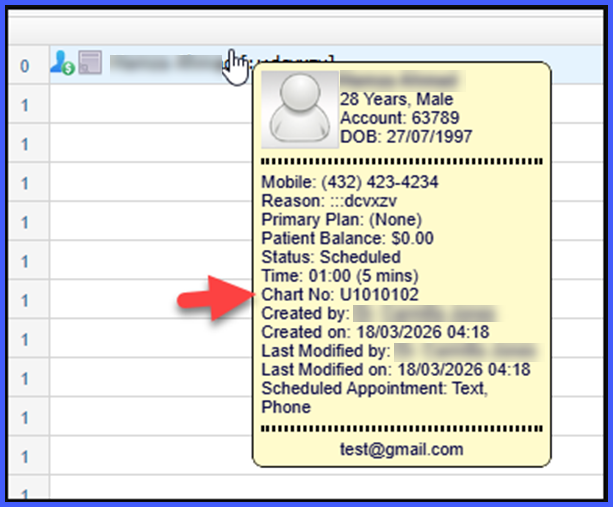
The patient’s Chart Number is now displayed in the Scheduler appointment tooltip.
-
Chart Number appears alongside existing patient and appointment details.
-
The field is positioned before the “Created By” section for consistent visibility.
-
If no Chart Number is available, the field is not shown.
How It Works
- Navigate to the Scheduler.
- Hover over any appointment.
- The tooltip displays patient and appointment details, including the Chart Number (if available).
- If the patient does not have a Chart Number, the tooltip displays without this field
Benefits
-
Improves patient identification directly from the Scheduler view.
-
Reduces the need to open patient profiles for basic identification details.
-
Maintains a clean interface by showing the field only when data is available.
