Patient Birth Sex and Legal Sex Fields in Provider Note and Letter Templates
What’s New
-
The existing Patient Sex field is now labeled as Patient Birth Sex in template field lists.
-
A new field, Patient Legal Sex, is available for selection in templates.
-
Patient Birth Sex continues to pull data from the Birth Sex field in patient demographics.
-
Patient Legal Sex pulls data from the Legal Sex field in patient demographics.
-
Existing templates using Patient Sex are automatically mapped to Patient Birth Sex.
-
Both fields are available in note templates and letter templates.
-
Field behavior remains consistent across all template types.
How It Works
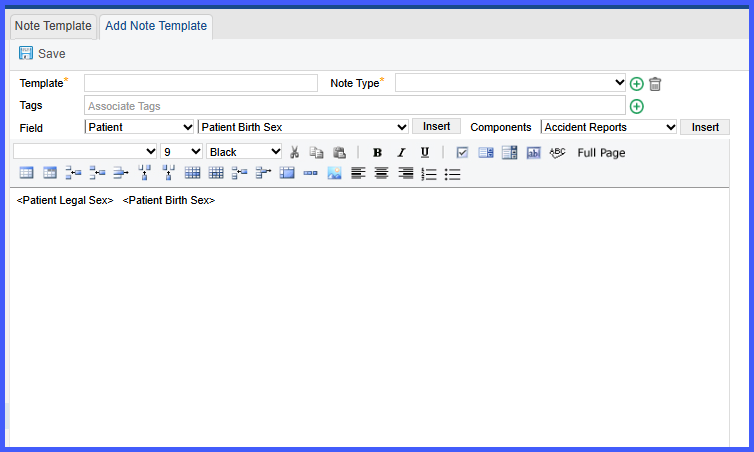
- Navigate to Settings > Reports > Letter Templates or Settings > EHR > Note Templates.
- Create or edit a template.
- Open the list of available patient fields.
- Select either Patient Birth Sex or Patient Legal Sex.
- Insert the selected field into the template.
- When generating the document:
– Patient Birth Sex displays the value from the Birth Sex field in demographics.
– Patient Legal Sex displays the value from the Legal Sex field in demographics. - Existing templates using Patient Sex automatically display as Patient Birth Sex without requiring updates.
Benefits
- Ensures accurate and distinct representation of birth sex and legal sex in documentation.
- Maintains backward compatibility with existing templates without requiring changes.
- Provides flexibility for practices to include appropriate demographic fields based on use case.
- Supports consistent data rendering across notes and letters.
