Add Pharmacy Instructions from Patient Chart: Patient > Medications > Add Prescription > Pharmacy Instructions
Enter Instructions in eRx Workflow: Patient > eRx > Draft Prescription > Pharmacy Instructions
Update Instructions via Refill or Notifications: Patient > Refill Requests / Rx End Date Notification > Pharmacy Instructions
Add Instructions from Provider Note: Patient > Clinical > Provider Note > Prescription > Pharmacy Instructions
What’s New
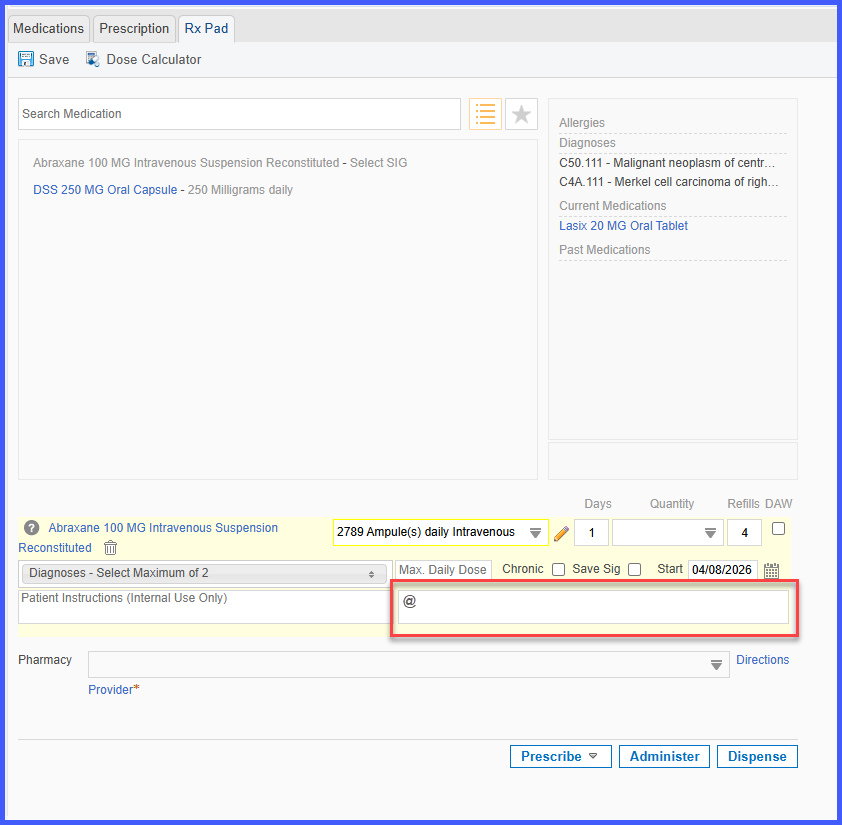
- The Pharmacy Instructions field now accepts the “@” character
- Behavior is consistent across all prescription-related workflows
- No validation errors or restrictions are triggered when using “@”
- The character is saved and transmitted as part of prescription details
- Aligns with existing support for characters like period (.), hyphen (-), and underscore (_)
How It Works
- Navigate to any workflow that includes the Pharmacy Instructions field.
- Enter instructions, including the “@” character.
- The system accepts the input without validation errors.
- Save or submit the prescription.
- The entered instructions, including “@”, are stored and transmitted as part of the prescription details.
Benefits
- Enables accurate entry of pharmacy-specific instructions
- Removes unnecessary input restrictions
- Ensures consistent behavior across prescription workflows
- Improves data integrity in transmitted prescription details
- Enhances overall usability of the Pharmacy Instructions field
