Scheduler > Select Time Slot > Reports > Patient Demographics Report > Select Display Race / Ethnicity / Preferred Language > Generate Report
What’s New
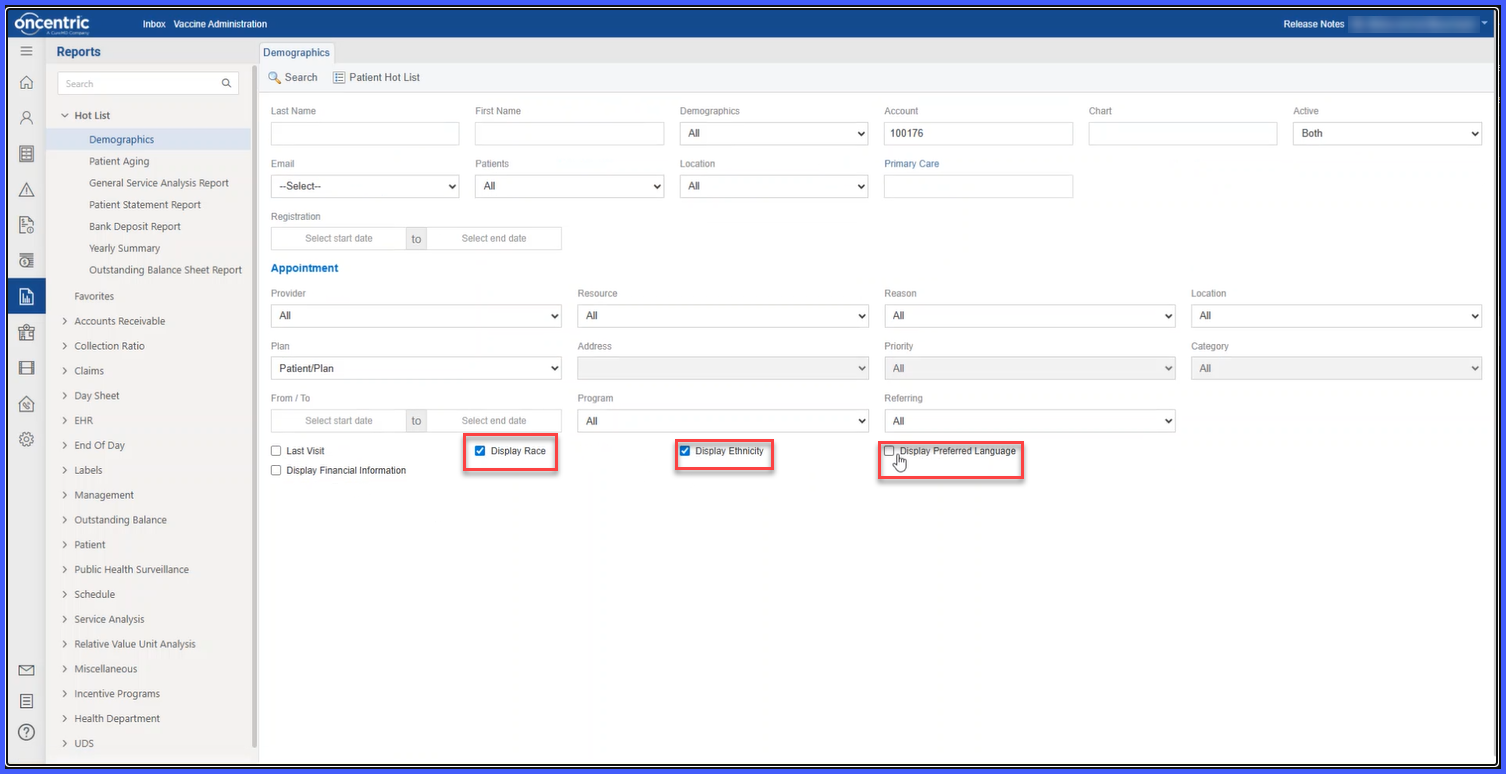
- Three new checkbox options added to the Patient Demographics Report configuration:
– Display Race
– Display Ethnicity
– Display Preferred Language
- Selected fields appear in the Patient Information section of the report.
- Values populate automatically if data exists in the patient record.
- Applies to all supported export formats of the Patient Demographics Report.
- All options are unchecked by default until enabled by the user.
How It Works
- Navigate to the Patient Demographics Report.
- Locate the new checkbox options: Display Race, Display Ethnicity, and Display Preferred Language.
- Select the desired fields to include in the report.
- Generate or print the report.
- If corresponding data exists in the patient record, the selected fields appear in the Patient Information section.
Benefits
- Provides flexibility in controlling which demographic fields appear in reports.
- Ensures printed reports reflect available patient demographic data.
- Supports more complete and consistent documentation.
- Helps maintain accurate demographic records for review and compliance.
