Patient > Registration > Demographics
What’s New
- Users can add misspelled or domain-specific words to a personal dictionary.
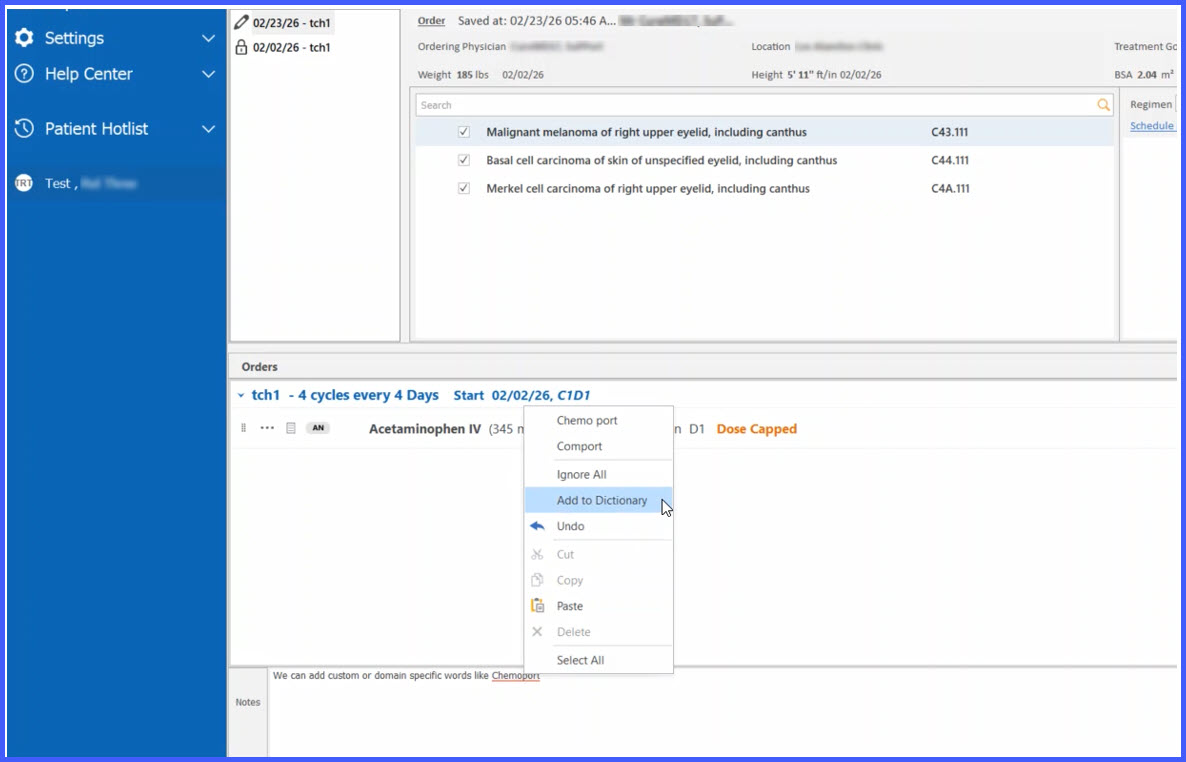
- The Add to Dictionary option appears in the right-click context menu for misspelled words.
- Dictionary entries are saved per logged-in user.
- Duplicate entries for the same user are prevented.
- Personal dictionary entries apply only within spell checker-enabled fields in the Chemotherapy Manager.
- Dictionary behavior synchronizes per login session and supports English language entries.
How It Works
- Navigate to any free-text field within the Chemotherapy Manager where spell check is enabled at the practice level.
- Type text as usual.
- When a word is underlined in red (indicating a misspelling), right-click the word.
- Select Add to Dictionary from the context menu.
- The system saves the word to the logged-in user’s personal dictionary.
- The word will no longer be flagged as misspelled for that user in future documentation.
- If the user logs in from another machine, the personal dictionary remains associated with their account.
- Other users will continue to see the word flagged unless they add it to their own dictionary.
Benefits
- Reduces repeated spelling flags for medically relevant or specialty-specific terminology.
- Improves documentation efficiency for chemotherapy workflows.
- Maintains user-level customization without affecting other users.
- Supports consistent spelling preferences across login sessions and devices.