Settings > EHR > Laboratory > Code > Edit Code > Add AOE
What’s New
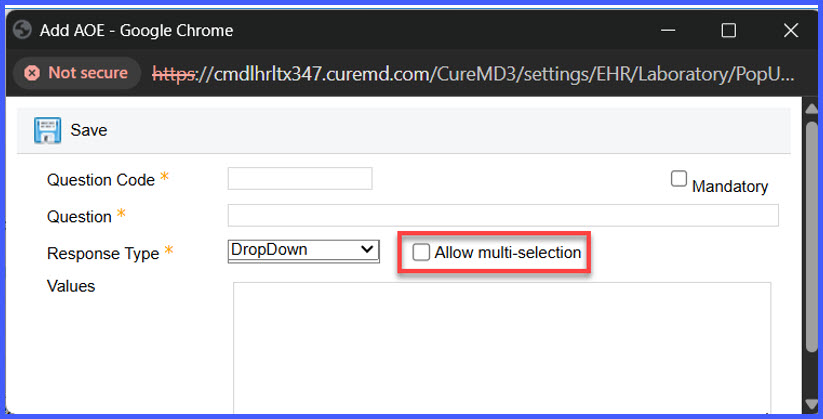
- A new checkbox labeled Allow multi-selection is available when configuring AOE fields with a Dropdown reason type.
- The checkbox appears under Settings > EHR > Laboratory > Code > Edit Code > Add AOE.
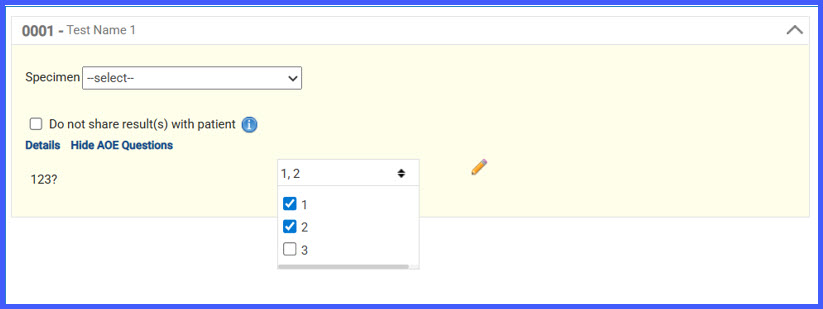
- When enabled, users can select multiple dropdown values during order entry.
- When disabled, only a single dropdown value can be selected.
- The multi-selection option is automatically hidden if the Reason Type is changed to a non-Dropdown type.
How It Works
- Navigate to Settings > EHR > Laboratory > Code.
- Select a lab code and choose Edit Code.
- Click Add AOE.
- Set the Reason Type to Dropdown.
- The Allow multi-selection checkbox becomes visible.
Benefits
- Increases flexibility when capturing order-related clinical details.
- Supports scenarios where multiple reasons apply to a single order.
- Maintains configuration clarity by limiting the option to Dropdown-type AOEs only.
- Reduces the need for additional custom fields to capture multiple responses.