‘Legal Sex’ Field Added and ‘Gender’ Renamed to ‘Birth Sex’ in Demographics
What’s New
-
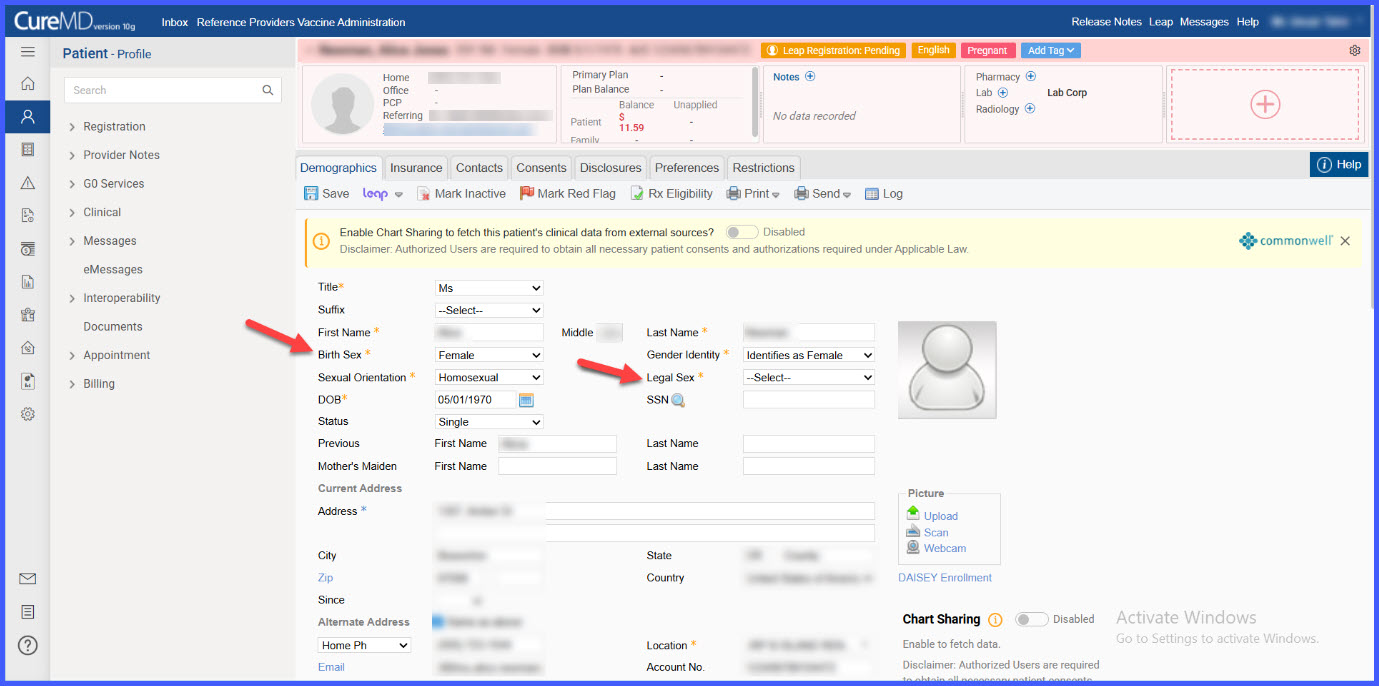
A new Legal Sex section is added to the Demographics tab.
-
Legal Sex includes standardized dropdown options
-
Patient sex unknown
-
Female
-
Male
-
Identifies as nonbinary gender
-
Asked But Declined
-
-
The selected Legal Sex value stores its corresponding standardized code in the backend.
-
The existing Gender field is renamed to Birth Sex.
-
The update is reflected across multiple areas including Patient Portal, LEAP, Avalon, Quick Add, and Patient Audit Trail.
How It Works
-
Navigate to Patient > Registration > Demographics.
-
Locate the newly added Legal Sex section.
-
Select the appropriate Legal Sex value from the dropdown list.
-
Save the patient record.
-
The existing field labeled Gender now appears as Birth Sex, clearly distinguishing it from Legal Sex.
 Impacted Areas
-
Patient > Registration > Demographics
-
Patient Portal
-
LEAP
-
Avalon
-
Quick Add
-
Patient Audit Trail
Benefits
-
Improves clarity by distinguishing Legal Sex from Birth Sex.
-
Supports standardized demographic coding.
-
Enhances consistency of demographic data across system modules.
