Provider Note Logs: Hyperlinked Appended and Sign-Off Entries
What’s New
-
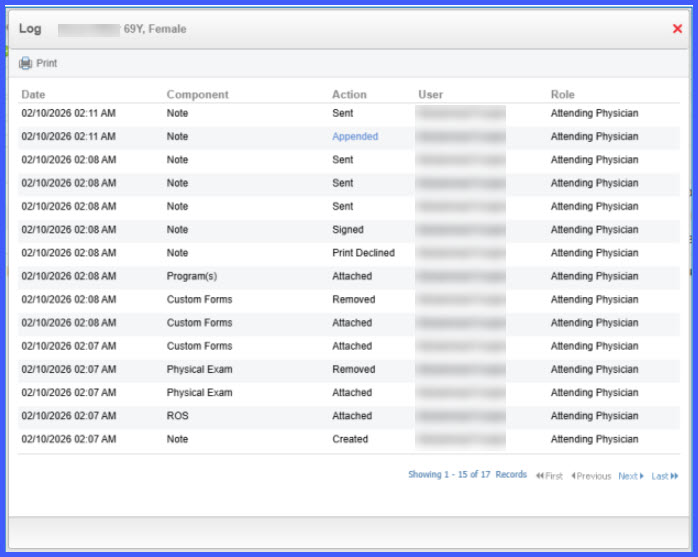
Appended log entries are now displayed as hyperlinks.
-
Sign Off log entries are now displayed as hyperlinks.
-
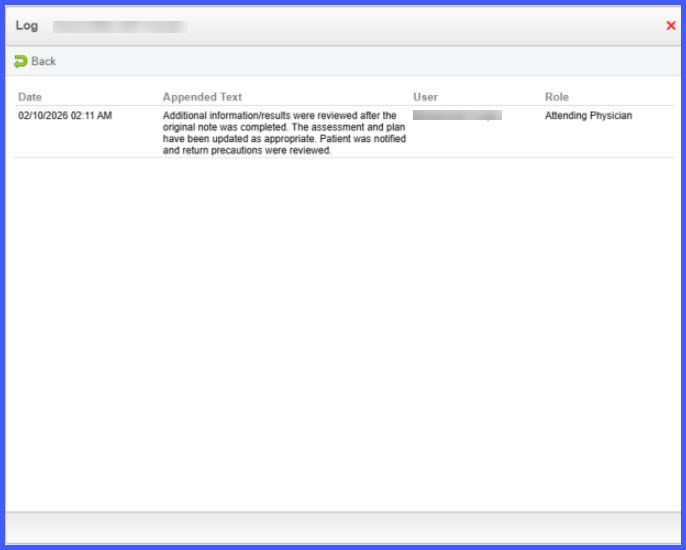
Clicking a link opens the exact text entered in the provider note.
-
The displayed text matches the original on-screen format.
-
A Back option allows users to return to the logs view.
How It Works
-
Navigate to Patient > Provider Notes.
-
Open a provider note that includes an addendum or sign-off.
-
Select Logs to view the Provider Note Logs screen.
-
Locate entries labeled Appended or Sign Off.
-
Click the hyperlink for the desired entry.
-
The system displays the exact text captured at the time of the addendum or sign-off.
-
Select Back to return to the logs view and review additional entries.
Benefits
-
Provides direct visibility into addendum and sign-off content.
-
Improves auditability of provider note modifications.
-
Reduces time spent manually locating appended or signed text.
-
Enhances transparency and traceability in clinical documentation workflows.