Standardized Reference Range Behavior for Automatic Result Flagging
What’s New
-
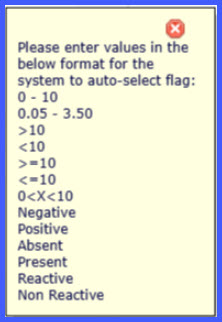
Reference range tooltips are added to CPT procedure and laboratory code configuration screens.
-
Supported numeric and qualitative reference range formats are standardized across workflows.
-
Reactive and Non-Reactive are added as supported qualitative values in lab result entry.
-
Automatic result flag calculation now follows the same reference range rules in configuration and entry contexts.
How It Works
-
Navigate to Settings > Billing > Procedure > Edit Procedure > Add LOINC or Settings > Laboratory > Codes (Lab and Radiology).
-
Focus on the Reference Range field.
-
A tooltip displays the supported numeric and qualitative formats required for automatic result flag calculation.
-
Navigate to a lab result entry workflow:
-
Patient > Orders & Results > Lab > Add/Edit Result, or
-
Personal > Orders > Lab > Add/Edit Result.
-
-
Enter a reference range using one of the supported formats.
-
The system evaluates the reference range and automatically applies result flags based on standardized logic.
Supported Reference Range Formats
-
0 – 10
-
0.05 – 3.50
-
>10
-
<10
-
>=10
-
<=10
-
0<X<10
-
Negative
-
Positive
-
Absent
-
Present
-
Reactive
-
Non-Reactive
Benefits
-
Ensures consistent automatic result flagging across CPT configuration and result entry.
-
Reduces ambiguity by clearly defining supported reference range formats.
-
Improves accuracy of result interpretation without manual flag adjustments.
-
Expands qualitative support to reflect commonly used lab result values.
-
Enhances usability through in-context guidance at configuration and entry points.