Configurable Standing Order Enablement by Order Type
What’s New
-
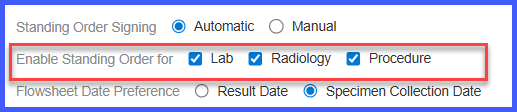
A new configuration panel is added under EHR settings to manage Standing Order availability.
-
Standing Orders can be enabled or disabled independently for:
-
Lab orders
-
Radiology orders
-
Procedure orders
-
-
The configuration directly controls whether the Standing Order option appears during order entry.
-
Changes take effect based on the selected order type settings.
How It Works
-
Navigate to Settings > EHR > Lab Orders.
-
Locate the Enable Standing Order for configuration section.
-
Select one or more order types (Lab, Radiology, Procedure) where Standing Orders should be enabled.
-
Save the settings.
-
During order entry, the system evaluates the configuration.
-
The Standing Order option is displayed only for the order types that are enabled.
-
Order types that are not enabled do not show the Standing Order option.
Benefits
-
Gives practices precise control over where Standing Orders are used.
-
Prevents Standing Orders from appearing in unsupported or undesired order workflows.
-
Reduces user error by limiting Standing Order options to configured order types.
-
Supports flexible EHR configuration to match practice policies and clinical workflows.
