Auto-Accept Appointment Requests Based on Visit Reason
What’s New
-
Appointment requests can be auto-accepted based on Visit Reason matching.
-
Auto-accept logic evaluates Visit Reason, provider availability, date/time, and slot validity.
-
Automatically accepted requests are booked directly on the scheduler.
-
Accepted requests move to the Accepted tab.
-
Scheduler logs capture a clear audit entry for each auto-accepted booking.
-
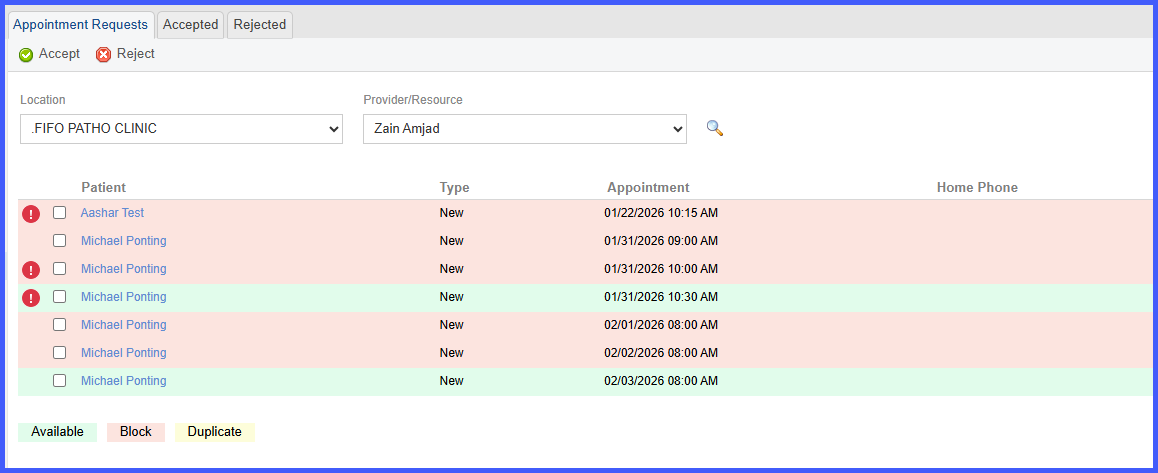
Requests that do not meet criteria are routed for manual review with a visible alert.
How It Works
- Enable Auto-accept Appointment Requests in Patient Portal Setup.
-
A patient submits an appointment request from the Patient Portal and selects a Visit Reason.
-
The system evaluates the request against:
-
Visit Reason configured for the selected slot
-
Provider availability
- Date and time availability
-
Scheduling rules (blocks, capacity limits, provider restrictions)
-
-
If all criteria are met:
-
The request is automatically accepted.
- The appointment is booked on the scheduler.
-
-
-
The request moves to the Accepted tab.
-
-
-
A scheduler log entry is recorded: Scheduled – Auto-accepted via Patient Portal on [Date Time] | [Visit Reason], Appointment Comments (if any)
-
-
If the request cannot be auto-accepted due to a Visit Reason mismatch or scheduling conflict:
-
The appointment is booked on the scheduler.
-
-
- The request moves to the Awaiting Actions tab.
-
- An alert icon appears next to the request with the message: “Reason mismatch or slot unavailable – manual review required.”
Benefits
-
Reduces staff workload by automatically booking valid appointment requests.
-
Ensures Visit Reason and scheduling rules are enforced consistently.
-
Improves patient experience with faster appointment confirmation.
-
Provides clear audit logging for auto-accepted appointments.
-
Clearly flags exceptions for timely staff review without silent failures.
