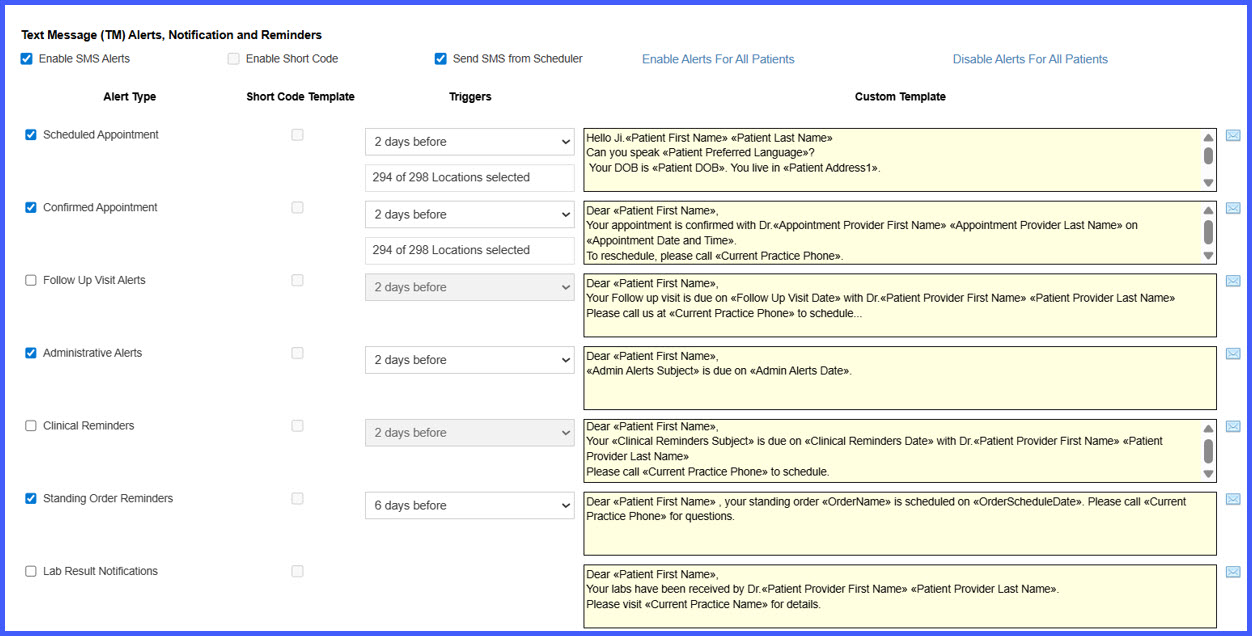
Patient Text Reminders for Standing Order Recurrences
What’s New
- A Standing Order Reminders setting is available under Device Integration.
- When enabled, the system sends an SMS reminder to the patient a set number of days before each scheduled standing order recurrence.
- Reminders are sent to the patient’s configured mobile number.
- Reminder timing is recalculated automatically if a recurrence is rescheduled.
- Canceled recurrences do not generate reminders.
- Reminder behavior is based only on the recurrence’s scheduled date and is not affected by automation modes (manual, auto-sign, auto-submit, fully automated).
- When the Standing Order Reminders setting is disabled, no SMS reminders are sent.
How It Works
- Go to Settings > Device Integration > Standing Order Reminders.
- Enable Standing Order Reminders to allow SMS notifications for standing order recurrences.
- For each standing order recurrence, the system calculates the reminder date based on the configured offset (number of days before the scheduled date).
- On the calculated reminder date, an SMS is sent to the patient’s mobile number on file.
- If a recurrence is rescheduled, the system recalculates the reminder timing based on the new date.
- If a recurrence is canceled or the setting is turned off, no reminders are generated for that recurrence.
Benefits
- Improves patient adherence to recurring tests and procedures by sending timely reminders.
- Reduces manual outreach efforts by automating SMS notifications for each recurrence.
- Ensures reminder timing stays accurate when recurrences are rescheduled.
- Avoids unintended messages for canceled recurrences by tying reminders strictly to active schedules.