Enhanced Visit Reason Display in Patient Portal with Patient-Friendly Labels & Automatic Duration Handling
What’s New
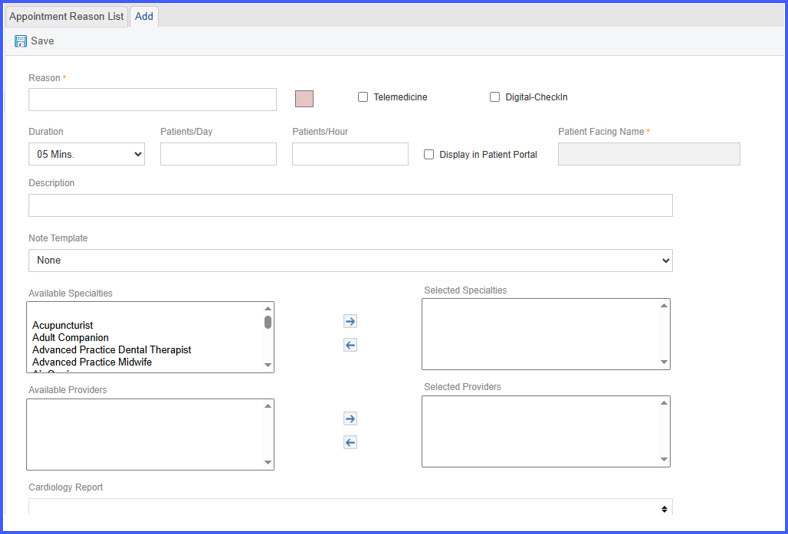
- A new Display in Patient Portal checkbox is available on the Visit Reason configuration page.
- When enabled, it allows the creation of a new Patient Facing Name (max 30 characters) for existing appointment reasons.
- Only visit reasons with Display in Patient Portal enabled appear in the Patient Portal scheduling dropdown.
- Patients will only see the Patient Facing Name for corresponding appointment reasons, not the internal name.
- Appointment duration automatically adopts the duration configured for the selected visit reason.
- Supports configurations using visit reason groups and split calendars—dropdown filters automatically based on enabled reasons.
- Appointment slot header now updates dynamically to reflect the selected visit reason and its duration (e.g., “Available Slots for Flu Shot” (15 minutes).
- If no slots are available, the portal now displays: “No slots available.”
How It Works
- Navigate to Settings > Practice > Appointment Reason.
- Select a appointment reason.
- Enable the Display in Patient Portal toggle.
- Enter a Patient Facing Name (up to 30 characters).
- Save the visit reason.
- In the Patient Portal, the patient sees only enabled visit reasons and only the Patient Facing Name.
- When selected, the appointment duration automatically adopts the reason’s configured duration.
- The slot header updates to reflect the visit reason and its duration; if no slots exist, the portal displays “No slots available.”
Benefits
- Ensures patients see only clear, appropriate, and patient-friendly visit reason names.
- Improves scheduling accuracy by enforcing automatic appointment duration.
- Gives practices full control over portal-visible visit reasons without altering internal naming standards.
- Reduces patient confusion—especially in multi-provider, group, or split calendar environments.
- Streamlines the patient experience with clearer slot headers and simplified “No slots available” messaging.