User-Based Permission to Restrict Financial Data Visibility in Patient Banner and Superbills
What’s New
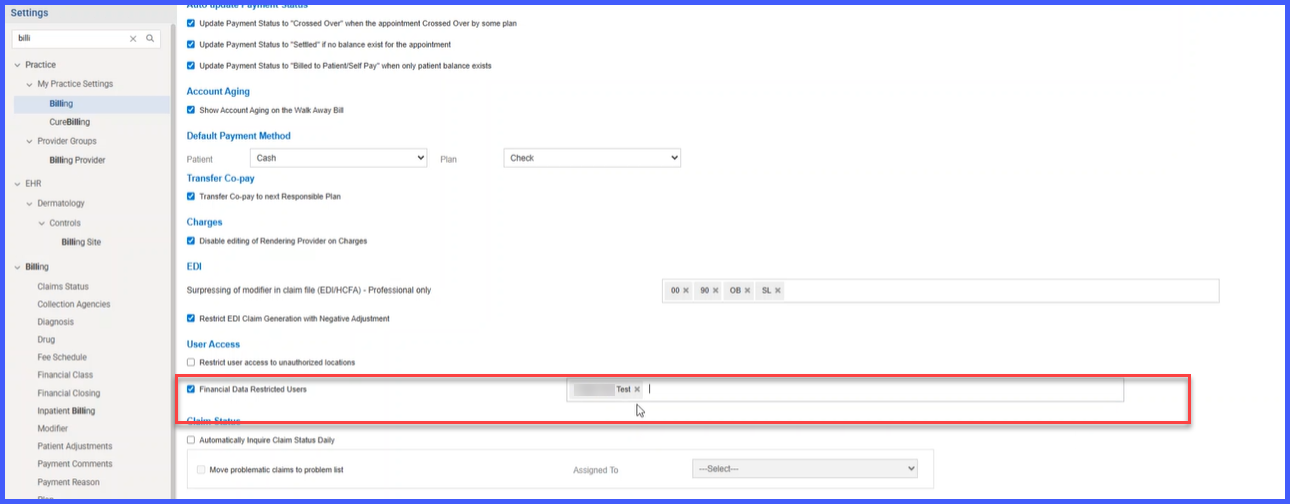
A new configuration option, Financial Data Restricted Users, has been added under Settings > Practice > My Practice Settings > Billing within the Patient Banner section. This field appears as a multi-select user list, allowing administrators to specify users who should not have access to patient financial information.
Users added to this list are automatically restricted from:
-
Viewing financial data in the patient banner (even via the gear icon toggle).
-
Viewing or printing financial information in superbills.
By default, the restriction list is empty, meaning no visibility limits are applied until configured. Once users are added, the restrictions apply immediately — no log out or restart required.
All configuration changes are logged with the user and timestamp to support auditability.
How It Works
-
By default, no users are restricted.
-
Once configured, users listed under Financial Data Restricted Users cannot view or print financial data in either the patient banner or superbills.
-
The restriction cannot be bypassed by toggling visibility options in the Home Module.
-
Updates to the restriction list are applied immediately without requiring system re-login.
-
All add/remove actions are logged for audit purposes, including user details and timestamps.
Benefits
-
Protects sensitive patient financial information by restricting access to authorized users only.
-
Helps practices maintain HIPAA compliance and meet internal privacy standards.
-
Centralizes financial data visibility control at the administrator level.
-
Prevents unauthorized users (e.g., front-desk staff or scribes) from viewing or printing billing details.
-
Provides transparent audit trails for configuration changes.
-
Reduces risk of data breaches, misuse, or accidental disclosure.
