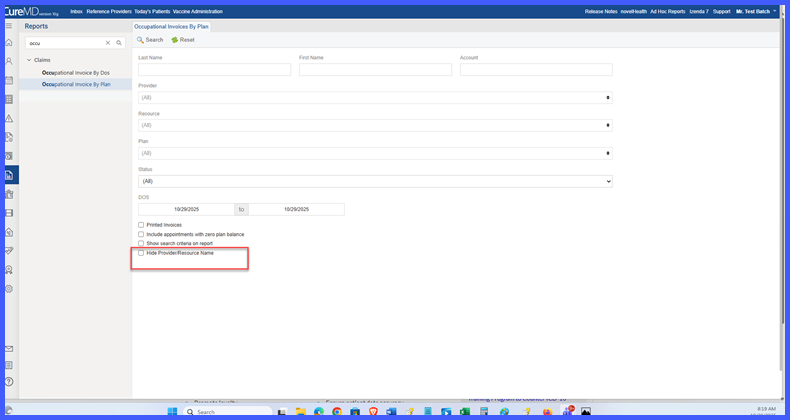
Add Option to Hide Provider/Resource Name in Occupational Invoice Reports
What’s New
-
-
New Checkbox Added: “Hide Provider/Resource Name” in the search criteria section of both Occupational Invoice reports.
-
New Behavior:
-
When checked → the Provider/Resource Name column is hidden from the report output.
-
When unchecked → the column remains visible (default behavior).
-
-
Applies To:
-
Both Occupational Invoice by DOS and Occupational Invoice by Plan reports.
-
Both on-screen views and exported files (Excel, PDF).
-
-
Default Setting: Checkbox is unchecked to maintain backward compatibility.
-
How It Works
-
Open either of the Occupational Invoice report.
-
In the search criteria panel, locate the new checkbox labeled “Hide Provider/Resource Name.”
-
Select or deselect the checkbox:
-
✅ Checked: The Provider/Resource column is excluded from the generated report.
-
⬜ Unchecked: The column remains visible.
-
-
Run the report. The column visibility setting applies to both on-screen results and exported outputs (Excel, PDF).
-
The option resets to default (unchecked) each time the report is reopened.
Benefits
-
Enables users to generate simplified or detailed invoice reports based on need.
-
Reduces visual clutter by hiding unnecessary provider/resource data.
-
Maintains accuracy of calculations, subtotals, and totals.
-
Enhances user control and report customization without affecting performance.
-
Ensures consistent output across on-screen and exported versions.