Improve Service Type Auto-Selection and Estimate Availability for Checked-In Appointments
What’s New
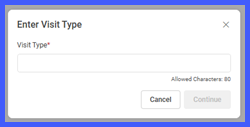
The system now automatically selects the Visit Type based on the appointment reason when generating a cost estimate from a scheduled appointment. Users can also create estimates for appointments that have already been Checked-In—a function now accessible through both the Scheduler and Cost Estimation Listing pages. Additionally, the field label Service Type has been updated to Visit Type across all relevant screens for better clarity and consistency.
How It Works
-
When launching the Cost Estimator from a Scheduled Appointment, the system automatically populates the Visit Type field with the appointment reason.
-
The Estimate option remains available even if the appointment is Checked-In.
-
Users can initiate or complete a cost estimate from:
-
Scheduler, or
-
Cost Estimation Listing.
-
-
The label Service Type is now displayed as Visit Type in all related estimator popups.
Benefits
-
Removes the need for manual service type selection.
-
Enables cost estimate generation for Checked-In patients.
-
Improves speed and accuracy of front-desk operations.
-
Enhances data consistency between appointment and estimation records.