New Units Field to Map CPT Codes with Lab Codes
What’s New
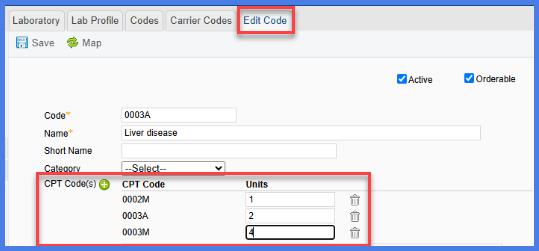
Users can now enter a Units value when mapping CPT codes to lab orders. This resolves a long-standing limitation where the same CPT code couldn’t be repeated, prompting users to create synonyms and workarounds. The update simplifies billing setup and aligns better with vendor requirements.
- A new Units field appears alongside each mapped CPT.
- The value entered here flows automatically to the eSuperbill.
- If no value is entered, the eSuperbill defaults to 1 unit.
- The eSuperbill displays a single CPT entry with the correct unit count.
- The previous free-text CPT entry box has been removed; CPTs now appear in a structured table with their corresponding Units.
Benefits
- Eliminates the need for duplicate or synonym CPT codes just to meet unit requirements.
- Improves billing accuracy and compliance with external lab vendors.
- Ensures clean CPT data on the eSuperbill, minimizing rejection risks
